

Machine-to-Machine API Authentication
📘 Looking for information on End-User authentication?
Please see End-User Authentication for information on how you can get access to Vimond VIA User Facing APIs.
As a Vimond customer, your streaming services may consist of multiple internal applications that require access to different VIA APIs and features. However, to utilize VIA admin APIs, authentication is required.
Machine-to-machine authentication, often referred to as M2M authentication, is a method of establishing secure communication and authentication between two autonomous systems or devices without human intervention. It enables machines, applications, or services to authenticate and interact with each other in a secure and efficient manner, typically in scenarios where direct human involvement is impractical or unnecessary.
VIA supports the Client Credentials Flow defined in the OAuth 2.0 protocol. In this flow, the authenticating application provides its **Client ID **and Client Secret to authenticate itself and obtain an access token. Using the access token, the application is able to successfully access VIA admin API.
How the Client-Credentials Flow Works
Section titled “How the Client-Credentials Flow Works”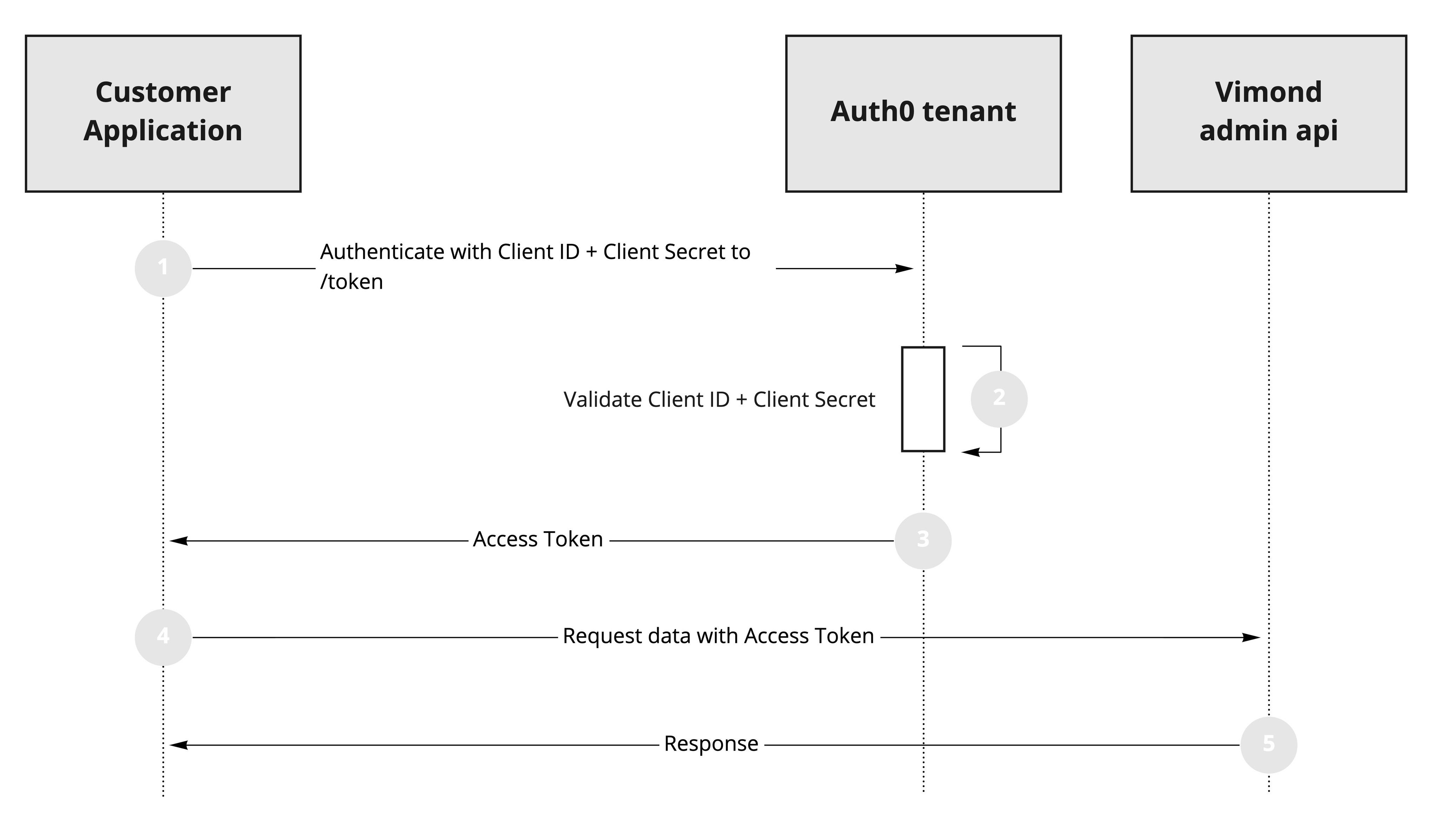
- Your application authenticates with the Auth0 Authorization Server using its **Client ID **and Client Secret via the
/oauth/tokenendpoint. - Your Auth0 Authorization Server validates the Client ID and Client Secret.
- Your Auth0 Authorization Server responds with an Access Token.
- Your application can use the Access Token to call Vimond admin API on behalf of itself.
- The VIA API responds with the requested data.
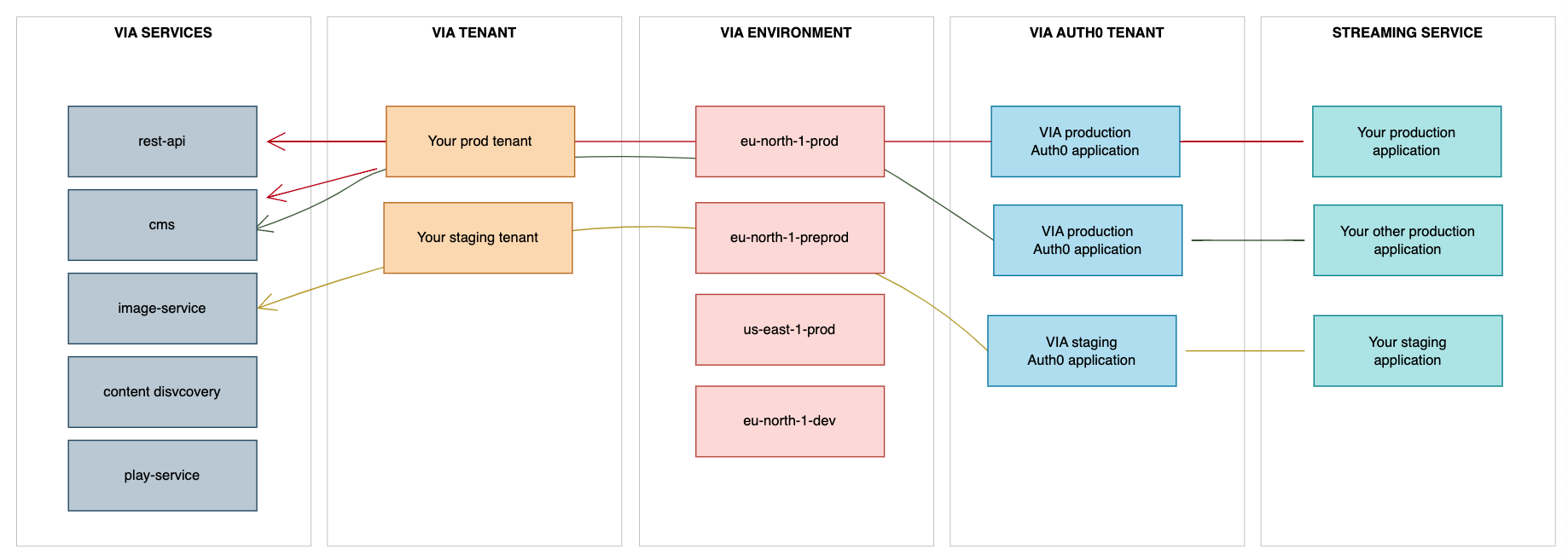
Kindly be aware that the Client ID, Client Secret, and Audience differ for each tenant and environment. The uniquely created VIA Auth0 Application will be granted access to one or more VIA APIs and features within the context of a specific tenant inside a specific environment.
Consequently, it is not possible to utilize a single Client ID to connect with APIs spanning different tenants, nor can the same Client ID be used to access both non-production and production environments.
When making VIA API calls the environment, tenant and service gets combined into a URL in the following pattern https://<tenant>.<service>.<environment>.vmnd.tv.
A prevalent cause of the 401 Unauthorized errors stems from developers attempting to employ staging credentials in a production setting, or from mistakenly addressing the wrong Auth0 tenant or Audience.
How to authenticate your Application
Section titled “How to authenticate your Application”- Before your application can authenticate with the Vimond admin API, Vimond will need to register your application to your specific Auth0 tenant config. Please contact Vimond Support or your Account Manager for assistance setting this up.
- Once the registration is complete, Vimond will provide you with the necessary parameters for your application to authenticate (Authentication URL, Client ID, Client Secret, and Audience).
Now that you have your Authentication URL, Client ID, Client Secret, and Audience, you can proceed further.
- Here are some basic code examples for requesting an Access Token:
curl --request POST \ --url '<<AUTH0_DOMAIN>>/oauth/token' \ --header 'content-type: application/x-www-form-urlencoded' \ --data grant_type=client_credentials \ --data client_id=<<AUTHO_CLIENT_ID>> \ --data client_secret=<<AUTH0_CLIENT_SECRET>> \ --data audience=<<AUTHO_AUDIENCE>>var request = require("request");
var options = { method: 'POST', url: '<<AUTH0_DOMAIN>>/oauth/token', headers: {'content-type': 'application/x-www-form-urlencoded'}, form: { grant_type: 'client_credentials', client_id: '<<AUTHO_CLIENT_ID>>', client_secret: '<<AUTH0_CLIENT_SECRET>>', audience: '<<AUTHO_AUDIENCE>>' }};
request(options, function (error, response, body) { if (error) throw new Error(error);
console.log(body);});HttpResponse<String> response = Unirest.post("<<AUTH0_DOMAIN>>/oauth/token") .header("content-type", "application/x-www-form-urlencoded") .body("grant_type=client_credentials&client_id=<<AUTHO_CLIENT_ID>>&client_secret=<<AUTH0_CLIENT_SECRET>>&audience=<<AUTHO_AUDIENCE>>") .asString();var client = new RestClient("<<AUTH0_DOMAIN>>/oauth/token");var request = new RestRequest(Method.POST);request.AddHeader("content-type", "application/x-www-form-urlencoded");request.AddParameter("application/x-www-form-urlencoded", "grant_type=client_credentials&client_id=<<AUTHO_CLIENT_ID>>&client_secret=<<AUTH0_CLIENT_SECRET>>&audience=<<AUTHO_AUDIENCE>>", ParameterType.RequestBody);IRestResponse response = client.Execute(request);package main
import ( "fmt" "strings" "net/http" "io/ioutil")
func main() {
url := "<<AUTH0_DOMAIN>>/oauth/token"
payload := strings.NewReader("grant_type=client_credentials&client_id=<<AUTHO_CLIENT_ID>>&client_secret=<<AUTH0_CLIENT_SECRET>>&audience=<<AUTHO_AUDIENCE>>")
req, _ := http.NewRequest("POST", url, payload)
req.Header.Add("content-type", "application/x-www-form-urlencoded")
res, _ := http.DefaultClient.Do(req)
defer res.Body.Close() body, _ := ioutil.ReadAll(res.Body)
fmt.Println(res) fmt.Println(string(body))
}response
{ "access_token": "eyJhbG...5AoOGY6A", "token_type": "Bearer"}Now that the application has an access_token, it is able to make authorized calls to the VIA APIs.
Caching the token
Section titled “Caching the token”The access token payload contains an exp claim that indicates when the token expires. To avoid unnecessary load on the identity provider, it is recommended to cache the token until the expiration time approaches. As a rule of thumb, the token should be cached until at least half the time between the iat claim (issued at) and the exp claim has passed.
Failure to properly cache the token can result in increased costs and requests failing with a 429 response.
How to make authorized calls to VIA APIs
Section titled “How to make authorized calls to VIA APIs”To authenticate your request, you need to include your Access Token as the value of the Authorization header in the following format:
Authorization:<space>Bearer<space><ACCESS_TOKEN>The Access Token contains information related to the machine-to-machine user, such as granted roles.
Example of the authentication header.
[block:parameters] { “data”: { “h-0”: “Header”, “h-1”: “Value”, “h-2”: “Comment”, “0-0”: “Authorization”, “0-1”: “Bearer eyJhbG…5AoOGY6A”, “0-2”: ”- Used by: All services that need to identify and authorize the machine-to-machine application. \n- The JWT can be used across all VIA admin services.” }, “cols”: 3, “rows”: 1, “align”: [ “left”, “left”, “left” ] } [/block]
See the Json Web Token website for more information about about JWT.
Coming from Vimond 1.x?
Section titled “Coming from Vimond 1.x?”If you have been using the classic API authentication flows in Vimond Platform version 1.x (reference: API Authentication Documentation)., it’s important to note that those authentication methods will no longer be supported in Vimond Platform version 2.x.
The deprecated authentication methods include:
- Usage of the ../authenticate API endpoint.
- Header-based authentication using an apiKey/secret (referred to as SUMO-authentication).
To continue using admin APIs in VIA 2.x, it is necessary to upgrade to the Client-Credentials Flow, as described earlier in the document. This updated authentication mechanism will provide a more secure and standardized approach for accessing the admin APIs.
If you have any questions or require further clarification, please let me know.