

Asset Types: Organize Content Efficiently
In VIA, each asset can only be categorized under one specific category, but what if you need to classify content types within or across categories? For instance, distinguishing all movies from trailers, regardless of their individual category placement. To address this, VIA offers two options: using custom metadata tags or utilizing the built-in Asset Type feature.
Classifying Assets
Section titled “Classifying Assets”Asset Types allow you to efficiently organize your content making it easier for end-users to navigate and discover the content they are interested in.
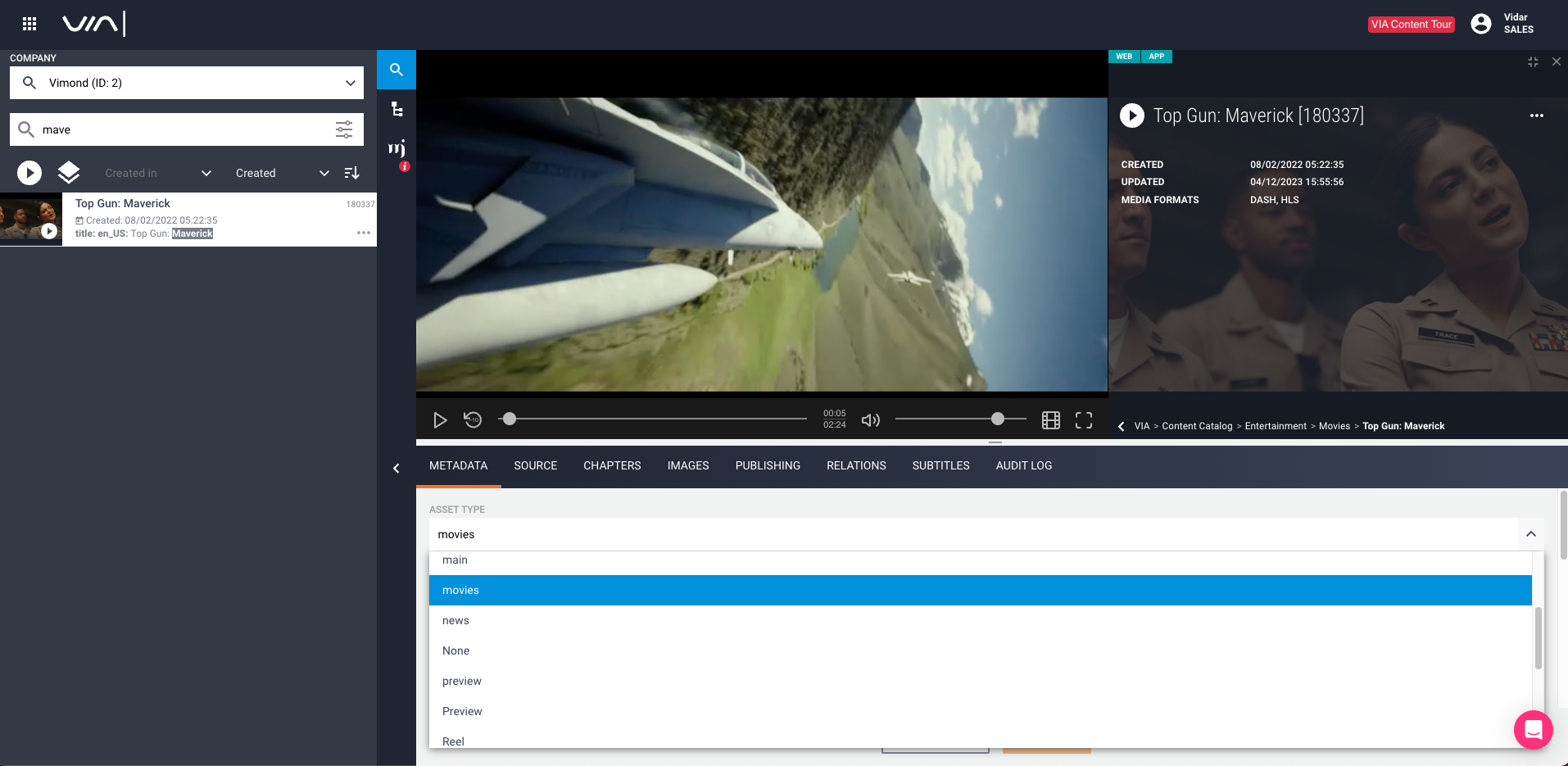
To classify assets as movies or trailers, you can either manually classify each asset using the VIA UI or automate the process through APIs. The example below demonstrates how the asset “Top Gun: Maverick” is classified as a asset type: movies.
Automate with Feed Ingest
Section titled “Automate with Feed Ingest”For batch operations, we recommend using Feed Ingest, which automates the ingest process for all your movies and trailers using a single Media RSS or Atom Feed. This way, you can efficiently create or update the assets and their related links
Example feed where we attach a trailer to our main video asset:
<?xml version="1.0" encoding="UTF-8" standalone="yes"?><feed xmlns:at="http://purl.org/atompub/tombstones/1.0" xmlns:dcterms="http://purl.org/dc/terms/" xmlns:vimond="http://www.vimond.com/vimondFeedExtension/1.0" xmlns:fn="http://www.w3.org/2005/xpath-functions" xmlns:media="http://search.yahoo.com/mrss/" xmlns="http://www.w3.org/2005/Atom"> ... <entry> ... <!-- Media files --> <media:content url="http://url-to-video-file/video-file.mp4" type="video/mp4" medium="video"/> <media:content url="http://url-to-video-file/trailer-video-file.mp4" type="video/mp4" medium="video"> <media:category scheme="urn:vimond-content-type">trailer</media:category> </media:content> ... </entry> ...</feed>See link for a full example of how to use Feed Ingest
Viewer Facing Services and using the Asset Type attribute
Section titled “Viewer Facing Services and using the Asset Type attribute”Once an asset has the Asset Type attribute set, you can use the Content Discovery APIs to search for movies or trailers across various categories.
GET https://<tenant>.content-discovery.cf.<region>.vmnd.tv/api/v1/assets?query=assetType:moviesThe response will only contain assets that matched our query
{ "data": [ { "id": "180337", "title": "Top Gun: Maverick", .... "assetType": "movies", ... } ]}By enabling quick content filtering, your viewers can easily find related content and enjoy a better viewing experience.
A more advanced use case can be to use theasset type together with asset relations and create a multiple camera production where your end-users can switch between camera angles during live events.
Content Management APIs and using the Asset Type attribute
Section titled “Content Management APIs and using the Asset Type attribute”When working with content management APIs to fetch, create, or update assets, you’ll find that each asset exposes its Asset Type through the attribute assetTypeId
{ "id": 180337, "assetTypeId": 82, ...}VIA Data and using the Asset Type attribute
Section titled “VIA Data and using the Asset Type attribute”When working with VIA Data the available Asset Types are available as a daily snapshot that is linked from the asset export.
Customizable Classification Options
Section titled “Customizable Classification Options”The available options for Asset Type are fully customizable based on what content classification makes sense for your service and users. For example, a movie/tv service might use options like “movies,” “episodes,” “extras,” and “trailers,” while a sports service could utilize “matches,” “pre-game,” “post-game,” “Interviews,” and more.
To see which options are configured in your setup, you can use the provided API call.
GET https://<tenant>.rest-api.<region>.vmnd.tv/api/web/asset/typesYou now know how to leverage the power of Asset Types in VIA to optimize content organization, improve content discovery, and provide a tailored viewing experience for your end-users. With streamlined classification, you can offer a more compelling and user-friendly service that keeps your audience engaged.
For help with configuring your system and getting started with using Asset Types please reach out to Vimond Support.