

VIA Data Exports
Vimond VIA Data Exports is a standard push delivery option for getting daily delta and snapshots of all your data from the Vimond Platform. The data is delivered as UTF-8 encoded CSV files.
📘
VIA Data Exportsis an optional service. Please reach out to your Account Manager for more details on how to enable it and get started.For near-real-time data please see VIA Data Event Stream
Features
Section titled “Features”- Daily data export from Vimond databases.
- File format: UTF-8 encoded CSV files.
- Delivery: Push to configured S3 bucket, Google Storage and/or (S)FTP folder.
Entity Relationship Diagram
Section titled “Entity Relationship Diagram”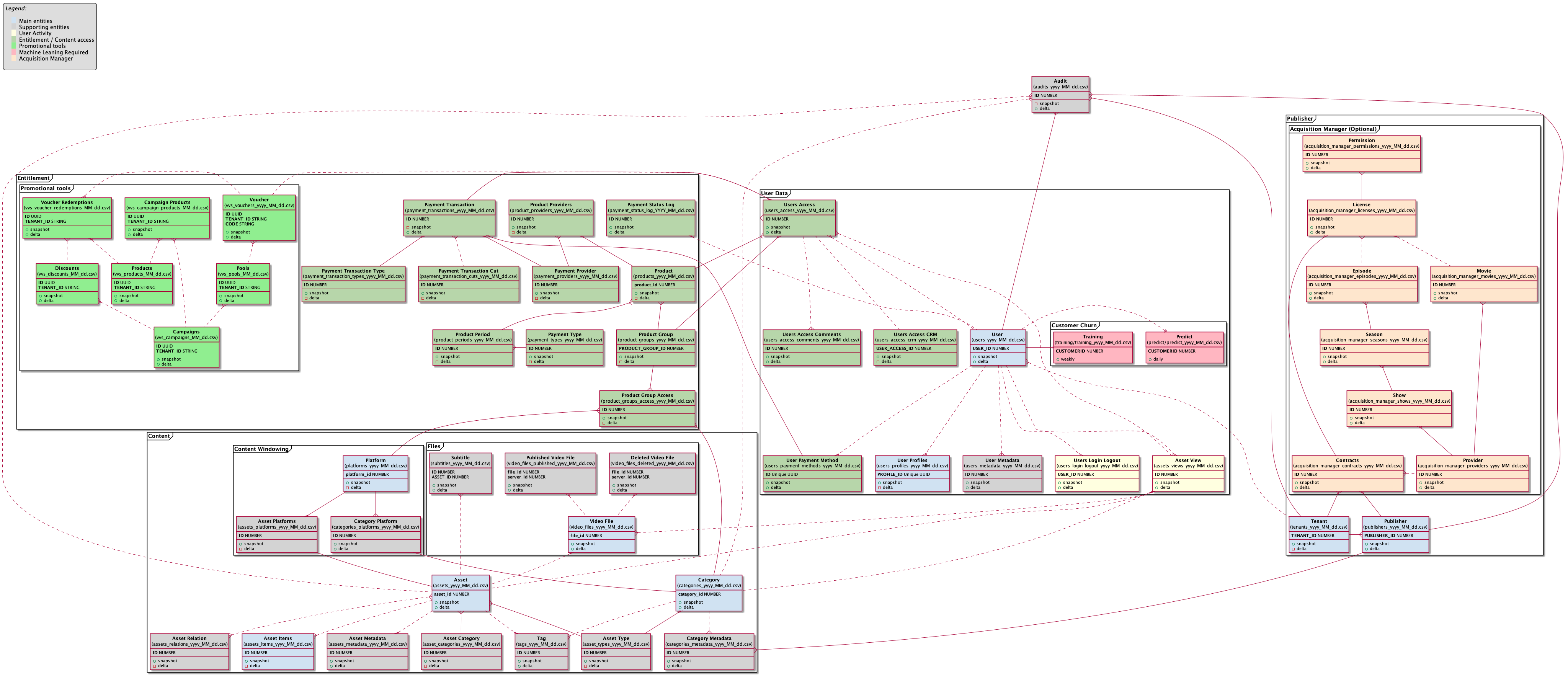
How is an Asset linked to a Category?
Assets are linked to a Category through the entity Asset Type assets.asset_type_id
Channel and Shows are also linked to the entity Asset Type categories.asset_type_id
How is a Show linked to a Channel? And a Channel to a Genre?
A Show is linked to Channel via categories.parent_id
A Channel is linked to a Genre via categories.parent_id
Category type (genre, show, channel etc) is defined via categories.level_type
How can I tell if a Channel or Show is published on a Platform?
If a given Channel or Show is published on a Platform is defined via
categories_platforms.category_id + categories_platforms.platform_id + categories_platforms.published
How can I tell if an Asset is published on a Platform?
If a given Asset is published on a Platform is defined via
assets_platforms.asset_id + assets_platforms.platform_id + assets_platforms.published + assets_platforms.live_published
How to tell if an Asset has a limited viewing windows (scheduled publishing / un-publishing) on a platform
assets_platforms.asset_id + assets_platforms.platform_id + assets_platforms.publish_start + assets_platforms.publish_end
How is a Category linked to a Publisher?
Categories are linked to Publishers through Category Metadata
categories_metadata.name = "publisher-id" + categories_metadata.value = {publisher Id} + categories_metadata.category_id = {category id}
How is a Asset linked to an Publisher?
Assets are linked to a Publisher via their Category.
What data is included?
All relevant data from our database can be exported. See above entity diagram for more info.
How often can I get the data?
By default you will get a daily delivery of “snapshot” and “delta” exports.
What is the difference between the snapshot and delta data?
The “snapshot” exports are snapshots of the database state at the time of the query being ran and contains all data from the database.
Incremental reports contains only the delta (new or changed) data from previous day.
Can I customize the date range for delta data extraction?
| Option | Default | Description |
|---|---|---|
| DATA_DELTA_DAYS | 1 | How many days of data should be included in ‘delta’ exports |
| DATA_DELTA_MIDNIGHT_TO_MIDNIGHT | 0 | Should delta queries be run from midnight to midnight (“00:00 to 23:59”)? Or from “[start of job execution hour] to [start of job execution hour-DATA_DELTA_DAYS]”? |
| DATA_DELTA_TIME_ZONE | UTC | When using DATA_DELTA_MIDNIGHT_TO_MIDNIGHT what time zone should be used? |
Can I customize what entities are exported and at what time?
Yes you can for each entity override the below defaults for when/if the job should be run. By setting a job to "" (empty value) it will not be sent at all.
We internally use cron to schedule export jobs, and all timestamps are in UTC. For more info on cron job scheduling please see https://en.wikipedia.org/wiki/Cron
CRON_SCHEDULE_ASSET_CATEGORIES="10 0 * * *" CRON_SCHEDULE_ASSET_TYPES="10 0 * * *" CRON_SCHEDULE_ASSETS_ITEMS="10 0 * * *" CRON_SCHEDULE_ASSETS_METADATA="10 0 * * *" CRON_SCHEDULE_ASSETS_PLATFORMS="10 0 * * *" CRON_SCHEDULE_ASSETS_RELATIONS="10 0 * * *" CRON_SCHEDULE_ASSETS_VIEWS="10 0 * * *" CRON_SCHEDULE_ASSETS="10 0 * * *" CRON_SCHEDULE_AUDITS="30 0 * * *" CRON_SCHEDULE_CATEGORIES_METADATA="10 0 * * *" CRON_SCHEDULE_CATEGORIES_PLATFORMS="10 0 * * *" CRON_SCHEDULE_CATEGORIES="10 0 * * *" CRON_SCHEDULE_CHURN_PREDICT="" CRON_SCHEDULE_CHURN_TRAINING="" CRON_SCHEDULE_PAYMENT_PROVIDERS="15 0 * * *" CRON_SCHEDULE_PAYMENT_STATUS_LOG="15 0 * * *" CRON_SCHEDULE_PAYMENT_TRANSACTION_CUTS="15 0 * * *" CRON_SCHEDULE_PAYMENT_TRANSACTION_TYPES="15 0 * * *" CRON_SCHEDULE_PAYMENT_TRANSACTIONS="15 0 * * *" CRON_SCHEDULE_PAYMENT_TYPES="15 0 * * *" CRON_SCHEDULE_PLATFORMS="10 0 * * *" CRON_SCHEDULE_PRODUCT_GROUP_ACCESS="15 0 * * *" CRON_SCHEDULE_PRODUCT_GROUPS="15 0 * * *" CRON_SCHEDULE_PRODUCT_PERIODS="15 0 * * *" CRON_SCHEDULE_PRODUCT_PROVIDERS="15 0 * * *" CRON_SCHEDULE_PRODUCTS="15 0 * * *" CRON_SCHEDULE_PUBLISHERS="15 0 * * *" CRON_SCHEDULE_SUBTITLES="10 0 * * *" CRON_SCHEDULE_TAGS="10 0 * * *" CRON_SCHEDULE_TENANTS="10 0 * * *" CRON_SCHEDULE_USERS_ACCESS_COMMENTS="20 0 * * *" CRON_SCHEDULE_USERS_ACCESS_CRM="20 0 * * *" CRON_SCHEDULE_USERS_ACCESS="20 0 * * *" CRON_SCHEDULE_USERS_LOGIN_LOGOUT="20 0 * * *" CRON_SCHEDULE_USERS_METADATA="20 0 * * *" CRON_SCHEDULE_USERS_PAYMENT_METHODS="20 0 * * *" CRON_SCHEDULE_USERS_PROFILES="" CRON_SCHEDULE_USERS="20 0 * * *" CRON_SCHEDULE_VIDEO_FILES_DELETED="15 0 * * *" CRON_SCHEDULE_VIDEO_FILES_PUBLISHED="15 0 * * *" CRON_SCHEDULE_VIDEO_FILES="15 0 * * *" CRON_SCHEDULE_VOUCHERS="" CRON_SCHEDULE_ACQUISITION_MANAGER_CONTRACTS="" CRON_SCHEDULE_ACQUISITION_MANAGER_EPISODES="" CRON_SCHEDULE_ACQUISITION_MANAGER_LICENSES="" CRON_SCHEDULE_ACQUISITION_MANAGER_MOVIES="" CRON_SCHEDULE_ACQUISITION_MANAGER_PERMISSIONS="" CRON_SCHEDULE_ACQUISITION_MANAGER_PROVIDERS="" CRON_SCHEDULE_ACQUISITION_MANAGER_SEASONS="" CRON_SCHEDULE_ACQUISITION_MANAGER_SHOWS="" CRON_SCHEDULE_VVS_CAMPAIGN_PRODUCTS_SNAPSHOT="15 0 * * *" CRON_SCHEDULE_VVS_CAMPAIGN_PRODUCTS_DELTA="15 0 * * *" CRON_SCHEDULE_VVS_CAMPAIGNS_SNAPSHOT="15 0 * * *" CRON_SCHEDULE_VVS_CAMPAIGNS_DELTA="15 0 * * *" CRON_SCHEDULE_VVS_DISCOUNTS_SNAPSHOT="15 0 * * *" CRON_SCHEDULE_VVS_DISCOUNTS_DELTA="15 0 * * *" CRON_SCHEDULE_VVS_POOLS_SNAPSHOT="15 0 * * *" CRON_SCHEDULE_VVS_POOLS_DELTA="15 0 * * *" CRON_SCHEDULE_VVS_PRODUCTS_SNAPSHOT="15 0 * * *" CRON_SCHEDULE_VVS_PRODUCTS_DELTA="15 0 * * *" CRON_SCHEDULE_VVS_VOUCHER_REDEMPTIONS_SNAPSHOT="15 0 * * *" CRON_SCHEDULE_VVS_VOUCHER_REDEMPTIONS_DELTA="15 0 * * *" CRON_SCHEDULE_VVS_VOUCHERS_SNAPSHOT="15 0 * * *" CRON_SCHEDULE_VVS_VOUCHERS_DELTA="15 0 * * *"This looks great, but I need real-time data… what are my options?
Contact your Vimond Technical Account Manager for information and pricing for VIA Data Event Stream .
What file format is the data delivered in?
The data is delivered as CSV files following the rfc4180 CSV standard. (ref https://tools.ietf.org/html/rfc4180)
Can I customize the CSV file format?
Yes. You can have the following options for configuring the CSV file format.
[block:parameters]
{
“data”: {
“h-0”: “Option”,
“h-1”: “Default”,
“h-2”: “Description”,
“0-0”: “CSV_INCLUDE_HEADER”,
“0-1”: “1 (on)”,
“0-2”: “Should header row be included?”,
“1-0”: “CSV_FIELD_SEPARATOR”,
“1-1”: ”,”,
“1-2”: “Which character should be used for field separator”,
“2-0”: “CSV_TEXT_ROW_SEPARATOR”,
“2-1”: “0 (off - leave inline line-breaks)”,
“2-2”: “Which character should be used for replacing inline line-breaks”,
“3-0”: “CSV_TEXT_ENCLOSURE”,
“3-1”: """,
“3-2”: “Which character should be used for text enclosure”,
“4-0”: “CSV_ESCAPE_CHAR”,
“4-1”: """,
“4-2”: “When using text enclosure, which character should be used for escaping”,
“5-0”: “CSV_DATE_FORMAT”,
“5-1”: ""yyyy-MM-dd’T’HH:mm:ssZ"",
“5-2”: “ISO 8601 Date format, example: 2018-01-09T14:56:13+0000”,
“6-0”: “CSV_MD5”,
“6-1”: “0 (off)”,
“6-2”: “Should we also distribute a sidecar .md5 checksum file for each distributed .csv file? \n \nIf your file is named assets/assets_yyyy_MM_dd.csv the sidecar will be named assets/assets_yyyy_MM_dd.csv.md5 \n \nSince version 2.2.0 of vimond-talend the sidecar file also includes the filename of the CSV file so that you can easily verify using md5sum. Example: \n \nmd5sum -c assets_2018_09_10.csv.md5 \n \nresults in : \nassets_2018_09_10.csv: OK”,
“7-0”: “CSV_SNAPSHOT”,
“7-1”: “all”,
“7-2”: “For jobs that has both ‘delta’ and ‘snapshot’ tasks which jobs should generate snapshot csv files? (comma separated list). Can also be set to “all”, or "" for including everything.”
},
“cols”: 3,
“rows”: 8,
“align”: [
“left”,
“left”,
“left”
]
}
[/block]
What timezone are the date fields in?
Your Oracle database will by default be configured to run in UTC timezone. The database does not hold timezone information per field, so all date fields are stored in in the timezone of the database (UTC). The exported Oracle date value is therefore also UTC.
Data from other sources such as PostgreSQL can however hold timezone information per field.
It is therefore recommended to use a CSV_DATE_FORMAT format that includes timezone information.
When will I receive the reports?
It is recommended to run the data export daily some minutes over midnight. This will ensure that you will get everything of yesterday’s data included in the incremental reports. Each report can however be setup with custom CRON patterns for when they should be queued for execution.
How will I receive the data?
The CSV files can be posted to your FTP, S3 bucket, and/or Google Storage bucket of choice.
How can I have the data delivered to Amazon S3?
For this delivery option we need the following information from you
[block:parameters] { “data”: { “h-0”: “Option”, “h-1”: “Default”, “h-2”: “Description”, “0-0”: “S3_BUCKET”, “0-1”: "", “0-2”: “Name of S3 bucket”, “1-0”: “S3_ACCESS_KEY”, “1-1”: "", “1-2”: “Optional AWS Access key with access to write to given S3 bucket. \n \nUsing IAM roles rather than access key / secret are recommended.”, “2-0”: “S3_SECRET_KEY”, “2-1”: "", “2-2”: “Optional AWS secret key. \n \nUsing IAM roles rather than access key / secret are recommended.”, “3-0”: “S3_KEY_PREFIX”, “3-1”: "", “3-2”: “Optional key prefix if you would like the data further categorized. \n \nUseful when getting reports from stage and production environment delivered to the same bucket.”, “4-0”: “S3_DELIVERY”, “4-1”: “all”, “4-2”: “which files should be distributed (comma separated list). Can also be set to “all”, or "" for including everything…”, “5-0”: “S3_ASSUME_ROLE”, “5-1”: "", “5-2”: “Optional assume role ARN \n \nIf exporting to an S3 bucket under another account, this should hold the role ARN to assume.” }, “cols”: 3, “rows”: 6, “align”: [ “left”, “left”, “left” ] } [/block]
How can I have the data delivered to (S)FTP?
For this delivery option we need the following information from you
🚧 Please note that the FTP user is required to have
create directorypermission in addition touploadpermission. It is also recommended to grantoverwritepermission to ensure corrections can be sent in case of initial data transfer failures etc.
[block:parameters] { “data”: { “h-0”: “Option”, “h-1”: “Default”, “h-2”: “Description”, “0-0”: “FTP_HOST”, “0-1”: "", “0-2”: “IP or hostname for your FTP server.”, “1-0”: “FTP_PORT”, “1-1”: “21”, “1-2”: “Port to use. \nFor SFTP we require using port 22.”, “2-0”: “FTP_USERNAME”, “2-1”: "", “2-2”: “Username.”, “3-0”: “FTP_PASSWORD”, “3-1”: "", “3-2”: “Password.”, “4-0”: “FTP_REMOTE_DIRECTORY”, “4-1”: ”/”, “4-2”: “Optional directory on FTP server if you would like the data further categorized. \n \nUseful when getting reports from stage and production environment delivered to the same FTP server.”, “5-0”: “FTP_DELIVERY”, “5-1”: “all”, “5-2”: “which files should be distributed (comma separated list). Can also be set to “all”, or "" for including everything…” }, “cols”: 3, “rows”: 6, “align”: [ “left”, “left”, “left” ] } [/block]
How can I have the data delivered to my Google Storage Bucket?
For this delivery option we need the following information from you
| Option | Default | Description |
|---|---|---|
| GOOGLE_BUCKET | Name of Bucket | |
| GOOGLE_ACCESS_KEY | Access key with access to write to given bucket | |
| GOOGLE_SECRET_KEY | Secret key for above access key | |
| GOOGLE_DELIVERY | all | which files should be distributed (comma separated list). Can also be set to “all”, or "" for including everything… |
For more info on how you can setup developer access keys please see https://cloud.google.com/storage/docs/migrating#keys
User stories
Section titled “User stories”[block:parameters]
{
“data”: {
“h-0”: “Requirement”,
“h-1”: “Story”,
“h-2”: “Currently Supported By”,
“0-0”: “Signing up for service”,
“0-1”: “As a service admin \nI want to study the sign-up rate on my service \nSo that I can see if we have momentum”,
“0-2”: “users.registration_date”,
“1-0”: “Logging in to the service”,
“1-1”: “As a service admin \nI want to study the sign-in rate on my service \nSo that I can see if we have momentum”,
“1-2”: “users_login_logout.log_time”,
“2-0”: “Channel subscription”,
“2-1”: “As a service admin \nI want to study the channel subscription rate on my service \nSo that I can see if we have momentum”,
“2-2”: “user_access.registered”,
“3-0”: “Active Channel subscriptions”,
“3-1”: “As a service admin \nI want to study the channel subscription count on my service \nSo that I can see how many active subscriptions we have”,
“3-2”: “A subscription is active and renewable if \n- user_access.STATUS_ID = 0 \n- user_access.ENDDATE has not passed \n- user_access.STARTDATE has passed \n- user_access.AUTORENEW_STATUS = 0 \n \nWhen the subscription is stopped, user_access.AUTORENEW_STATUS gets set to 2.”,
“4-0”: “Unsubscribe”,
“4-1”: “As a service admin \nI want to study the channel churn rate on my service \nSo that I can see if we have momentum”,
“4-2”: “user_access.user_stop_date + user_access.last_activity_date”,
“5-0”: “What is being watched?”,
“5-1”: “As a service admin \nI want to know what is being watched on the service \nSo that I know what the most popular content is”,
“5-2”: “assets_views.asset_id + assets_views.registered”,
“6-0”: “Where is it being watched from”,
“6-1”: “As a service admin \nI want to know where my users are when they watch content \nSo that I know where I have momentum”,
“6-2”: “assets_views.ip + assets_views.geo_country + assets_views.geo_isp”,
“7-0”: “Which platform is being used to watch”,
“7-1”: “As a service admin \nI want to know which platform my content is consumed from \nSo that I know where I have momentum and where I need to push harder”,
“7-2”: “asset_views.platform”,
“8-0”: “Registered vs non-registered access”,
“8-1”: “As a service admin \nI want to know how many users are logged in while viewing content, and how many are viewing anonymously \nSo that I know how many users are tempted to create an account and find it valuable enough to use it”,
“8-2”: “assets_views.user_id \n \nValue -1 for non-authenticated users, while authenticated users will have a valid user_id.”,
“9-0”: “Which Show/Channel is being watched”,
“9-1”: “As a service admin \nI want to know how many views the different shows and channels have \nSo that I know which content is most popular”,
“9-2”: “assets_views.category_id mapped to categories.id \n \nTo identify show vs channel, map to categories.level_type”,
“10-0”: “Available metadata for an Asset”,
“10-1”: “As a service admin \nI want to read all available metadata for an asset \nSo that I can enrich my data”,
“10-2”: “assets_metadata.asset_id mapped to assets.id”,
“11-0”: “Available metadata for an Category”,
“11-1”: “As a service admin \nI want to read all available metadata for an category \nSo that I can enrich my data”,
“11-2”: “categories_metadata.category_id mapped to category.id”,
“12-0”: “Video files created”,
“12-1”: “As a service admin \nI want to know which video files are created for an Asset \nSo that I can keep track of them”,
“12-2”: “Several video files can be generated and associated to a given assets. They are linked together through the asset id \n \nvideo_files.asset_id”,
“13-0”: “Video files distributed”,
“13-1”: “As a service admin \nI want to know where my video files are distributed \nSo that I can keep track of them”,
“13-2”: “Each generated video files can be distributed and maintained in multiple locations. It is possible to identify where video files are delivered using the file id \n \nvideo_files_published.file_id + video_files_published.server_id \n \nOnce video files are removed from a remote location, there are also kept into the system for traceability \nvideo_files_deleted.file_id + video_files_deleted.server_id”,
“14-0”: “Sub profiles”,
“14-1”: “As a service admin \nI want to know how many profiles were created and gender metrics \nSo that I can keep track of my audience”,
“14-2”: “Each sub-profile as an entry in users_profiles. ( \n users_profiles.subprofileid) \n \nThese can be linked to a parent account via users_profiles.user_id”
},
“cols”: 3,
“rows”: 15,
“align”: [
“left”,
“left”,
“left”
]
}
[/block]