

Image service
Overview
Section titled “Overview”The Vimond Image Service delivers dynamically sized and cropped images for any asset, category, or other entity that needs imagery. Editors upload originals and configure cropping; client apps fetch the variant they need at request time via a stable URL.
Internally the service has two cooperating parts:
| Part | Repo / Component | Hostname pattern | Audience |
|---|---|---|---|
| Image serving (end-user) | vimond-image-handler — CloudFront + S3 + Lambda | https://<tenant>.image-service.<region>.vmnd.tv/api/v2/img/<imagePackId> | Player apps, websites, set-top boxes — anything that renders an image |
| Image management (admin) | vimond-image-service — JVM admin API | https://<tenant>.image-service.<region>.vmnd.tv/adminAPI/... | Ingest pipelines, CMS / editor tooling |
The serving part replaced the end-user routes that previously lived in the JVM image-service. The legacy JVM service is still the source of truth for originals, image-pack metadata, cropping, and location configuration — the handler reads from it on cache miss.
Crucially, the public client URL did not change. Apps integrated against GET /api/v2/img/<imagePackId> keep working unchanged; they just get faster delivery and a few additional query parameters.
Concepts
Section titled “Concepts”| Concept | Meaning |
|---|---|
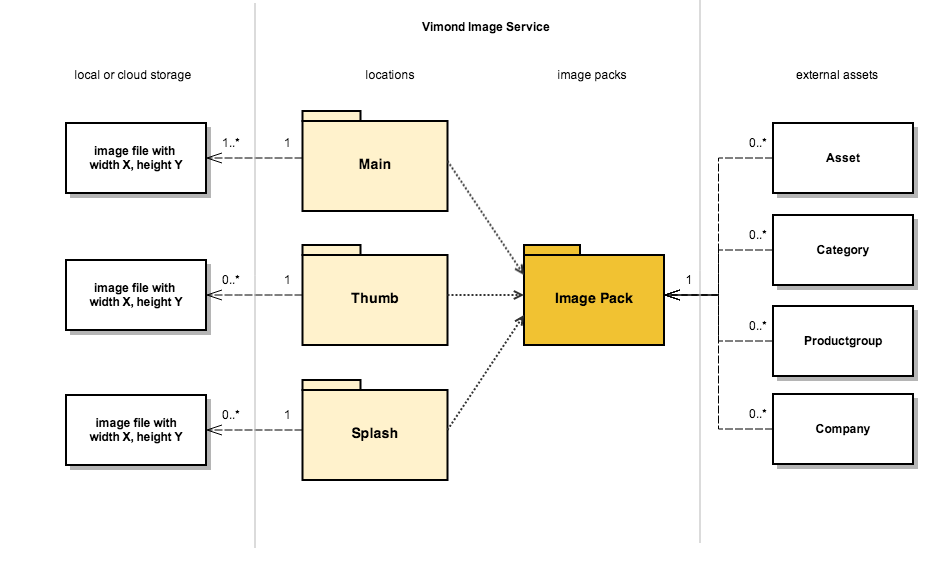
| Image pack | A unique grouping of one or more original images, identified by an imagePackId (e.g. 62e89a0ce4b0003c6f22b5a3-1662654467834). Assets and categories reference image packs to display imagery. |
| Image location | A named variant slot on a pack — for example main, thumb, splash, portal-cover, portal-carousel. Each location has a default pixel size and resize behavior configured on the tenant. |
| Image location config | Tenant-wide definition of a location (width, height, fallback location, resize gravity, transparency-padding rule). Editors manage these via the admin API or the VIA CMS. |
| Crop info | Per-pack overrides specifying the crop rectangle on the original image, expressed in relative coordinates (0.0–1.0). |
When a client requests an image pack at a given location, the service picks the most specific original available for that pack/location, then resizes and crops it to the configured (or query-overridden) dimensions and serves the result.
Request flow
Section titled “Request flow”- The client builds a URL of the form
https://<tenant>.image-service.<region>.vmnd.tv/api/v2/img/<imagePackId>?location=main&width=300(image-pack IDs and template URLs are returned by Content Discovery alongside each asset / category — see Content Images). - CloudFront intercepts the request. A parameters-normalizer edge function rewrites the query string into a canonical S3 key so requests with equivalent semantics share a cache entry.
- If the variant is already cached at CloudFront or in the variants S3 bucket, it is served immediately.
- Otherwise CloudFront fails over to the image-processing Lambda, which loads the original from the legacy image-service S3 bucket, applies the location + query-parameter transformation (using Sharp), writes the result to the variants bucket, and returns it to CloudFront.
The complete query-parameter reference lives in Image URLs and parameters.
Where to go next
Section titled “Where to go next”Building a client / player app:
- Content Images — end-to-end tutorial: how to discover image pack IDs from Content Discovery and turn them into image URLs.
- Image URLs and parameters — reference for every supported query parameter (
location,width,height,resize-mode,resize-gravity,rounded-corners,skip-crop,location-ratio,format, access keys). - Vimond Image Service API reference — interactive OpenAPI (client + admin + cache invalidation). Compact index:
/openapi/image-service.llms.md. Not part of the Management API in the 2.0 platform.
Managing image packs and location configs (ingest / CMS tooling):
- Image management — admin overview of the management API: image packs, locations, cropping, and how changes propagate to the serving layer.
- Image location configs — set up named locations (
main,thumb,portal-cover, …) and their pixel sizes and resize behavior. - Image packs — create packs, upload originals, set per-location crop info.
- Image cache invalidation — automatic propagation when a pack changes, and how to force an invalidation manually.
Resize behavior at a glance
Section titled “Resize behavior at a glance”When the requested aspect ratio differs from the original, the service either crops the image to fill the requested box (default) or includes the whole image with transparent padding (resize-mode=includeAll, served as PNG to preserve transparency). The decision can be set:
- Per request via the
resize-modequery parameter. - On the image-pack location (admin API).
- On the image-location config (admin API).
- As a tenant default in the service configuration.
The first non-UNSET value found in that order wins.
Cache-busting
Section titled “Cache-busting”Two patterns are supported and produce the same valid pack:
- Append a timestamp to the imagePackId:
…/img/62e89a0ce4b0003c6f22b5a3-1662654467834(preferred — stable, easy to store with the asset). - Add an arbitrary query parameter (e.g.
?date=…) — accepted by the handler.
Avoid ad-hoc URL parameters not listed in the reference — they are stripped by the parameters-normalizer and have no effect, but they still cost a cache lookup.