

End-User Authentication
📘 Looking for information on machine-to-machine API authentication?
Please see Machine-to-Machine: API Authentication for information on how you can get access to Vimond VIA admin APIs.
In this tutorial, you will learn how to authenticate your requests to the Vimond VIA APIs for viewer-facing and personalization services. The authentication method used is OpenID Connect (OIDC) and JSON Web Tokens (JWT).
Authentication Header
Section titled “Authentication Header”To authenticate your request, you need to include a JWT token as the value of the “Authorization” header in the following format:
Authorization:<space>Bearer<space>[JWT]The JWT token contains information related to the end-user, such as IDs and entitlements.
Example of the authentication header.
[block:parameters] { “data”: { “h-0”: “Header”, “h-1”: “Value”, “h-2”: “Comment”, “0-0”: “Authorization”, “0-1”: “Bearer eyJhbG…5AoOGY6A”, “0-2”: ”- Used by: All services that need to identify the end user. \n- The JWT can be used across all services. \n- The JWT token lifestyle depends on your OIDC provider configuration. Once a token has expired, it needs to be refreshed via your OIDC provider. \n- The OIDC provider must be compatible and registered in the Vimond Platform.” }, “cols”: 3, “rows”: 1, “align”: [ “left”, “left”, “left” ] } [/block]
See the Json Web Token website for more information about about JWT.
OpenID Connect (OIDC) and Identity and Access Manager (IAM)
Section titled “OpenID Connect (OIDC) and Identity and Access Manager (IAM)”OpenID Connect 1.0 is an identity layer built on top of the OAuth 2.0 protocol. It allows clients to verify the identity of the end-user and obtain basic profile information in a REST-like manner.
The authentication process involves an IAM (Identity and Access Manager) or an OIDC provider that issues Access Token and ID Token (JWT tokens). The IAM can be either your own OIDC provider, a commercial alternative such as Auth0, or the Vimond IAM.
See the OpenID connection website for more information about Open ID Connect.
The diagram below illustrates the flow where an End UserAuthentication Request is sent to the IAM / OIDC Provider to retrieve an Access Token (JWT Token) that can then be used in all following communication with the Vimond APIs on behalf of the authenticated user.
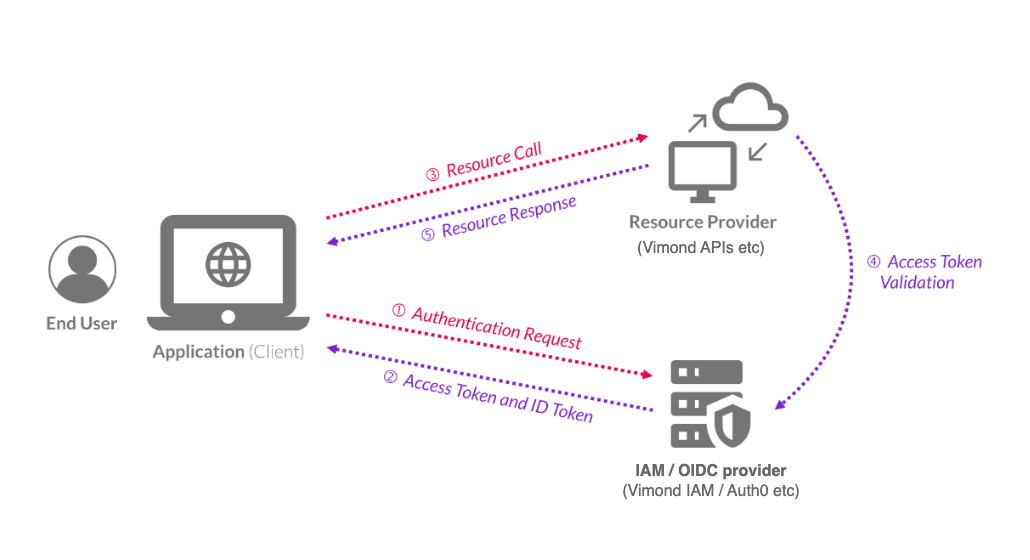
To be valid, a token must be issued from a compatible and registered IAM. Registering your IAM can be done by submitting a support request.
If you are using, or plan to use, the Vimond IAM, then this configuration will be done automatically when creating your account.
Claims
Section titled “Claims”The JWT has two purposes:
- Identifies the user and the user’s tenant in a safe manner
- Contains extra information about the users.
To be compatible with the VIA Platform, the JWT has to contain several claims. Claims are statements about an entity (typically, the user) and additional metadata. There are three types of claims: registered, public, and private claims. The VIA platform requires both registered and private claims.
UserId (registered claims)
Section titled “UserId (registered claims)”| Claim | Description |
|---|---|
| sub | The Subject (sub) standard claim is used to identify the end user. |
| iss | The Issuer (iss) claim is used to separate user IDs from different tenants/services in case the solution serves multiple tenants. The combination of the issuer and subject claims is unique across Vimond. |
Custom entitlement claims (private claims)
Section titled “Custom entitlement claims (private claims)”The IAM needs to support custom properties per user, which can be accessed through custom claims in the JWT token. The Vimond IAM is already compatible with Vimond custom claims.
Entitlements
Section titled “Entitlements”Entitlements are a set of claims that define what and how a user is allowed to access content. It specifies a list of content packages, categories, or assets, along with attributes like the maximum concurrent streaming sessions and video stream quality. Each attribute of an entitlement can be set independently.
Vimond supports defining a single entitlement or a list of them, which need to be ordered with the best ones on the top of the list, meaning the entitlements that allow to access better quality streams and/or more concurrent clients. This is necessary to ensure the best end-user experience.
Expectations and recommendations
Section titled “Expectations and recommendations”- The list of entitlements should only include currently valid entitlements.
- To reduce the size of the token, we recommend that entitlements with similar properties (quality and streamcount) are grouped together.
- SVOD entitlements should be put in the token before the TVOD entitlements.
- It is a good idea to order SVOD entitlements with the highest quality/streamcount values first in the list. In case an asset belongs to multiple product packages you then make sure that the first match is also the best match.
- It is a good idea to list TVOD entitlements with recent purchases/rentals first, to increase the chance of an “early match”.
Limits
Section titled “Limits”The HTTP total header size is limited to 8K. This means that you should try to keep the JWT token as compact as possible. Still, with the given constraints there should be sufficient room to include most users’ complete list of valid subscriptions, rentals and purchases. Keep in mind that the way you group entitlements and the number of digits in the asset and category ids will influence the total number of entitlements there is room for in the token. As a guiding rule, given a list of ten entitlements where each id consists of 6 digits, you will be able to safely include 250 ids.
List of scopes and claims
Section titled “List of scopes and claims”The following table lists the scopes and claims for the play flow. The naming scheme of these custom claims is in the form of a URI (OIDC conventions try to make them unique).
Note that the custom claim namespace representation in the JWT token from Auth0 needs to be a URI. Also, note that if your OpenId provider does not support custom claim names formatted as URI you can use vimond_ prefix.
Scope: vimond:play
[block:parameters]
{
“data”: {
“h-0”: “Namespace/Property”,
“h-1”: “Description”,
“0-0”: “https://vimond/entitlements or vimond_entitlements”,
“0-1”: “Optional (if catalog has content that should be totally free) List of entitlements the user has access to. \n \nEach entitlement can be composed of the following sub-claims: \n- svod \n- tvod \n- quality \n- streamcount \n- until \n \nNote that if both the svod and tvod claim is missing, the corresponding entitlement is skipped from being processed. See below for a detailed explanation of those fields.”,
“1-0”: “https://vimond/devicerule or vimond_devicerule”,
“1-1”: “Optional \nThis claim is used for bypassing device registration rules for example for VIP or test users.”,
“2-0”: “https://vimond/geoblock or vimond_geoblock”,
“2-1”: “Optional \nIndicates properties about user’s geolocation. Can be used for implementing EU portability regulations or for bypassing geolocation restrictions”,
“3-0”: “https://vimond/has_more_tvod or has_more_tvod”,
“3-1”: “Optional \nThis claim can be used when a viewer has a larger number of tvod entitlements than can fit in the JWT itself. If this claim is present and has the value true, and no match can be found on the entitlements contained in the token itself, an additional call to a configured external entitlement service endpoint will be made to validate access.”
},
“cols”: 2,
“rows”: 4,
“align”: [
“left”,
“left”
]
}
[/block]
The entitlements claim is composed of objects with the following sub-claims:
[block:parameters]
{
“data”: {
“h-0”: “Sub Claim name”,
“h-1”: “Description”,
“0-0”: “svod”,
“0-1”: “Comma-separated list of content packages entitlement identifiers e.g. 54,77. \nThe svod package id is mapped to the Vimond internal package id in the play flow.”,
“1-0”: “tvod”,
“1-1”: “Contains arrays of TVOD asset IDs and parent category IDs that the user has access to. IDs can be specified as numbers or strings. \n \nExample: \n \n\"tvod\": {\n \"a\": [4567,6789],\n \"c\": [1031,1045]\n} \n \na contains the asset IDs \nc contains the parent category IDs \n \nNote that the category id specified needs to be the immediate parent category of the asset. If you have a series - season - assets structure for example, the claim can include the season category IDs, but not the series category IDs.”,
“2-0”: “quality”,
“2-1”: “Optional \nContains the quality package the user has access to. The list of quality available and can be configured with the Vimond team. \nThis claim is optional, and represents a possible upgrade from the standard quality package defined in the platform. If not defined, the user will be assigned to the default quality defined in the environment configuration”,
“3-0”: “streamcount”,
“3-1”: “Optional. \nIndicates the maximum concurrent viewing sessions allowed for the user. \nThis claim is optional and represents a possible upgrade from the standard configured streamcount limit defined in the platform. This claim overwrite all the possible stream count limit.”,
“4-0”: “until”,
“4-1”: “Optional \nISO 8601 formatted timestamp indicating until the entitlement is valid. If the value is older than the moment when the checks happen, the whole entitlement is discarded. \n \nUse of this claim is not recommended for tvod entitlements since it will make it hard to group entitlements with similar properties.”
},
“cols”: 2,
“rows”: 5,
“align”: [
“left”,
“left”
]
}
[/block]
Legacy single entitlement definition
Section titled “Legacy single entitlement definition”In a setup where end-users have only one svod claim value, or where several svod claim values share the same quality and streamcount, it is possible to define the content packages, the quality, and the stream count rules independently by using top level claims:
- https://vimond/svod or vimond_svod
- https://vimond/quality or vimond_quality
- https://vimond/streamcount or vimond_streamcount
having the same meaning as the svod, quality and streamcount sub claims
Note that is this configuration, each claim is optional.
The preferred approach is to use the https://vimond/entitlements or vimond_entitlements claim, even though the end-users are supposed to have only one entitlement defined. However, Vimond supports also defining an entitlement as a combination of separate claims.
🚧 If the https://vimond/entitlements or vimond_entitlements claim is defined, then the legacy entitlement claims are ignored
Bypass restrictions
Section titled “Bypass restrictions”It is possible to set some of the claims mentioned above bypass restrictions in the Vimond platform.
| Name | Description | Value |
|---|---|---|
| svod (To be set within an entitlement object) | Skip entitlements checks attached to an asset | * |
| https://vimond/geoblock or vimond_geoblock | Skip possible geolocation check attached to an asset | {“bypass”:true} |
| https://vimond/streamcount or vimond_streamcount | Skip stream count check. The user is still expected to send periodic player events. | * |
| https://vimond/devicerule or vimond_devicerule | Skip device registration check attached to an asset type. | * |
Note that in the case of a legacy single entitlement setup, in order to implement the skipping of entitlements check the https://vimond/svod or vimond_svod needs to be set to *.
Skip entitlements check example:
"https://vimond/entitlements": [ { "svod": "*", "quality": "4k", "streamcount": "5" }, ... ]Skip entitlements check with legacy entitlement definition
{ "https://vimond/svod": "*", "https://vimond/quality": "4k", "https://vimond/streamcount": "5",}Examples
Section titled “Examples”A token including all of the claims in the vimond:play scope should look like this:
{ ... "https://vimond/entitlements": [ { "svod": "54,77", "quality": "4k", "streamcount": "5", "until": "2019-10-17T14:25:27+00:00" }, { "svod": "456", "quality": "hd", "streamcount": "2" }, { "tvod": { "a": [123,345,678], "c": [432,654,876] }, "quality": "hd", "streamcount": "1" }, ... ], "https://vimond/devicerule": "*", "https://vimond/geoblock": { "bypass": true } ...}If specifying a single claim using the legacy approach is preferred, then the token should look like:
{ ... "https://vimond/svod": "54,77", "https://vimond/quality": "4k", "https://vimond/streamcount": "5", "https://vimond/devicerule": "*", "https://vimond/geoblock": {"bypass":true} ...}Note that the previous claims allow the user bearing it to skip device rule limitation and bypass geoblocking check on a play call.
The legacy definition does not support tvod claims. The tvod claim must be part of an entitlement object.