

Subprofile API
Introduction
Section titled “Introduction”The Subprofile API allows developers to manage subprofiles associated with user accounts. Subprofiles provide a way to differentiate between users sharing an account, allowing for personalized experiences based on individual preferences. The service identifies the user making the request through the bearer token provided in the Authorization header.
Create a Subprofile
Section titled “Create a Subprofile”To create a new subprofile, send a POST request as shown in the example below:
curl -X POST \ https://{tenant}.subprofile.{domain}/api/v1/subprofiles \ -H 'Authorization: Bearer {jwt_token}' \ -H 'Content-Type: application/json' \ -d '{"subProfileName":"Thomas","subProfileId":"my-custom-id","birthDate":"1983-08-04","properties":{"gender":"M","ageLimit":"10+"}}'Field explanations
- subProfileName - The required display name of the profile. Max size is 30 characters.
- subProfileId - The id of the profile. Will be auto generated as a UUID if not present. Max size is 64 characters.
- birthDate - Format is “YYYY-MM-DD”. Not required
- properties - A customizable map of properties. Not required. Max size is 2KB.
Responses
Section titled “Responses”| Response Code | Description |
|---|---|
| 201 Created | Subprofile successfully created |
| 401 Not Authorized | User must login |
| 403 Forbidden | User exceeded the maximum subprofiles limit for the tenant |
| 409 Conflict | A subprofile with the same subprofile ID already exists for the user |
| 422 Unprocessable Entity | Could not process the subprofile in the request body |
Sample response
Section titled “Sample response”{ "data": [ { "subProfileName": "Thomas", "subProfileId": "my-custom-id", "birthDate": "1983-04-08", "properties": { "gender": "M", "ageLimit": "10+" } } ]}Retrieve Subprofile token
Section titled “Retrieve Subprofile token”To retrieve a subprofile token, specify the subprofile ID in the request as shown below. The service responds with the token in the X-Vimond-Subprofile response header, which can be used when calling other Vimond services to be subprofile aware.
curl -X GET \ https://{tenant}.subprofile.{domain}/api/v1/subprofiles/{sub-profile-id}/token \ -H 'Authorization: Bearer {jwt_token}'Responses
Section titled “Responses”| Response Code | Description |
|---|---|
| 204 No Content | Success |
| 401 Not Authorized | User must login |
| 404 Not Found | Subprofile not found |
Sample response (header)
Section titled “Sample response (header)”X-Vimond-Subprofile: eyJraWQiOiJrZXktaWQtMSIsIm.eygsg...X-Vimond-Token-Expires-At: 1619169993Retrieve one Subprofile
Section titled “Retrieve one Subprofile”To retrieve information about a specific subprofile, use the subprofile ID in the request as shown below:
curl -X GET \ https://{tenant}.subprofile.{domain}/api/v1/subprofiles/{sub-profile-id} \ -H 'Authorization: Bearer {jwt_token}'Responses
Section titled “Responses”| Response Code | Description |
|---|---|
| 200 OK | Success |
| 401 Not Authorized | User must login |
| 404 Not Found | Subprofile not found |
Sample response
Section titled “Sample response”{ "data": [ { "subProfileName": "Thomas", "subProfileId": "7c699b36-bda4-444c-8637-385025461a0a", "birthDate": "1983-04-08", "properties": { "gender": "M", "ageLimit": "10+" } } ]}Retrieve all Subprofiles for a User Account
Section titled “Retrieve all Subprofiles for a User Account”To fetch all subprofiles linked to a user account, use the following request, which retrieves the user ID from the bearer token:
curl -X GET \ https://{tenant}.subprofile.{domain}/api/v1/subprofiles \ -H 'Authorization: Bearer {jwt_token}'Responses
Section titled “Responses”| Response Code | Description |
|---|---|
| 200 OK | Success |
| 401 Not Authorized | User must login |
Sample response
Section titled “Sample response”{ "data": [ { "subProfileName": "Thomas", "subProfileId": "7c699b36-bda4-444c-8637-385025461a0a", "birthDate": "1983-04-08", "properties": { "gender": "M", "ageLimit": "10+" } }, { "subProfileName": "Freddy", "subProfileId": "8d569b36-bda4-444c-8637-385025461b3b", "birthDate": "1980-05-04", "properties": { "gender": "M", "ageLimit": "18+" } } ]}Update a sub profile
Section titled “Update a sub profile”To update a property field in a subprofile, send the entire updated subprofile object with all the properties to the update endpoint. The subprofile will be overwritten with the new values.
In the example below we are sending a new age limit (16+).
curl -X PUT \ https://{tenant}.subprofile.{domain}/api/v1/subprofiles/{sub-profile-id} \ -H 'Authorization: Bearer {jwt_token}' \ -H 'Content-Type: application/json' \ -d '{"subProfileName":"Thomas","birthDate":"1983-08-04","properties":{"gender":"M","ageLimit":"16+"}}'Responses
Section titled “Responses”| Response Code | Description |
|---|---|
| 200 OK | Success |
| 401 Not Authorized | User must login |
| 404 Not Found | Subprofile not found |
| 422 Unprocessable Entity | Could not process the subprofile in the request body |
Sample response
Section titled “Sample response”{ "data": [ { "subProfileName": "Thomas", "subProfileId": "7c699b36-bda4-444c-8637-385025461a0a", "birthDate": "1983-04-08", "properties": { "gender": "M", "ageLimit": "16+" } } ]}Add Custom Properties to Subprofile
Section titled “Add Custom Properties to Subprofile”To add custom properties to a subprofile, include them in the properties entity of the subprofile body when creating or updating the profile. Please note that there will be defined a size limit on this properties entity.
In the example below we are adding the property “favoriteColor” to a profile.
curl -X PUT \ https://{tenant}.subprofile.{domain}/api/v1/subprofiles/{sub-profile-id} \ -H 'Authorization: Bearer {jwt_token}' \ -H 'Content-Type: application/json' \ -d '{"subProfileName":"Thomas","birthDate":"1983-08-04","properties":{"gender":"M","ageLimit":"16+","favoriteColor":"yellow"}}'Responses
Section titled “Responses”| Response Code | Description |
|---|---|
| 200 OK | Success |
| 401 Not Authorized | User must login |
| 404 Not Found | Subprofile not found |
| 422 Unprocessable Entity | Could not process the subprofile in the request body |
Sample response
Section titled “Sample response”{ "data": [ { "subProfileName": "Thomas", "subProfileId": "7c699b36-bda4-444c-8637-385025461a0a", "birthDate": "1983-04-08", "properties": { "gender": "M", "ageLimit": "16+", "favoriteColor": "yellow" } } ]}Delete a Subprofile
Section titled “Delete a Subprofile”To delete a specific subprofile, use the DELETE request with the subprofile ID:
curl -X DELETE \ https://{tenant}.subprofile.{domain}/api/v1/subprofiles/{sub-profile-id} \ -H 'Authorization: Bearer {jwt_token}'Responses
Section titled “Responses”| Response Code | Description |
|---|---|
| 204 No Content | Success |
| 401 Not Authorized | User must login |
| 404 Not Found | Subprofile not found |
Delete All Subprofiles for a User Account
Section titled “Delete All Subprofiles for a User Account”To delete all subprofiles linked to a user account, use the following DELETE request
curl -X DELETE \ https://{tenant}.subprofile.{domain}/api/v1/subprofiles/ \ -H 'Authorization: Bearer {jwt_token}'Responses
Section titled “Responses”| Response Code | Description |
|---|---|
| 204 No Content | Success |
| 401 Not Authorized | User must login |
Example Using Subprofile in Playlist Service
Section titled “Example Using Subprofile in Playlist Service”To demonstrate the API, we will follow the scenario below:
- Retrieve all subprofiles for the user account.
- Get a token for the chosen profile.
- Use the token against the playlist service to fetch all playlists for the profile.
Please note that the authentication step is not included in the example.
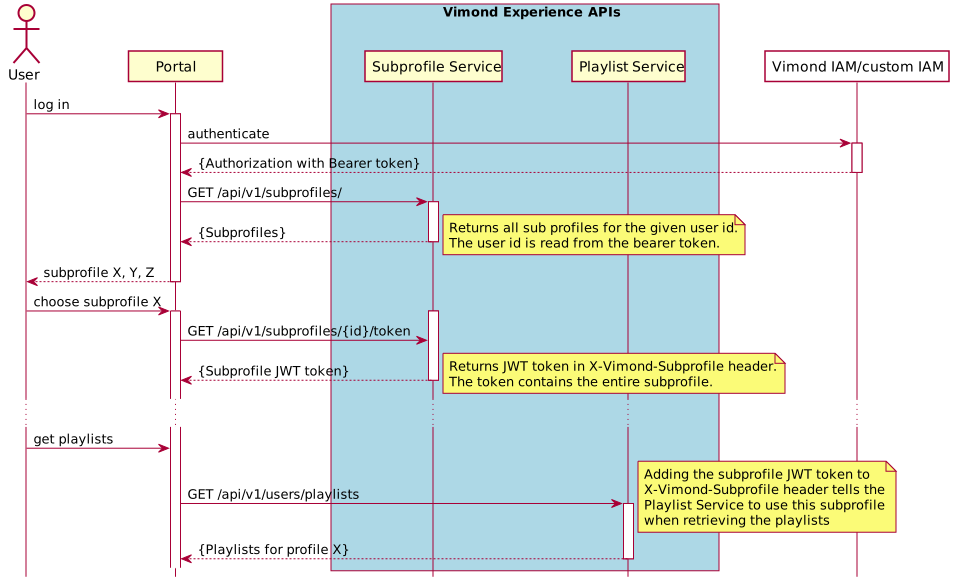
Retrieve Subprofiles
Section titled “Retrieve Subprofiles”curl -X GET \ https://{tenant}.subprofile.{domain}/api/v1/subprofiles \ -H 'Authorization: Bearer {jwt_token}'Response
Section titled “Response”{ "data": [ { "subProfileName": "Thomas", "subProfileId": "7c699b36-bda4-444c-8637-385025461a0a", "birthDate": "1983-04-08", "properties": { "gender": "M", "ageLimit": "10+" } }, { "subProfileName": "Freddy", "subProfileId": "8d569b36-bda4-444c-8637-385025461b3b", "birthDate": "1980-05-04", "properties": { "gender": "M", "ageLimit": "18+" } } ]}Choose Subprofile and Get Token
Section titled “Choose Subprofile and Get Token”curl -X GET \ https://{tenant}.subprofile.{domain}/api/v1/subprofiles/7c699b36-bda4-444c-8637-385025461a0a/token \ -H 'Authorization: Bearer {jwt_token}'Response header
Section titled “Response header”X-Vimond-Subprofile: eyJraWQiOiJrZXktaWQtMSIsImFsZyI6IkhTMjU2In0.eyJhdWQiOiJ2aW1vbmQtc3VicHJvZmlsZS1hdWRpZW5jZSIsInN1YiI6IjgwMGQ2NDZkLTExMzktNGQyYi05YmUwLTQ0N2I3MTYyMTEzZSIsImFnZUxpbWl0IjoiMTArIiwiZ2VuZGVyIjoiTSIsImh0dHBzOlwvXC92aW1vbmRcL3N1YnByb2ZpbGUiOiI3YzY5OWIzNi1iZGE0LTQ0NGMtODYzNy0zODUwMjU0NjFhMGEiLCJpc3MiOiJodHRwczpcL1wvdmltb25kLnN1YnByb2ZpbGUtc2VydmljZS5oYS5rOHMubmNhYi1maXJzdC52aW1vbmR0di5jb20iLCJleHAiOjE1MzE3OTExODMsImlhdCI6MTUzMTc0Nzk4MywianRpIjoiMjM0ZmVhODEtMzhkNy00ODc0LWExOTYtMTNlMWY0OGI4MDMxIn0.sAQFd5R-seHqAZ-s8txw01krpWcQ2mc9H57atg2z7b4Get Playlists for Profile
Section titled “Get Playlists for Profile”curl -X GET \https://{tenant}.playlist.{domain}\api/v1/users/playlists \-H 'Authorization: Bearer {jwt_token}' \-H 'X-Vimond-Subprofile: eyJraWQiOiJrZXktaWQtMSIsImFsZyI6IkhTMjU2In0.eyJ...'Response
Section titled “Response”{ "data": [ { "id": "c1a5051d-81f4-4932-80f0-bcac81bbaf9d", "name": "playlist-1531600610", "status": "PRIVATE", "assetIds": [ "12345" ] }, { "id": "d4f5051d-81f4-4932-80f0-bcac81bbag3r", "name": "playlist-1532400240", "status": "PRIVATE", "assetIds": [ "12345", "54321" ] } ]}We hope this guide has provided you with a comprehensive understanding of the Subprofile API and its capabilities. By incorporating subprofiles into your application or service, you can deliver a truly personalized and enjoyable video streaming experience for your users.
If you have any questions or need further assistance, please don’t hesitate to reach out to our support team. Happy coding and happy subprofile management!