

External Streams and Play Calls
In this tutorial we are going to create an asset with an external stream url on different CDNs then make a play call selecting one content delivery manager.
Here is a summary of the steps needed:
- Create an asset
- Add external streams to the asset
- Publish the asset
- Make the play call with an end user token
Create an Asset
Section titled “Create an Asset”To do this, we will simply use VCC.
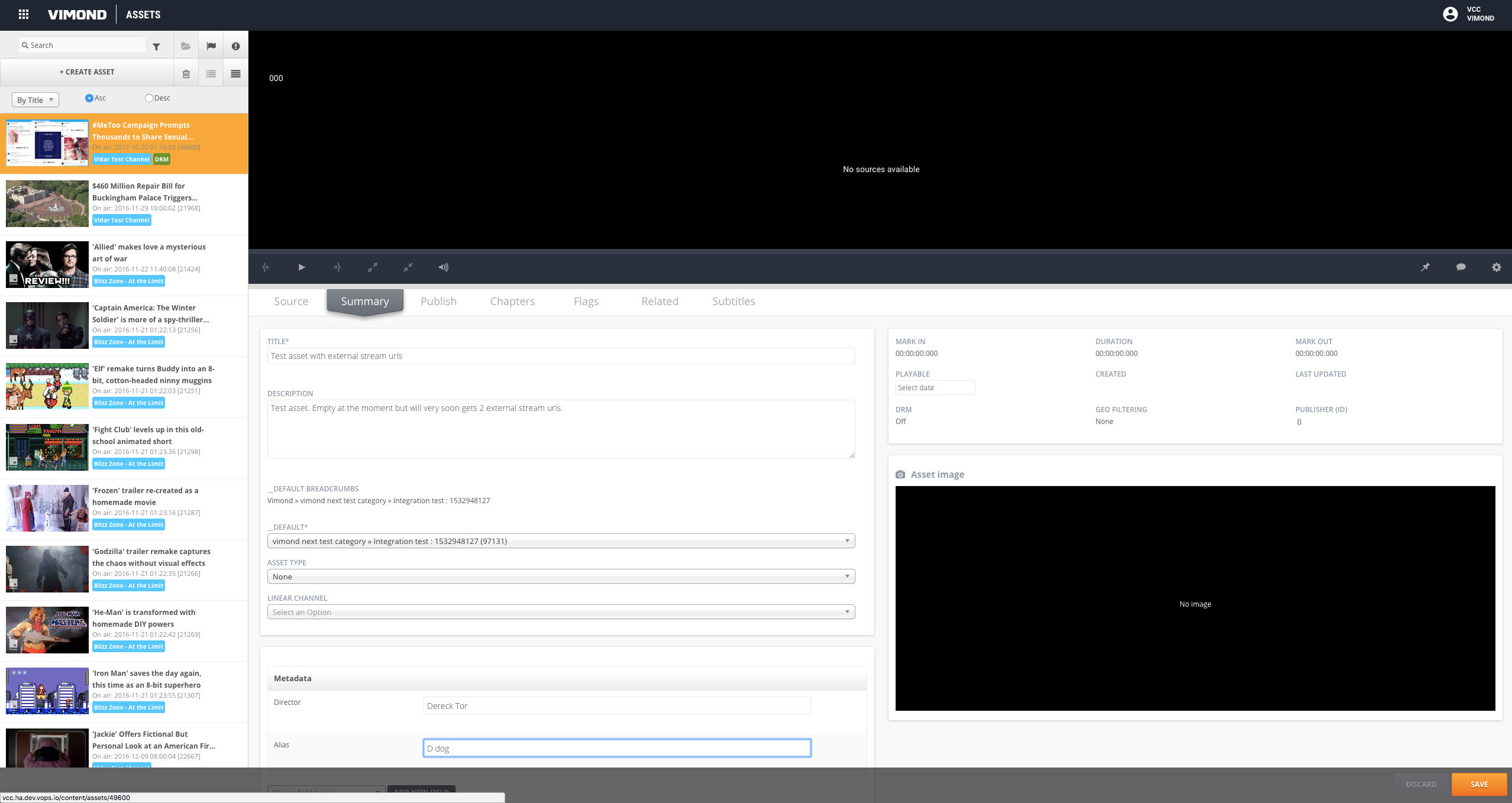
In order to let the end user have access to this asset, we create it in a category the end user has access to.
Once created, we can use the Vimond API to retrieve this asset information:
curl -X GET https://vimond-rest-api.{domain}/api/web/asset/141414\ -H 'Accept: application/json;v=3'This should return a description of the asset, by default the asset has a playback strategy set to DEFAULT and no external playback URLs. We are going to change this by adding the external stream URLs.
{ "uri": "/api/web/asset/141414", "id": 141414, "categoryId": 97131, "channelId": 0, "profileId": 0, "viewCount": 0, "commentsUri": { "uri": "/api/web/asset/141414/comments" }, "ratingsUri": { "uri": "/api/web/asset/141414/ratings" }, "copyLiveStream": false, "aspect16x9": true, "drmProtected": false, "live": false, "publishedPlatforms": [], "itemsUri": { "uri": "/api/web/asset/141414/items", "items": [] }, "categoryUri": { "uri": "/api/web/category/97131", "properties": {}, "assets": [], "articleList": { "articles": [] }, "sectionUri": {}, "metadata": { "entries": {}, "empty": true }, "ancestorCategories": { "categories": [] }, "children": [], "categoriesUri": { "categories": [] }, "assetsUri": { "assets": [] }, "available": false }, "playbackUri": { "uri": "/api/web/asset/141414/play", "playbackItems": [] }, "metadata": { "uri": "/api/metadata/asset/141414", "entries": {}, "empty": true }, "encoderGroupId": 0, "archive": true, "deleted": false, "distributed": 0, "createTime": "2018-07-30T11:17:13Z", "updateTime": "2018-07-30T11:17:13Z", "itemsPublished": false, "playbackStrategy": "DEFAULT", "labeledAsFree": false, "productGroupAccessType": "PAID", "sortIndex": 10, "externalPlaybacks": [], "parent": true, "onDemandTimeBegin": 0, "onDemandTimeEnd": 0, "imageVersions": { "images": [] }, "title": "Test asset with external stream urls", "liveBroadcastTime": "2018-07-30T11:17:13Z", "description": "Test asset. Empty at the moment but will very soon gets 2 external stream urls. ", "duration": 0, "autoEncode": false, "autoPublish": false, "autoDistribute": true, "assetTypeId": 0, "showInEpg": false, "hostProgramId": 141414, "platformPublishInfo": [ { "id": 541283, "platformId": 1, "assetId": 141414, "platformName": "web", "livePublished": false, "onDemandPublished": false, "downloadable": false } ], "programViewCount": 0, "durationLong": 0, "productUri": { "uri": "/api/web/asset/141414/productgroups", "productPaymentsUri": {} }, "hostAssetId": 141414}Add External Streams to the Asset
Section titled “Add External Streams to the Asset”We can add the external stream URLs by doing a simple API call. At the same time, we will change the playback strategy to EXTERNAL.
In order to make this call, you will need an admin bearer token.
curl -X PUT \  https://vimond-rest-api.ha.dev.vops.io/api/web/asset/141414 \  -H 'Accept: application/json;v=3' \  -H 'Authorization: Bearer {admin_token}' \  -d '{    "id": 141414,    "categoryId": 97131,    "playbackStrategy": "EXTERNAL",    "externalPlaybacks": [      {        "playoutUri": "https://tenant.akamaihd.net/i/free/nogeoblock/path/to/video/master.m3u8",        "format": "HLS",        "cdn": "AKAMAI",        "tokenizer": "AKAMAI_EDGE",        "cdnProfile": "default",        "urlProfile": "4k",                "streamRank": 1      },      {        "playoutUri": "https://tenant.cloudfront.net/path/to/video.ism/Manifest",        "format": "HLS",        "cdn": "CLOUDFRONT",        "tokenizer": "CLOUDFRONT",        "cdnProfile": "default",        "urlProfile": "4k",                "streamRank": 2      }      ]
}'
Here we add two external stream URLs. When adding a external stream you can fill the provider information.
playoutUri: The external stream URL pointing to your video. This has to be input without any CDN token.format: The video format of your stream. You can find a list of the standard formats and their corresponding mime types below. Note that you can configure your own format name and mime type as well, just ask a Vimond support operator to do so.
| Format name | Mime type |
|---|---|
| HLS | application/x-mpegurl |
| MP4 | video/mp4 |
| ism | application/vnd.ms-sstr+xml |
| ism_http | application/vnd.ms-sstr+xml |
| dash | application/dash+xml |
| webm | video/webm |
| flv | video/flv |
| hds | application/f4m+xml |
cdn: The name of the content delivery manager providing this stream. This field is useful for the play service when filtering on the stream CDN. At the moment the values allowed areCLOUDFRONTandAKAMAI.tokenizer: Internally used by Vimond to parse the stream URL. It can take the following values:CLOUDFRONTorAKAMAI_EDGE.cdnProfile(Optional) : The Vimond platform can use a different CDN profile while computing the stream URL’s token. These CDN profiles contain information such as token validity time, and whether the stream url should be restricted to a single ip. The profile has to be defined with the Vimond team and preconfigured. The default CDN profile isdefault.urlProfile: Can be used to tag the stream quality. See the section on Filters for more information.drmType: A string that identifies the drm proxy type. For streams using the anydrm solution, they have to follow this pattern: anydrm..
The proxy could be irdeto, ezdrm, castlabs, or other drm proxy solutions.
The provider could be fairplay, widevine or playready. It is needed for the player to know which drm provider to fetch a license for.drmLicenseUrl: The full url to make the license request against your drm proxy (irdeto).drmFairplayCertUrl: For HLS streams that are fairplay protected you will need to add the fairplay certificate url in order for our vcc player to be able to play the content.streamRank: an integer value defining the priority of the stream respect to the other streams for the same asset. It is used to display streams with highest priority on top of the list in the VIA UI player. Higher streamRank values are display on top
Publish the Asset
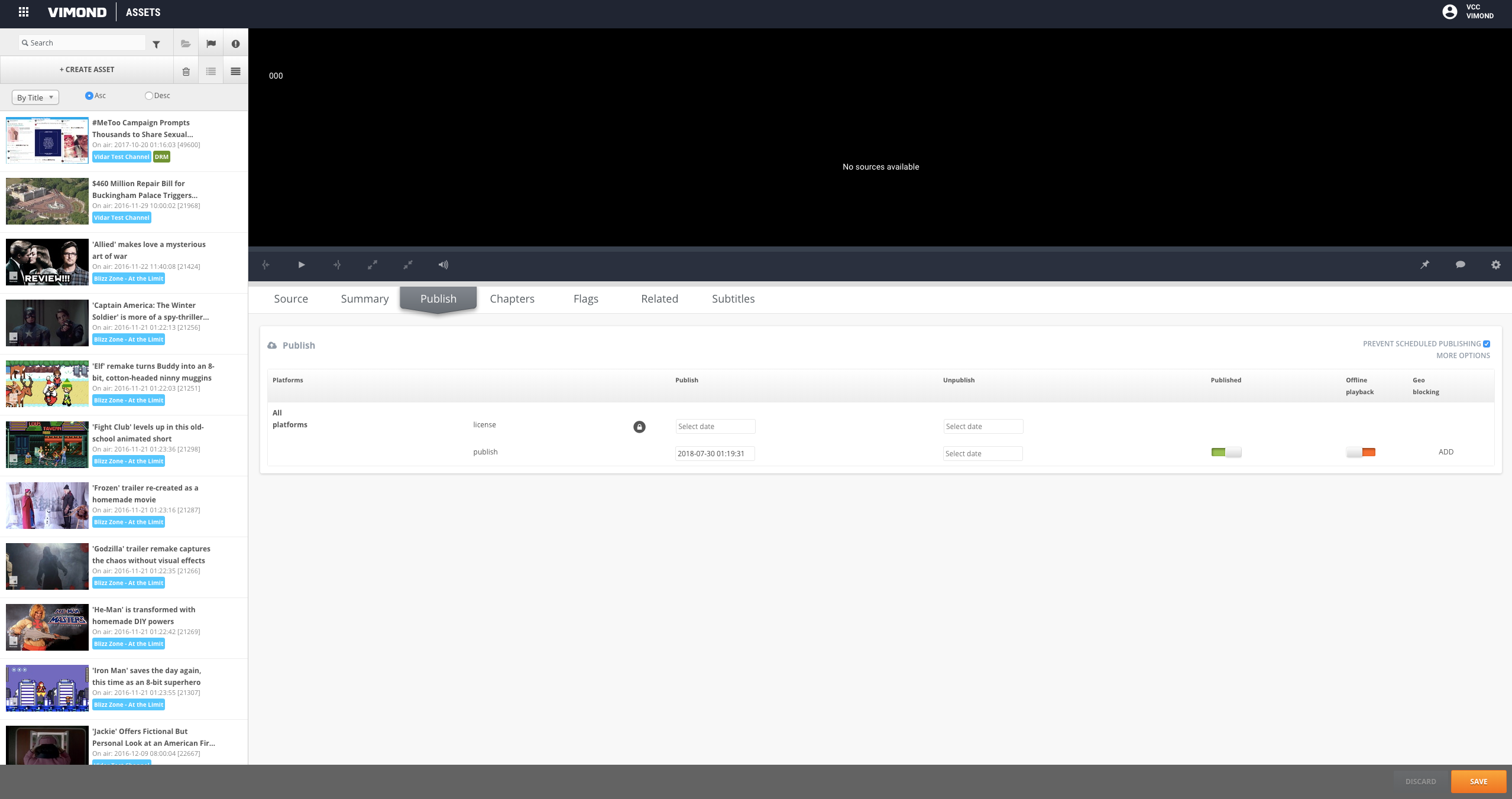
Section titled “Publish the Asset”To publish the asset, simply use VIA UI and make it available to the end user.
Play Call
Section titled “Play Call”Within a few seconds, the asset should be available in the Vimond Play service. In our case, no configuration has been done related to urlProfile, so we will ignore this case for now.
Get the Stream URL
Section titled “Get the Stream URL”First of all, we can make a simple play call to retrieve a signed version of the stream URLs.
curl -X POST 'https://{tenant}.play-service.{domain}/api/v2/asset/141414/play' \ -H 'Authorization: Bearer {access_token}' \ -d ' { "device": { "label": "DEVICE_LABEL_MY_IPHONE_FOR_EXAMPLE", "udid": "DEVICE_LABEL_MY_IPHONE_FOR_EXAMPLE" } 'In the response, we can see that the play service returns a signed version of the stream url. The play service always returns a recommended URI.
{ "data": [ { "assetId": "141414", "assetTitle": "Test asset with external stream urls", "categoryId": "97131", "startTime": 0, "endTime": 0, "duration": 0, "transmissionTime": "2018-07-30T11:17:13Z", "isDrmProtected": false, "isLive": false, "recommendedStream": { "id": "1", "bitrate": 0, "mediaFormat": "hls", "mimeType": "application/x-mpegurl", "provider": "CLOUDFRONT", "urlProfile": "4k", "manifest": { "headers": [], "uri": "https://tenant.cloudfront.net/path/to/video.ism/Manifest?Policy=eyJTdGF0ZW1lbnQiOiBbeyJSZXNvdXJjZSI6Imh0dHBzOi8vdGVuYW50LmNsb3VkZnJvbnQubmV0L3BhdGgvdG8vdmlkZW8uaXNtL01hbmlmZXN0IiwiQ29uZGl0aW9uIjp7IkRhdGVMZXNzVGhhbiI6eyJBV1M6RXBvY2hUaW1lIjoxNTMyOTU2NTA3fSwiSXBBZGRyZXNzIjp7IkFXUzpTb3VyY2VJcCI6IjAuMC4wLjAvMCJ9LCJEYXRlR3JlYXRlclRoYW4iOnsiQVdTOkVwb2NoVGltZSI6MTUzMjk1NjIwN319fV19&Signature=MHd~ytx8APKcJipqG3oLgDS~mch7w2fLG3-X2QwdvHcsLAoibQVyVhLU27MdfQfuaQlpEXElXzDmXi4QVJXcStpC0Cp5waTqLS4nNe0x0bpZKfWU~qL0fybyc3~8A-CjyDPB15BKOY6TMQrUjv7mq1r~W6JFRR4VSnZUhy9G-Mf8AW52vXY28oRdBEoj9TgXE~2xBWQMTG5WMuiUVLIg85LeYlXop7UUHPqJxqFyZUTedYs7XuxDGk0ZgA1fFnwU8~GoxKQztRIgk~eQKh3ozIvhvTNTwFBxl5CQUrE3kGbgJHGHYSwdjqfDNsPIQCfRjzz1rHAJqe37gm1GJ0JOCQ__&Key-Pair-Id=APKAI2UWAUVG55VRIRSA" } }, "playerEventRequest": { "body": { "eventName": "player_log_event", "originator": "${originator}", "originatorId": "fb85ba9a-72bd-47a8-8071-68dddee1347d", "subProfileId": "00000000-0000-0000-0000-000000000000", "versions": [ "1.0" ], "tenant": "vimond", "logData": "To complete", "client": { "buildName": "${client_build_name}", "buildVersion": "${client_build_version}", "deviceId": "DEVICE_LABEL_MY_IPHONE_FOR_EXAMPLE", "drm": "${client_drm}", "envPlatform": "${client_env_platform}", "envVersion": "${client_env_version}", "pageUrl": "${client_page_url}", "platform": "web", "playerEvent": "${player_event}", "playerState": "${player_state}", "streamUrl": "${client_stream_url}", "userAgent": "PostmanRuntime/7.1.5", "videoFormat": "${video_mime_type}", "videoProtocol": "${video_protocol}", "viewingSession": "${viewing_session}" }, "progress": { "assetId": "141414", "categoryId": "97131", "title": "Test asset with external stream urls", "playbackType": "vod", "eventNumber": 1, "vod": { "duration": 0, "position": "${vod_stream_position}" } }, "timestamp": "${client_date}", "streamRules": { "subscription": { "name": "Subscription rule", "streamLimit": 2 } } }, "eventInterval": 10, "uri": "https://{tenant}.player-session-service.{domain}/api/v1/external/player-events" } } ], "links": { "self": "/api/v2/asset/141414/play" }}In this response the recommended stream is the one from CloudFront.
Get the Stream URL by CDN
Section titled “Get the Stream URL by CDN”Is it also possible not to ask for alternative streams and request the Akamai URL directly in the play call by using the provider parameter.
curl -X GET'https://{tenant}.play-service.{domain}\/api/v2/asset/141414/play?provider=AKAMAI' \ -H 'Authorization: Bearer {access_token}' \ -d ' { "device": { "label": "DEVICE_LABEL_MY_IPHONE_FOR_EXAMPLE", "udid": "DEVICE_LABEL_MY_IPHONE_FOR_EXAMPLE" } '{ "data": [ { "assetId": "141414", "assetTitle": "Test asset with external stream urls", "categoryId": "97131", "startTime": 0, "endTime": 0, "duration": 0, "transmissionTime": "2018-07-30T11:17:13Z", "isDrmProtected": false, "isLive": false, "recommendedStream": { "id": "2", "bitrate": 0, "mediaFormat": "hls", "mimeType": "application/x-mpegurl", "provider": "AKAMAI", "urlProfile": "4k", "manifest": { "headers": [], "uri": "https://tenant.akamaihd.net/i/free/nogeoblock/path/to/video/master.m3u8?hdnea=st=1532956286~exp=1532956574~acl=%2fi%2ffree%2fnogeoblock%2fpath%2fto%2fvideo%2f%2a~hmac=dc3df4049e73be002edb7f0287ac2bee5be56166c8f85110ebc85bb0f78e019f" } }, "playerEventRequest": { "body": { "eventName": "player_log_event", "originator": "${originator}", "originatorId": "fb85ba9a-72bd-47a8-8071-68dddee1347d", "subProfileId": "00000000-0000-0000-0000-000000000000", "versions": [ "1.0" ], "tenant": "vimond", "logData": "To complete", "client": { "buildName": "${client_build_name}", "buildVersion": "${client_build_version}", "deviceId": "DEVICE_LABEL_MY_IPHONE_FOR_EXAMPLE", "drm": "${client_drm}", "envPlatform": "${client_env_platform}", "envVersion": "${client_env_version}", "pageUrl": "${client_page_url}", "platform": "web", "playerEvent": "${player_event}", "playerState": "${player_state}", "streamUrl": "${client_stream_url}", "userAgent": "PostmanRuntime/7.1.5", "videoFormat": "${video_mime_type}", "videoProtocol": "${video_protocol}", "viewingSession": "${viewing_session}" }, "progress": { "assetId": "141414", "categoryId": "97131", "title": "Test asset with external stream urls", "playbackType": "vod", "eventNumber": 1, "vod": { "duration": 0, "position": "${vod_stream_position}" } }, "timestamp": "${client_date}", "streamRules": { "subscription": { "name": "Subscription rule", "streamLimit": 2 } } }, "eventInterval": 10, "uri": "https://vimond.player-session-service.lof.dev.k8s.vops.io/api/v1/external/player-events" } } ], "links": { "self": "/api/v2/asset/141414/play" }}Get all the stream URLs
Section titled “Get all the stream URLs”Finally, it is also possible to get all of the play URLs in one call, we can add the query parameter extraFields set to alternativeStreams.
📘 Alternative streams
Note that adding this field might affect performance, since the play service has to compute the URL signature for each alternative stream.
{ "data": [ { "assetId": "141414", "assetTitle": "Test asset with external stream urls", "categoryId": "97131", "startTime": 0, "endTime": 0, "duration": 0, "transmissionTime": "2018-07-30T11:17:13Z", "isDrmProtected": false, "isLive": false, "recommendedStream": { "id": "1", "bitrate": 0, "mediaFormat": "hls", "mimeType": "application/x-mpegurl", "provider": "CLOUDFRONT", "urlProfile": "4k", "manifest": { "headers": [], "uri": "https://tenant.cloudfront.net/path/to/video.ism/Manifest?Policy=eyJTdGF0ZW1lbnQiOiBbeyJSZXNvdXJjZSI6Imh0dHBzOi8vdGVuYW50LmNsb3VkZnJvbnQubmV0L3BhdGgvdG8vdmlkZW8uaXNtL01hbmlmZXN0IiwiQ29uZGl0aW9uIjp7IkRhdGVMZXNzVGhhbiI6eyJBV1M6RXBvY2hUaW1lIjoxNTMyOTU2NTA3fSwiSXBBZGRyZXNzIjp7IkFXUzpTb3VyY2VJcCI6IjAuMC4wLjAvMCJ9LCJEYXRlR3JlYXRlclRoYW4iOnsiQVdTOkVwb2NoVGltZSI6MTUzMjk1NjIwN319fV19&Signature=MHd~ytx8APKcJipqG3oLgDS~mch7w2fLG3-X2QwdvHcsLAoibQVyVhLU27MdfQfuaQlpEXElXzDmXi4QVJXcStpC0Cp5waTqLS4nNe0x0bpZKfWU~qL0fybyc3~8A-CjyDPB15BKOY6TMQrUjv7mq1r~W6JFRR4VSnZUhy9G-Mf8AW52vXY28oRdBEoj9TgXE~2xBWQMTG5WMuiUVLIg85LeYlXop7UUHPqJxqFyZUTedYs7XuxDGk0ZgA1fFnwU8~GoxKQztRIgk~eQKh3ozIvhvTNTwFBxl5CQUrE3kGbgJHGHYSwdjqfDNsPIQCfRjzz1rHAJqe37gm1GJ0JOCQ__&Key-Pair-Id=APKAI2UWAUVG55VRIRSA" } }, "alternativeStreams": [ { "id": "2", "bitrate": 0, "mediaFormat": "hls", "mimeType": "application/x-mpegurl", "provider": "AKAMAI", "urlProfile": "4k", "manifest": { "headers": [], "uri": "https://tenant.akamaihd.net/i/free/nogeoblock/path/to/video/master.m3u8?hdnea=st=1532956207~exp=1532956495~acl=%2fi%2ffree%2fnogeoblock%2fpath%2fto%2fvideo%2f%2a~hmac=ba24976498fa85936b69117a746dfbce082651730001e9417d67e04c89996e8c" } } ], "playerEventRequest": { "body": { "eventName": "player_log_event", "originator": "${originator}", "originatorId": "fb85ba9a-72bd-47a8-8071-68dddee1347d", "subProfileId": "00000000-0000-0000-0000-000000000000", "versions": [ "1.0" ], "tenant": "vimond", "logData": "To complete", "client": { "buildName": "${client_build_name}", "buildVersion": "${client_build_version}", "deviceId": "DEVICE_LABEL_MY_IPHONE_FOR_EXAMPLE", "drm": "${client_drm}", "envPlatform": "${client_env_platform}", "envVersion": "${client_env_version}", "pageUrl": "${client_page_url}", "platform": "web", "playerEvent": "${player_event}", "playerState": "${player_state}", "streamUrl": "${client_stream_url}", "userAgent": "PostmanRuntime/7.1.5", "videoFormat": "${video_mime_type}", "videoProtocol": "${video_protocol}", "viewingSession": "${viewing_session}" }, "progress": { "assetId": "141414", "categoryId": "97131", "title": "Test asset with external stream urls", "playbackType": "vod", "eventNumber": 1, "vod": { "duration": 0, "position": "${vod_stream_position}" } }, "timestamp": "${client_date}", "streamRules": { "subscription": { "name": "Subscription rule", "streamLimit": 2 } } }, "eventInterval": 10, "uri": "https://{tenant}.player-session-service.{domain}/api/v1/external/player-events" } } ], "links": { "self": "/api/v2/asset/141414/play" }}However, in the case of poor performance from a content delivery manager, the stream URL might no longer be valid if the signature has expired. In this case, the client can do another play call, specifying the URL that they want.