

Content Metadata
The Vimond platform provides the capability to add metadata to various objects such as assets, categories, lists, and product groups. Metadata in Vimond is stored as key/value pairs and is supported by a customized rule engine known as metadata definition. Each metadata field can have different definitions or rules.
A metadata entry consists of a name, value, language, and update time.
A metadata definition entry or rule specifies the characteristics of a field, such as its data type (string, number, date, etc.), whether it is required, and if it should be validated during asset/category/list/product group creation.
Additionally, the rule can enforce predefined values, limiting editorial staff to select from a dropdown list instead of entering free text. The rule can also define whether the field is protected or editable by editorial staff. These flexible rules enable the customization of each field for your specific usage scenarios.
Before adding new metadata to an asset or any other object, it is necessary to ensure that the metadata field has a definition; otherwise, the metadata creation will fail.
Example metadata field setup
Section titled “Example metadata field setup”Here is a list of example metadata fields delivered with the platform so you got a reference point to some of the possible metadata fields you might want.
| Name | Datatype | Description |
|---|---|---|
| title | string | Title of asset/category |
| text | string | Short description of the asset |
| production-year | number | Production year of asset |
| production-country | string | The production origin country of the asset |
| original-title | string | Original title of movie/video (Some titles are translated into some languages) |
| genre | string | The genre of the asset |
| age-limit | number | Recommended age limit for viewing the asset, ex: 15 years |
| parental-guidance | string | Ex: Motion Picture Rating System and similar letter-based ratings |
| home-team-name | string | Applicable for sports events |
| away-team-name | string | Applicable for sports events |
| season | number | Can be the year for sports tournaments, and a number of Tv shows |
| league | string | Applicable for sports events |
| description-long | string | Synopsis or other longer descriptions of the asset |
| producer | string | Producer of asset |
| director | string | Director of asset |
| actors | string | List of actors in the asset |
| episode | number | episode number in a season |
| studio | string | Studio behind asset |
| tournament | string | Applicable for sports events |
| keywords | string | List of keywords |
| external-gere | string | List of original genres provided by the content provider, every genre should be prefixed with a content provider identifier (Ex: dvb. 1000) |
| external-actor-ids | string | List of external actor references, each reference should be prefixed with a content provider identifier (Ex: imdb.100) |
| external-director-id | string | List of external director references, each reference should be prefixed with a content provider identifier (Ex: imdb.100) |
| external-producer-id | string | List of external producer references, each reference should be prefixed with a content provider identifier (Ex: imdb.100) |
| series | string | Name of the series if the program belongs to a series |
| series-id | string | Series Id if the program belongs to a series |
| dtt-start-over | number | Boolean flag indicating if a live program is available for start-over (time-based buffer) |
| replay | number | 1 if the program is a replay |
| premiere | number | 1 if the program is a premiere |
| highlights | number | 1 if the program is a highlight |
| dtt-video-properties | string | Video properties on the DTT channel |
| dtt-audio-properties | string | Audio properties on the DTT channel |
| ratings | string | Ratings |
| rating-overall | number | Average rating |
This is just a list of basic metadata definitions that we give on installation and all customers will generally have their own metadata fields they want added or they might have added to support what metadata they want to promote in the portal or use for content listing.
Protected metadata fields used by the VIA system
Section titled “Protected metadata fields used by the VIA system”The protected metadata fields used by the VIA system serve crucial roles in managing assets, categories, lists, and product groups. These fields provide essential information for various functionalities and integrations within the system. Here is an overview of the protected metadata fields and their usage:
| Name | Datatype | Description |
|---|---|---|
| title | string | Represents the title of an asset, category, list, or product group |
| description-short | string | Provides a shorter description of an asset, category, list, or product group. |
| image-pack | string | Contains a reference to the Image Services image pack ID associated with the asset, category, list, or product group. |
| unique-category-id | string | Used by the Feed Ingest functionality to map external categories to VIA categories. |
| external-asset-id | string | Used by the Feed Ingest functionality to map external assets to VIA assets. |
| media-feed-id | string | Represents the ID of the Feed Ingest feed where the asset originated. |
| import-job-id | string | Identifies the ID of the Feed Ingest job (batch) from which the asset originated. |
| publisher-id | number | Represents the ID of the company that owns the content. |
These protected metadata fields ensure consistency and accurate data management within the VIA system.
Metadata data model
Section titled “Metadata data model”The data model for metadata in Vimond follows a hierarchical structure. The metadata definition is used to define rules for metadata fields. The appliesTo property in the metadata definition determines whether the definition applies to all possible entity types (Asset, Category, List, Product Group) or only a specific one. This allows you to have different metadata fields and requirements for your Assets, Categories, Lists, and Product Groups. By using appliesTo:all you can also add metadata fields and requirements across all Assets, Categories, Lists, and Product Groups.
Here is an illustration of the metadata data model:
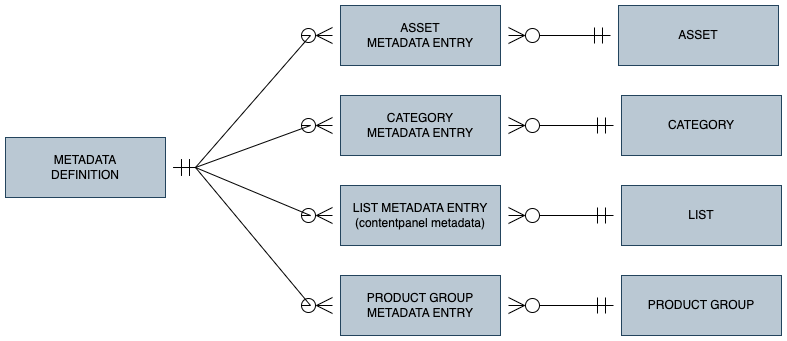
Each Asset, Category, List, or Product Group can have 0 to many metadata entries.
Each metadata entry is backed by exactly one metadata definition (rule).
Getting the metadata definitions
Section titled “Getting the metadata definitions”Before working with metadata and adding new fields, it’s recommended to review the existing metadata definitions for your service. This can be done using the metadata definition API (API Reference):
GET /api/metadata/definitionscurl --request GET \ --url https://{tenant}.rest-api.{region}.vmnd.tv/api/metadata/definitions \ --header 'accept: application/json;v=3'The response will be in JSON format and provide a list of all existing metadata fields and their definitions.
{ "metadataDefinition": [ { "name": "title", "title": "Title", "description": "The title of the asset", "sortOrder": 1, "required": true, "searchable": true, "fieldType": "TEXT", "dataType": "STRING", "enabled": true, "hidden": false, "appliesTo": "all", "multilingual": true, "isProtected": false, "defaultVisible": true, "solrFieldTypeVal": "text", "filterable": true, "excluded": false }, { "name": "description-short", "title": "Description", "description": "Shorter description of asset", "sortOrder": 5, "required": false, "searchable": true, "fieldType": "TEXT", "dataType": "STRING", "enabled": true, "hidden": false, "appliesTo": "all", "multilingual": true, "isProtected": false, "defaultVisible": true, "solrFieldTypeVal": "text", "filterable": true, "excluded": false }, { "name": "image-pack", "title": "Image Pack", "description": "Reference to Image services image pack id", "sortOrder": 88, "required": false, "searchable": true, "fieldType": "TEXT", "dataType": "STRING", "enabled": true, "hidden": false, "appliesTo": "all", "multilingual": false, "isProtected": true, "defaultVisible": false, "solrFieldTypeVal": "text", "filterable": true, "excluded": false }, { "name": "unique-category-id", "title": "unique-category-id", "description": "Used by AssetImporter to map categories", "sortOrder": 101, "required": false, "searchable": false, "fieldType": "TEXT", "dataType": "STRING", "enabled": true, "hidden": false, "appliesTo": "all", "multilingual": false, "isProtected": true, "defaultVisible": false, "solrFieldTypeVal": "text", "filterable": true, "excluded": false }, { "name": "external-asset-id", "title": "external-asset-id", "description": "Used by AssetImporter to map assets", "sortOrder": 102, "required": false, "searchable": true, "fieldType": "TEXT", "dataType": "STRING", "enabled": true, "hidden": false, "appliesTo": "all", "multilingual": false, "isProtected": true, "defaultVisible": false, "solrFieldTypeVal": "text", "filterable": true, "excluded": false }, { "name": "publisher-id", "title": "Company ID", "description": "The id of the company that owns this content", "sortOrder": 103, "required": false, "searchable": true, "fieldType": "TEXT", "dataType": "NUMBER", "enabled": true, "hidden": false, "appliesTo": "all", "multilingual": false, "isProtected": true, "defaultVisible": false, "solrFieldTypeVal": "double", "filterable": true, "excluded": false }, { "name": "monetization-model", "title": "monetization-model", "description": "The monetization model", "sortOrder": 62, "required": false, "searchable": true, "fieldType": "SELECT", "dataType": "STRING", "options": "free,subscription,ad", "enabled": true, "hidden": false, "appliesTo": "category", "multilingual": false, "isProtected": true, "defaultVisible": false, "solrFieldTypeVal": "text", "filterable": true, "excluded": false }, { "name": "parent-asset-id", "title": "parent-asset-id", "description": "parent-asset-id", "sortOrder": 104, "required": false, "searchable": false, "fieldType": "TEXT", "dataType": "NUMBER", "enabled": true, "hidden": false, "appliesTo": "asset", "multilingual": false, "isProtected": true, "defaultVisible": false, "solrFieldTypeVal": "double", "filterable": true, "excluded": false }, { "name": "labels", "title": "Labels", "description": "Labels", "sortOrder": 0, "required": false, "searchable": true, "fieldType": "AUTOCOMPLETE", "dataType": "STRING", "enabled": true, "hidden": false, "appliesTo": "all", "multilingual": false, "isProtected": false, "defaultVisible": false, "solrFieldTypeVal": "text", "filterable": true, "excluded": false }, { "name": "panelType", "title": "Container Type", "description": "Decides which container will be used in the client", "sortOrder": 3, "required": false, "searchable": false, "fieldType": "SELECT", "dataType": "STRING", "options": "Hero Carousel, Tag Gallery, Content Gallery, Search", "enabled": true, "hidden": false, "appliesTo": "contentpanel", "multilingual": false, "isProtected": false, "defaultVisible": false, "solrFieldTypeVal": "text", "filterable": true, "excluded": false }, { "name": "people", "title": "People", "description": "People", "sortOrder": 0, "required": false, "searchable": true, "fieldType": "AUTOCOMPLETE", "dataType": "STRING", "enabled": true, "hidden": false, "appliesTo": "all", "multilingual": false, "isProtected": false, "defaultVisible": false, "solrFieldTypeVal": "text", "filterable": true, "excluded": false }, { "name": "mimir-id", "title": "mimir-id", "description": "ID of asset in Mimir", "sortOrder": 102, "required": false, "searchable": true, "fieldType": "TEXT", "dataType": "STRING", "enabled": true, "hidden": false, "appliesTo": "asset", "multilingual": false, "isProtected": true, "defaultVisible": false, "solrFieldTypeVal": "text", "filterable": true, "excluded": false }, { "name": "io-project-id", "title": "IO project id", "description": "IO project id", "sortOrder": 105, "required": false, "searchable": false, "fieldType": "TEXT", "dataType": "STRING", "enabled": true, "hidden": true, "appliesTo": "asset", "multilingual": false, "isProtected": false, "defaultVisible": false, "solrFieldTypeVal": "text", "filterable": true, "excluded": false }, { "name": "preview_url_mp4", "title": "Preview url for mp4", "description": "Preview url for mp4", "sortOrder": 106, "required": false, "searchable": false, "fieldType": "TEXT", "dataType": "STRING", "enabled": true, "hidden": true, "appliesTo": "contentpanel", "multilingual": false, "isProtected": true, "defaultVisible": false, "solrFieldTypeVal": "text", "filterable": false, "excluded": false }, { "name": "preview_url_hls", "title": "Preview url for hls", "description": "Preview url for hls", "sortOrder": 107, "required": false, "searchable": false, "fieldType": "TEXT", "dataType": "STRING", "enabled": true, "hidden": true, "appliesTo": "contentpanel", "multilingual": false, "isProtected": true, "defaultVisible": false, "solrFieldTypeVal": "text", "filterable": false, "excluded": false }, { "name": "panel-type", "title": "Panel type", "description": "The paneltype for a contentpanel", "sortOrder": 2, "required": false, "searchable": true, "fieldType": "TEXT", "dataType": "STRING", "enabled": true, "hidden": false, "appliesTo": "contentpanel", "multilingual": false, "isProtected": false, "defaultVisible": false, "solrFieldTypeVal": "text", "filterable": true, "excluded": false }, { "name": "container_type", "title": "Container type", "sortOrder": 0, "required": false, "searchable": true, "fieldType": "SELECT", "dataType": "STRING", "options": "Shows, Films, Clips, Menu, Promotion, Asset-teaser, Category-teaser, URL-teaser", "enabled": true, "hidden": false, "defaultValue": "Shows", "appliesTo": "all", "multilingual": true, "isProtected": false, "defaultVisible": false, "solrFieldTypeVal": "text", "filterable": false, "excluded": false }, { "name": "external-product-id", "title": "External Product Id", "description": "External Product Package Id", "sortOrder": 30, "required": false, "searchable": true, "fieldType": "TEXT", "dataType": "STRING", "enabled": true, "hidden": false, "appliesTo": "productgroup", "multilingual": false, "isProtected": false, "defaultVisible": false, "solrFieldTypeVal": "text", "filterable": false, "excluded": false }, { "name": "FreezeOrder.Enabled", "title": "FreezeOrderEnabled", "description": "Needed for freeze orders", "sortOrder": 0, "required": false, "searchable": false, "fieldType": "TEXT", "dataType": "STRING", "enabled": true, "hidden": false, "defaultValue": "100.0", "appliesTo": "productgroup", "multilingual": true, "isProtected": false, "defaultVisible": false, "solrFieldTypeVal": "text", "filterable": false, "excluded": false }, { "name": "FreezeOrder.StartDate", "title": "FreezeOrderStartDate", "description": "Needed for freeze orders", "sortOrder": 0, "required": false, "searchable": false, "fieldType": "TEXT", "dataType": "STRING", "enabled": true, "hidden": false, "defaultValue": "100.0", "appliesTo": "productgroup", "multilingual": true, "isProtected": false, "defaultVisible": false, "solrFieldTypeVal": "text", "filterable": false, "excluded": false }, { "name": "FreezeOrder.EndDate", "title": "FreezeOrderEndDate", "description": "Needed for freeze orders", "sortOrder": 0, "required": false, "searchable": false, "fieldType": "TEXT", "dataType": "STRING", "enabled": true, "hidden": false, "defaultValue": "100.0", "appliesTo": "productgroup", "multilingual": true, "isProtected": false, "defaultVisible": false, "solrFieldTypeVal": "text", "filterable": false, "excluded": false }, { "name": "preview-asset-id", "title": "Preview asset id", "description": "Preview asset id", "sortOrder": 108, "required": false, "searchable": false, "fieldType": "TEXT", "dataType": "STRING", "enabled": true, "hidden": false, "appliesTo": "contentpanel", "multilingual": false, "isProtected": false, "defaultVisible": false, "solrFieldTypeVal": "text", "filterable": false, "excluded": false }, { "name": "VatCalculation.TaxBasisPercentage", "title": "TaxBasisPercentage", "description": "Needed for VAT calculations", "sortOrder": 0, "required": false, "searchable": false, "fieldType": "TEXT", "dataType": "STRING", "enabled": true, "hidden": false, "defaultValue": "100.0", "appliesTo": "productgroup", "multilingual": true, "isProtected": false, "defaultVisible": false, "solrFieldTypeVal": "text", "filterable": false, "excluded": false }, { "name": "publisher", "title": "Publisher", "description": "The publisher of a channel", "sortOrder": 1, "required": false, "searchable": true, "fieldType": "AUTOCOMPLETE", "dataType": "STRING", "options": "{\"url\":\"/cms/api/editorial/search?type=autocomplete\", \"queryParams\": [{\"key\":\"term\", \"value\":\"value\"}, {\"key\":\"field\", \"value\":\"field\"}]}", "enabled": true, "hidden": true, "appliesTo": "all", "multilingual": false, "isProtected": true, "defaultVisible": true, "solrFieldTypeVal": "text", "filterable": true, "excluded": false }, { "name": "alias", "title": "Alias", "description": "Used to name content-panels", "sortOrder": 0, "required": false, "searchable": true, "fieldType": "TEXT", "dataType": "STRING", "enabled": true, "hidden": false, "appliesTo": "contentpanel", "multilingual": false, "isProtected": false, "defaultVisible": false, "solrFieldTypeVal": "text", "filterable": false, "excluded": false }, { "name": "import-job-id", "title": "import-job-id", "description": "The id of the job (batch) where the program originated", "sortOrder": 99, "required": false, "searchable": true, "fieldType": "TEXT", "dataType": "STRING", "enabled": true, "hidden": false, "appliesTo": "asset", "multilingual": false, "isProtected": true, "defaultVisible": false, "solrFieldTypeVal": "text", "filterable": true, "excluded": false }, { "name": "media-feed-id", "title": "media-feed-id", "description": "The id of the media feed where the program originated", "sortOrder": 100, "required": false, "searchable": true, "fieldType": "TEXT", "dataType": "STRING", "enabled": true, "hidden": false, "appliesTo": "asset", "multilingual": false, "isProtected": true, "defaultVisible": false, "solrFieldTypeVal": "text", "filterable": true, "excluded": false }, { "name": "age-rating", "title": "Age Rating", "description": "Rating of the content", "sortOrder": 0, "required": false, "searchable": false, "fieldType": "SELECT", "dataType": "STRING", "options": "A, 6+, 12+, 18+", "enabled": true, "hidden": false, "appliesTo": "asset", "multilingual": false, "isProtected": false, "defaultVisible": false, "solrFieldTypeVal": "text", "filterable": false, "excluded": false }, { "name": "popularity", "title": "Popularity", "description": "Popularity of the content", "sortOrder": 0, "required": false, "searchable": false, "fieldType": "TEXT", "dataType": "NUMBER", "enabled": true, "hidden": false, "appliesTo": "asset", "multilingual": false, "isProtected": false, "defaultVisible": false, "solrFieldTypeVal": "double", "filterable": true, "excluded": false }, { "name": "tags", "title": "Tags", "description": "Comma separated values to describe the content", "sortOrder": 0, "required": false, "searchable": true, "fieldType": "AUTOCOMPLETE", "dataType": "STRING", "options": "Alex,Color,Cuisine,Documentary,Locally Producted,Real Madrid,alex,animals,barry,birds,dinosaurs,documentary,exclusive,knut,local_production,spain,sports,test", "enabled": true, "hidden": false, "appliesTo": "all", "multilingual": false, "isProtected": false, "defaultVisible": false, "solrFieldTypeVal": "text", "filterable": false, "excluded": false } ]}Adding or Modifying Metadata Definition Fields
Section titled “Adding or Modifying Metadata Definition Fields”To add a new field or modify an existing one, you can use the following API endpoint (API Reference):
PUT /api/metadata/definition/{field}curl --request PUT \ --url https://<tenant>.rest-api.<region>.vmnd.tv/api/metadata/definition/title \ --header 'accept: application/json;v=3' \ --header 'content-type: application/json;v=3' \ --data '{ "required": true, "searchable": true, "fieldType": "TEXT", "dataType": "STRING", "enabled": true, "hidden": false, "appliesTo": "all", "multilingual": true, "isProtected": true, "defaultVisible": true, "solrFieldTypeVal": "text", "filterable": true, "title": "Title", "description": "The title of the Asset", "sortOrder": 1}'This endpoint allows you to create new fields or update existing ones. However, please exercise caution when modifying existing fields, as it may impact Assets, Categories, Lists, or Product Groups that already have metadata entries for that field type.
❗️ Note: It is important to carefully consider the implications before making changes to existing fields to avoid any disruptions to the system.
Getting metadata for Assets
Section titled “Getting metadata for Assets”When developing end-user applications, it is recommended to refer to the Content Discovery guide, which provides information on using search endpoints to search, filter, and retrieve metadata in different languages for end-users.
For machine-to-machine integrations, content metadata can be accessed using the expand=metadata parameter in the assets endpoint based on category (API Reference). This parameter allows retrieving metadata along with asset data.
The metadata returned for assets can provide information such as movie/series actors, production year, and more.
Here’s an example of a machine-to-machine API request using the expand=metadata parameter:
GET /api/:platform/asset/:assetId?expand=metadatacurl -X GET \ -H "Accept: application/json" \ "https://api.yoursite.com/api/:platform/asset/:assetId?expand=metadata"The response will be in JSON format and include asset data along with its associated metadata
{ "uri": "/api/web/asset/179937", "id": 179937, "categoryId": 134398, "channelId": 0, "profileId": 0, "viewCount": 0, "commentsUri": { "uri": "/api/web/asset/179937/comments" }, "ratingsUri": { "uri": "/api/web/asset/179937/ratings" }, "copyLiveStream": false, "aspect16x9": true, "drmProtected": false, "live": false, "publishedPlatforms": [], "itemsUri": { "uri": "/api/web/asset/179937/items", "items": [] }, "categoryUri": { "uri": "/api/web/category/134398", "properties": {}, "assets": [], "articleList": { "articles": [] }, "sectionUri": {}, "metadata": { "entries": {}, "empty": true }, "ancestorCategories": { "categories": [] }, "available": false, "children": [], "categoriesUri": { "categories": [] }, "assetsUri": { "assets": [] } }, "playbackUri": { "uri": "/api/web/asset/179937/play", "playbackItems": [] }, "metadata": { "uri": "/api/metadata/asset/179937", "entries": { "image-pack": [ { "lang": "*", "value": "626bd9a0e4b098de8e5bbecc-1651235250549" } ], "publisher-id": [ { "lang": "*", "value": "2" } ], "description-short": [ { "lang": "en_US", "value": "Stockholm City Part 2" } ], "title": [ { "lang": "en_US", "value": "Stockholm" } ] }, "empty": false }, "encoderGroupId": 0, "archive": false, "deleted": false, "distributed": 0, "createTime": "2022-04-29T12:25:33Z", "updateTime": "2023-01-25T09:35:39Z", "itemsPublished": false, "playbackStrategy": "EXTERNAL", "labeledAsFree": true, "externalPlaybacks": [], "parent": true, "onDemandTimeBegin": 0.0, "onDemandTimeEnd": 0.0, "imageVersions": { "images": [] }, "title": "Stockholm", "liveBroadcastTime": "2022-04-29T12:25:33Z", "description": "Stockholm City Part 2", "duration": 5.96, "autoEncode": false, "autoPublish": false, "autoDistribute": false, "assetTypeId": 0, "showInEpg": false, "hostProgramId": 179937, "durationLong": 6, "platformPublishInfo": [ { "id": 905348, "platformId": 1, "assetId": 179937, "platformName": "web", "livePublished": true, "onDemandPublished": true, "downloadable": false, "publish": "2022-04-29T12:29:15Z" }, { "id": 905349, "platformId": 27, "assetId": 179937, "platformName": "app", "livePublished": true, "onDemandPublished": true, "downloadable": false, "publish": "2022-04-29T12:29:15Z" } ], "programViewCount": 0, "productUri": { "uri": "/api/web/asset/179937/productgroups", "productPaymentsUri": {} }, "hostAssetId": 179937, "productGroupAccessType": "FREE_NOLOGIN"}If you are only interested in the metadata you can do a more direct lookup for this with the API
GET /api/metadata/asset/:assetIdRef API reference
or search for assets with a specific metadata field/value using
GET /api/metadata/lookup/assets/:fieldref API reference
Getting metadata for a Category
Section titled “Getting metadata for a Category”Retrieving metadata for a category follows a similar approach to getting metadata for assets.
For end-user applications, refer to the Content Discovery guide to understand how to use search endpoints for retrieving metadata in different languages.
For machine-to-machine integrations, metadata for categories can be accessed using the expand metadata parameter in the category lookup endpoint ( API Reference). The metadata definitions applicable to the category will be included in the response.
Example curl and response:
GET /api/:platform/category/:categoryId?expand=metadatacurl -X GET \ -H "Accept: application/json" \ "https://api.yoursite.com/api/:platform/category/:categoryid?expand=metadata"{ "category": { "@id": "134398", "@uri": "/api/web/category/134398", "level": "SEASON", "levelTypeId": 10, "parent": { "@id": "134360", "@uri": "/api/web/category/134360", "level": "SHOW", "levelTypeId": 5, "parent": { "@id": "134321", "@uri": "/api/web/category/134321", "level": "SHOW_CATALOG", "levelTypeId": 9, "parent": { "@id": "134319", "@uri": "/api/web/category/134319", "level": "ENTERTAINMENT", "levelTypeId": 7, "parent": { "@id": "134318", "@uri": "/api/web/category/134318", "level": "COMPANY", "levelTypeId": 6, "parent": { "@id": "999", "@uri": "/api/web/category/999", "level": "TOP_LEVEL", "levelTypeId": 1, "priority": 0, "properties": "", "title": "Vimond", "favoritable": false, "shareable": true, "searchable": true, "assets": "", "articles": "", "metadata": { "@uri": "/api/metadata/category/999" }, "categories": { "@uri": "/api/web/category/999/categories" }, "approvalStatus": "APPROVED", "assetSortBy": "asset title", "activationStatus": "ACTIVE", "published": true, "updateTime": "2021-11-03T09:29:53Z", "available": true }, "parentId": 999, "priority": 1, "properties": "", "title": "Example company", "favoritable": false, "shareable": true, "searchable": true, "assets": "", "articles": "", "metadata": { "@uri": "/api/metadata/category/134318" }, "categories": { "@uri": "/api/web/category/134318/categories" }, "approvalStatus": "APPROVED", "assetSortBy": "asset title", "activationStatus": "ACTIVE", "published": true, "updateTime": "2023-01-19T16:21:12Z", "available": true }, "parentId": 134318, "priority": 1, "properties": "", "title": "Entertainment", "favoritable": false, "shareable": true, "searchable": true, "assets": "", "articles": "", "metadata": { "@uri": "/api/metadata/category/134319" }, "categories": { "@uri": "/api/web/category/134319/categories" }, "approvalStatus": "APPROVED", "assetSortBy": "asset title", "activationStatus": "ACTIVE", "published": true, "updateTime": "2023-01-19T16:21:29Z", "available": true }, "parentId": 134319, "priority": 1, "properties": "", "title": "TV Shows", "favoritable": false, "shareable": true, "searchable": true, "assets": "", "articles": "", "metadata": { "@uri": "/api/metadata/category/134321" }, "categories": { "@uri": "/api/web/category/134321/categories" }, "approvalStatus": "APPROVED", "assetSortBy": "asset title", "activationStatus": "ACTIVE", "published": true, "updateTime": "2023-01-19T16:22:10Z", "available": true }, "parentId": 134321, "priority": 1, "properties": "", "title": "Nordic Cities", "favoritable": false, "shareable": true, "searchable": true, "assets": "", "articles": "", "metadata": { "@uri": "/api/metadata/category/134360" }, "categories": { "@uri": "/api/web/category/134360/categories" }, "approvalStatus": "APPROVED", "assetSortBy": "asset title", "activationStatus": "ACTIVE", "published": true, "updateTime": "2023-01-24T10:52:30Z", "available": true }, "parentId": 134360, "priority": 1, "properties": "", "title": "Season 01 Sweden", "programTypeId": 130196, "favoritable": false, "shareable": true, "searchable": false, "assets": { "@uri": "/api/web/category/134398/assets" }, "articles": "", "metadata": { "@uri": "/api/metadata/category/134398", "image-pack": { "@xml:lang": "*", "$": "63d2e681e4b05c6cea9786ed-1674765958427" }, "publisher-id": { "@xml:lang": "*", "$": "2" }, "title": { "@xml:lang": "en_US", "$": "Season 01 Sweden" } }, "categories": { "@uri": "/api/web/category/134398/categories" }, "approvalStatus": "APPROVED", "assetSortBy": "asset title", "activationStatus": "ACTIVE", "published": false, "updateTime": "2023-01-25T09:34:36Z", "available": true }}If only the metadata is required, a direct lookup can be performed using the following API endpoint:
GET /api/metadata/category/:categoryIdref API reference
… or search for categories with a specific metadata field/value using
GET /api/metadata/lookup/categories/:fieldref API reference
Getting metadata for Content Panels
Section titled “Getting metadata for Content Panels”Content panels also support metadata, providing additional information about the panel’s content. Metadata for content panels can be retrieved by using the expand=metadata parameter in the content panel endpoint.
Example curl and response:
GET /api/contentpanel/element/:contentpanelId?expand=metadatacurl -X GET \ -H "Accept: application/xml" \ "https://api.yoursite.com/api/contentpanel/element/:contentpanelId?expand=metadata"{ "uri": "/api/contentpanel/element/80376", "id": 80376, "metadata": { "entries": { "title": [ { "lang": "en_US", "value": "Main Carousel" } ], "description-short": [ { "lang": "en_US", "value": "This is the main carousel used on the demo portal" } ], "tags": [ { "lang": "*", "value": "carousel" } ] }, "empty": false }, "panelName": "koRnrliaIp", "sortIndex": 1, "contentType": { "value": "carousel" }, "contentKey": "cu3zzI8W6q", "title": "Main Carousel", "text": "This is the main carousel used on the demo portal", "imageUrl": "https://sales.image-service.eu-north-1-prod.vmnd.tv/api/v2/img/64876a3ce4b0663d3d107bd6", "imagePackId": "64876a3ce4b0663d3d107bd6", "isPublished": false, "archived": false, "createTime": "2021-03-25T09:23:37Z"}Getting metadata for Product Groups
Section titled “Getting metadata for Product Groups”Metadata can also be obtained for product groups. This can be useful for providing additional information about a product besides price and period.
To retrieve metadata for all product groups or a specific product group, the expand=metadata parameter can be used.
All product groups
GET /api/web/productgroup?expand=metadatacurl -X GET \ -H "Accept: application/json" \ "https://api.yoursite.com/api/web/productgroup?expand=metadata"Single product group
GET /api/web/productgroup/:productgroupId?expand=metadatacurl -X GET \ -H "Accept: application/json" \ "https://api.yousite.com/api/web/productgroup/:productgroupId?expand=metadata"Example response for a single product group call:
{ "productGroup": { "@id": "1221", "@uri": "/api/web/productgroup/1221", "description": "Se PGA Touren. Over 100 turneringer om året og få adgang til ekstra-features.", "name": "C More Golf DK", "sortIndex": 1, "categories": { "@uri": "/api/web/productgroup/1221/categories" }, "accessType": "PAID", "metadata": { "productgroup-customconf": { "@xml:lang": "*", "$": "{\"theme\":\"sea-green\",\"signup\":{\"text\":\"Prøv nu\",\"link\":null},\"pricing\":null,\"sidebar\":{\"subheading\":\"Det her indgår\",\"highlights\":[\"Det bedste golf fra PGA\",\"Ingen bindning\",\"Ingen reklamer\"]}}" }, "productgroup-description": { "@xml:lang": "*", "$": "Det bedste golf fra PGA på C More" }, "productgroup-slug": { "@xml:lang": "*", "$": "c-more-golf-dk" }, "productgroup-title": { "@xml:lang": "*", "$": "C More Golf" } }, "products": { "@uri": "/api/web/productgroup/1221/products" }, "productGroupAccesses": { "@uri": "/api/web/productgroup/1221/accesses" }, "saleStatus": "ENABLED", "checkAccessForProgramRelations": false }}Additionally, it is possible to search for product groups with a specific metadata field/value using the following API endpoint:
GET /api/metadata/lookup/productgroups/:fieldref API reference
This allows searching for product groups based on specific metadata criteria.
The provided examples and explanations offer insights into accessing and utilizing metadata in the Vimond platform for different types of objects.