

Vipps login and payment flow
This guide describes the Vipps login and subscription checkout flow when your client uses the Vimond Default Payment Provider. It complements the platform Payment guide and the Stripe login and payment flow (inline card + clientSecret).
Typical components:
| Role | Responsibility |
|---|---|
| Client app | Vipps login redirect (optional), checkout UI, redirect to Vipps, return polling |
| Default Payment Provider | Login parameters, checkout, agreement status, webhook handling |
| Vipps | User approval, recurring agreements, webhooks |
API contracts: Default Payment Provider — Vipps, Vipps Webhooks · compact OpenAPI index
Prerequisites: End-user authentication (Vipps can also be used as a login path). For subscription concepts after purchase, see SVOD.
Simplified flow (high-level)
Section titled “Simplified flow (high-level)”
What happens in plain language
Section titled “What happens in plain language”- User can log in with Vipps from the web app.
- For subscription purchase, frontend calls backend to start Vipps checkout.
- Backend creates a Vipps agreement and returns a
vippsConfirmationUrl. - Frontend redirects user to Vipps for approval.
- User is redirected back to frontend.
- Frontend polls backend for agreement status (
PENDING,ACTIVE,STOPPED). - Vipps webhook events are processed by backend and persisted as agreements, charges, receipts, and entitlements.
Sequence flow (implementation-oriented)
Section titled “Sequence flow (implementation-oriented)”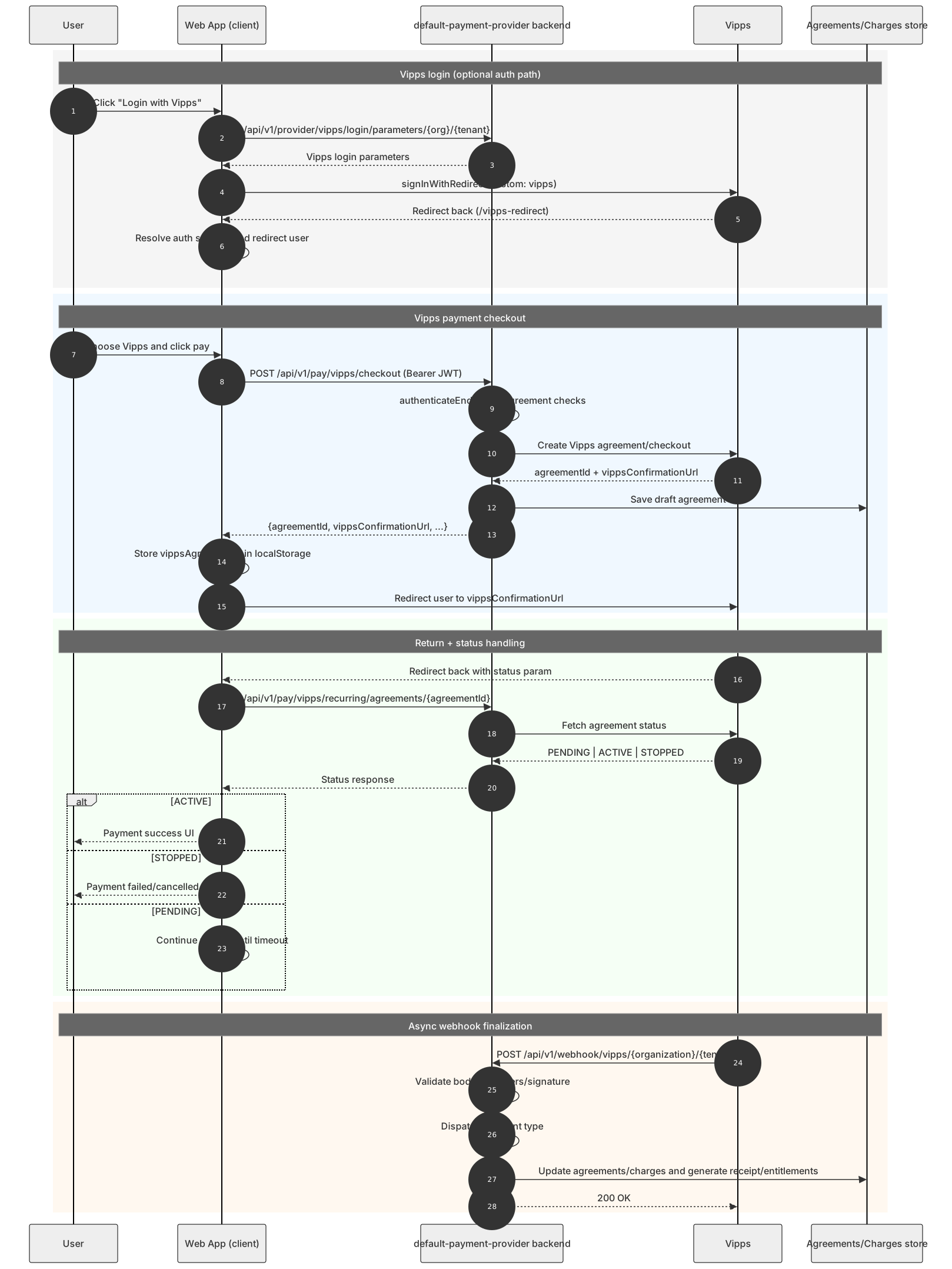
Stripe vs Vipps (current implementation)
Section titled “Stripe vs Vipps (current implementation)”| Area | Stripe | Vipps |
|---|---|---|
| User interaction model | Inline card form in checkout UI | Redirect to Vipps confirmation page |
| Frontend payment confirm | stripe.confirmCardPayment(clientSecret) | Browser redirect + callback status checks |
| Backend checkout endpoint | POST /api/v1/pay/stripe/checkout and /tvod | POST /api/v1/pay/vipps/checkout |
| Immediate response payload | clientSecret (and subscriptionId) | vippsConfirmationUrl, agreementId, charge metadata |
| Stateful identifier on frontend | Stripe payment method id | vippsAgreementId stored in localStorage |
| Post-return handling in frontend | Stripe SDK result in same flow | Poll GET /api/v1/pay/vipps/recurring/agreements/{id} |
| Webhook endpoint | /api/v1/webhook/stripe | /api/v1/webhook/vipps/{organization}/{tenant} |
| Webhook verification | Stripe signature + account to tenancy mapping | Vipps payload/header validation against tenancy |
| Saved payment methods UX | Yes (list/change/remove default card) | Not card-list based; agreement and charge driven |
See Stripe login and payment flow for Stripe-specific sequence diagrams and subscription state machine.
Key Vipps backend endpoints
Section titled “Key Vipps backend endpoints”| Endpoint | Purpose |
|---|---|
GET /api/v1/provider/vipps/login/parameters/{organizationName}/{tenantName} | Vipps login parameters for redirect auth |
POST /api/v1/provider/vipps/login/oauth2/token/{organizationName}/{tenantName} | OAuth2 token exchange after Vipps login redirect |
POST /api/v1/pay/vipps/checkout | Start Vipps subscription checkout |
GET /api/v1/pay/vipps/recurring/agreements/{agreementId} | Poll agreement status after return from Vipps |
POST /api/v1/webhook/vipps/{organization}/{tenant} | Vipps webhook receiver |
Key frontend interactions
Section titled “Key frontend interactions”- Login button:
signInWithVipps()through Amplify redirect. - Payment kickoff:
initiateVippsPayment(...). - Redirect:
window.location.href = vippsConfirmationUrl. - Return polling:
checkVippsAgreementStatus(...).
- Vipps flow is redirect-based; webhook processing is important for durable state updates.
- Frontend polling gives user feedback, but backend webhook handlers remain the source of truth for agreement and charge lifecycle.
- Stripe and Vipps can coexist behind the same payment-provider selection in the client app.
Related guides
Section titled “Related guides”- Stripe login and payment flow — inline Stripe checkout and webhooks
- Payment — product groups, orders, and REST API purchase flow
- SVOD — viewing and managing subscriptions after purchase
- TVOD — transactional purchases