

User Viewing History Service
Introduction
Section titled “Introduction”The User Viewing History Service is designed to store and retrieve information about users’ viewing history. It captures player events sent by end-users’ video players or apps during video playback. The service provides a user-centric perspective on viewing history and is not meant for statistical analysis.
With the API, client applications can fetch viewing history for a specific asset, category, or the entire history. The service offers valuable insights for implementing various use cases:
- Personalizing the end-user portal by highlighting previously watched videos.
- Displaying all contents that the user has started or completed watching.
- Recommending videos for the user based on their viewing history to third-party services.
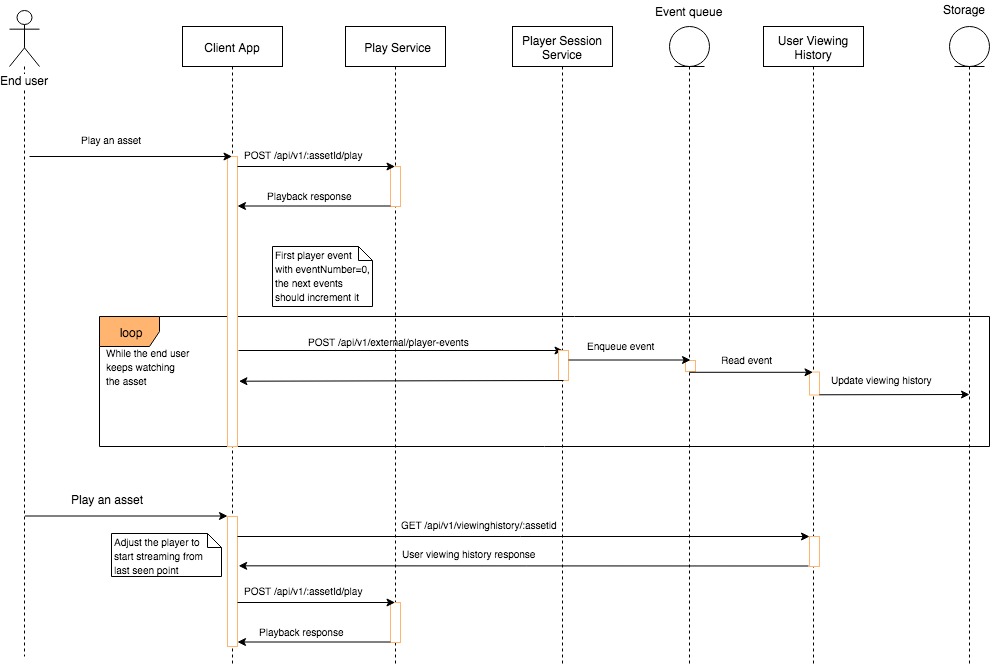
The following sequence diagram describes how the User Viewing History Service interacts with the other services or the Vimond ecosystem.
User Viewing History model example
Section titled “User Viewing History model example”{ "assetId": "22", "totalTime": "PT1H30M20S", "categoryId": "57", "progress": { "position": "PT10S", "date": "2018-07-10T15:02:05.102Z", "updateTime": "2018-07-10T15:02:05.102Z" }, "completed": { "dates": [ "2018-07-10T15:03:28.385Z" ], "viewCount": 1, "updateTime": "2018-07-10T15:03:29.939Z" }}A viewing history response for an asset contains generic information for that asset, including:
assetId: The ID of the asset requestedcategoryId: The category ID to which the asset belongstotalTime: Asset video duration in ISO8601 format.progress(optional): Information about the user’s progress in watching the asset, including:position: ISO8601 formatted duration indicating how far the user has progressed in watching the asset.date: ISO8601 formatted date indicating the timestamp of the player event containing the progress information.updateTime: ISO8601 formatted date indicating when the progress block was last updated.
completed(optional) in case the user has completed the asset:dates: An array of ISO8601 formatted dates representing when the user completed watching the asset.viewCount: Indicates how many times a user has completed watching the asset.updateTime: ISO8601 formatted date indicating when the completed block was last updated.
Updating the viewing history for a user
Section titled “Updating the viewing history for a user”For the service to function correctly, clients need to post player events throughout the entire video session. The frequency of posting events might affect the viewing history computation.
The service relies on the event containing all relevant information for computing the user’s viewing history. Clients should complete and use the event template returned when fetching the stream URL from the Play Service.
Clients should ensure the progress block of the playerEventRequest section in the play response is correctly completed.
Example playerEventRequest section:
"progress": { "eventNumber": 1, "assetId": "12345", "categoryId": "67890", "title": "Old Sheldon: The bathroom schedule multiplication", "playbackType": "vod", "vod": { "duration": 147.877, "position": 50 }}The only field that needs to be computed by the client is the position field, indicating how far the user has progressed in watching the asset (in seconds or ISO8601 formatted string). Other placeholders are essential for analytics purposes.
For more details on posting a player event, refer to the Reference: Post player event section.
By leveraging the User Viewing History Service, client applications can offer personalized experiences, track user engagement, and enable intelligent video recommendations based on viewing behavior.