

TVOD: Transactional-based Video on Demand
Transactional Video on Demand (TVOD) empowers content providers to monetize individual content pieces, offering personalized experiences to viewers. This guide equips developers with the tools to seamlessly integrate and manage a successful TVOD service.
TVOD enables users to access specific content without subscribing. Users pay for individual titles, available for a limited period (rental) or indefinitely (purchase). Successful TVOD hinges on planning, user-centric design, marketing, and continuous enhancements.
TVOD and VIA Monetise
Section titled “TVOD and VIA Monetise”TVOD’s payment flow mirrors Subscription-based Video on Demand (SVOD), charging users for specific assets or categories rather than packages.
In the below examples, we will set up a new offering of one-month rentals for our movie catalog.
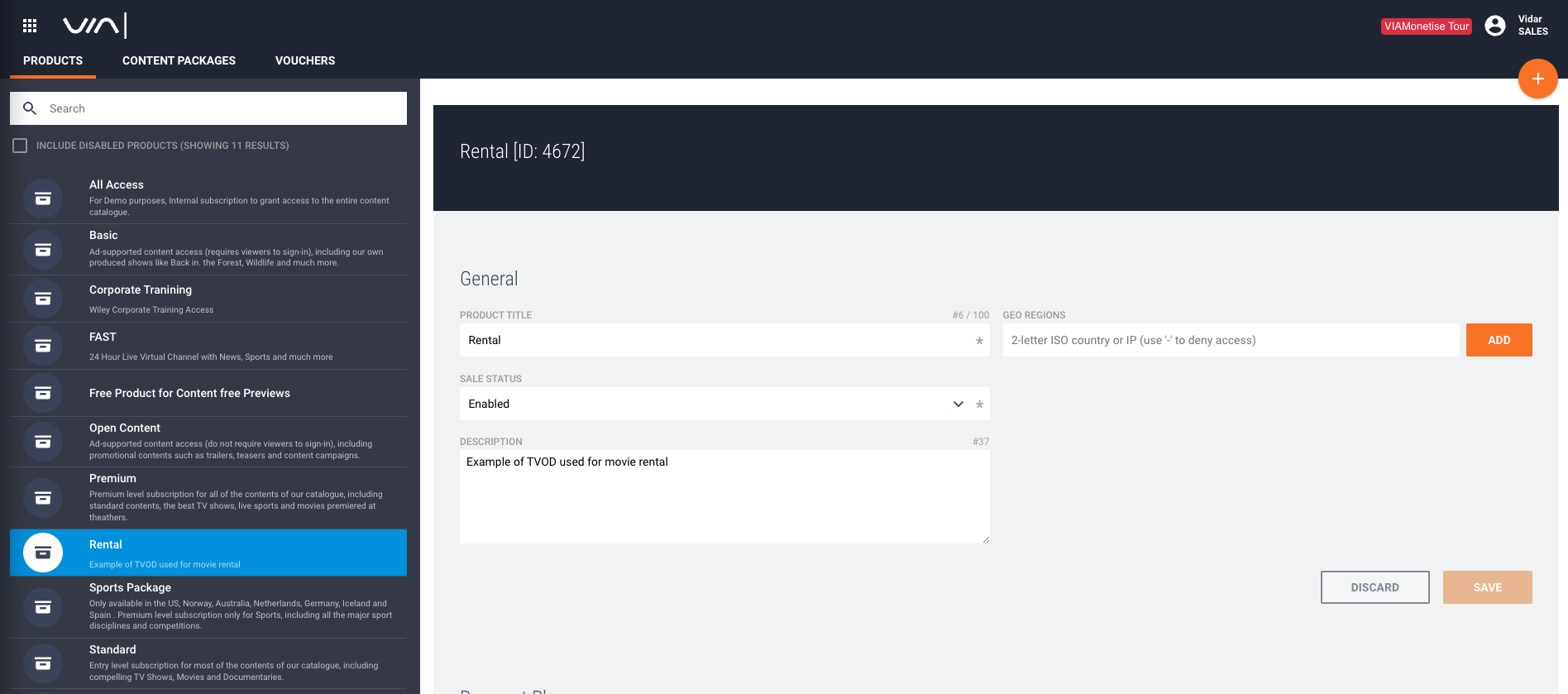
- Create a new product named “Rental.”
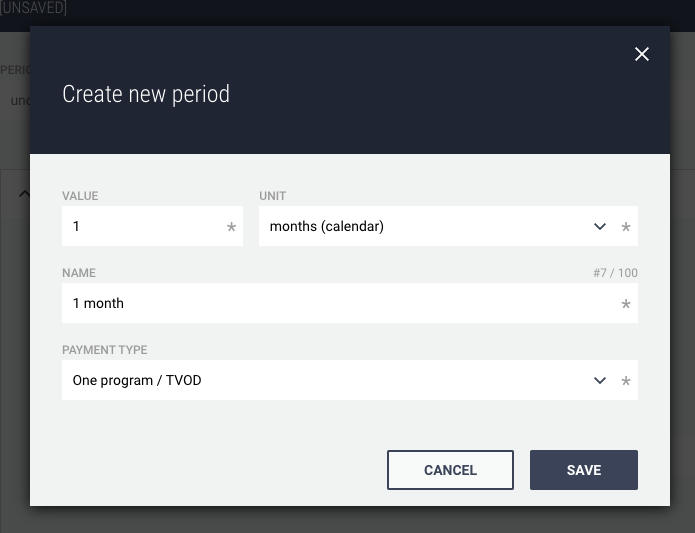
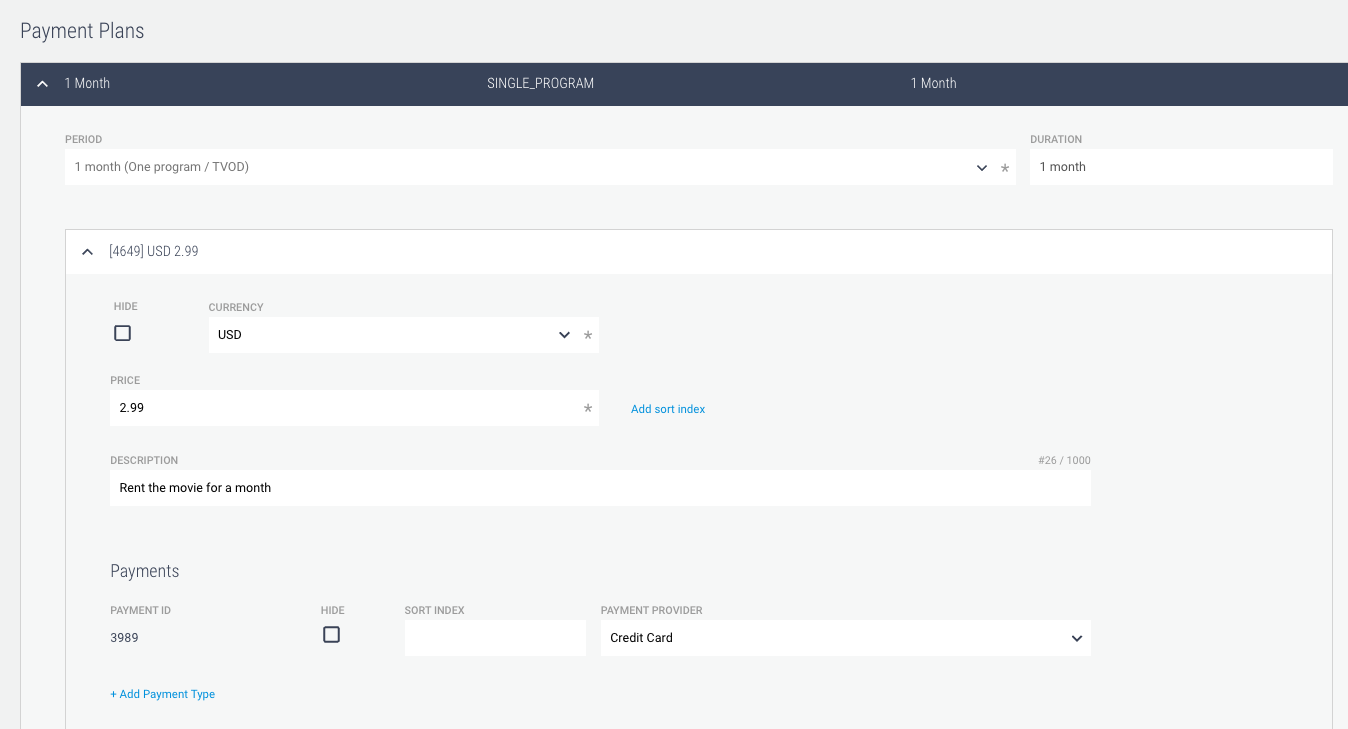
- Under Payment Plans, add a new one-month TVOD period with USD as currency and 2.99 as the price.
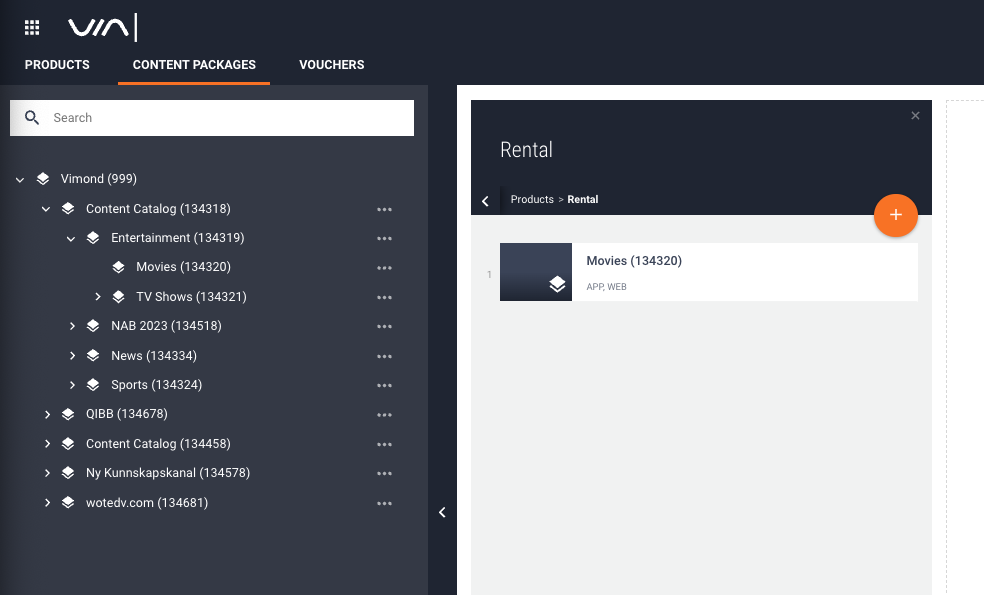
- Create a content package and add your Movies category to the Rental product. Any asset placed in this category will now be eligible for a one-month rental.
For more information about creating TVOD products using the VIA UIs please see Products (VIA user guide).
To learn how to use the VIA APIs for granting rental access to any of the assets in our Movie category we can now follow the payment guide.
Fetching Product Groups:
Retrieve product groups for a specific asset using:
GET https://<tenant>.rest-api.<environment>.vmnd.tv/api/web/asset/<assetId>/productgroupsIn the response, we can see our newly created TVOD rental offering.
{ "productGroups": [ { "uri": "/api/web/productgroup/4672", "description": "Example of TVOD used for movie rental", "id": 4672, "name": "Rental", "sortIndex": 0, "categoriesUri": { "uri": "/api/web/productgroup/4672/categories" }, "accessType": "PAID", "metadata": { "uri": "/api/metadata/productgroup/4672", "entries": {}, "empty": true }, "productsUri": { "uri": "/api/web/productgroup/4672/products", "products": [] }, "productGroupAccessesUri": {}, "saleStatus": "ENABLED", "checkAccessForProgramRelations": false } ]}Fetching Product Details
Since there is only a single option for the user to get access to the asset, we can proceed with fetching additional product details
GET https://<tenant>.rest-api.<region>.vmnd.tv/api/web/productgroup/4672/products/This call returns product information including pricing and payment details
{ "products": [ { "uri": "/api/web/productgroup/4672/products/4649", "paymentPlan": { "id": 1403, "name": "1 month", "paymentType": "SINGLE_PROGRAM", "period": "P1M" }, "description": "Rent the movie for a month", "enabled": true, "minimumPeriods": 0, "price": 2.99, "productGroupId": 4672, "productPaymentsUri": { "uri": "/api/web/productgroup/4672/products/4649/productPayments" }, "id": 4649, "currency": "USD", "productStatus": "ENABLED" } ]}Fetching Payment Options
We continue on to get payment options
GET https://<tenant>.rest-api.<region>.vmnd.tv/api/web/productgroup/4672/products/4649/productPaymentsThis response provides payment plans and details
{ "productPaymentList": [ { "uri": "/api/web/productgroup/4672/products/4649/productPayments/3989", "enabled": true, "id": 3989, "initPrice": 2.99, "discountedPrice": 2.99, "recurringPrice": 2.99, "recurringDiscountedPrice": 2.99, "paymentProviderId": 1, "productId": 4649, "productPaymentStatus": "ENABLED", "paymentObjectUri": { "uri": "/api/web/productgroup/4672/products/4649/productPayments/3989/payment" }, "autorenewWarningChannel": "EMAIL", "autoRenewWarningEnabled": false, "noOfTrialPeriods": 1, "initPeriod": "P1M" } ]}Initializing an Order:
We now have enough information to initialize a new order request with userId, productPaymentId, and progId using
curl --location 'https://sales.rest-api.eu-north-1-prod.vmnd.tv/api/web/order/' \--header 'Accept: application/json' \--header 'Content-Type: application/json' \--header 'Authorization: Bearer ...' \--data '{ "order": { "userId": "1", "productPaymentId": "3989", "progId":"181091" }}'Upon initialization, the response provides order details and status
{ "order": { "autorenewStatus": "NOT_ELIGIBLE", "earliestEndDate": "2023-08-08T18:31:44Z", "endDate": "2023-09-08T18:31:44Z", "accessEndDate": "2023-09-08T18:31:44Z", "id": 5072009, "price": 2.99, "initPrice": 2.99, "productName": "Rental 1 month", "progId": 181091, "productId": 4649, "productGroupId": 4672, "startDate": "2023-08-08T18:31:44Z", "userId": 1, "ip": "108.192.128.232", "period": 2678400, "periodIso": "P1M", "platformId": 1, "productPaymentId": 3989, "orderRef": 5072009, "status": "INITIALIZE", "payment": { "name": "Credit Card" }, "currency": "USD", "userPaymentMethod": "", "autorenewErrors": 0, "statusText": "Purchase initialized", "registered": "2023-08-08T18:31:44Z", "activePeriods": 1, "changeAction": "NEW", "trialOverride": "DEFAULT", "timeZone": "UTC", "basisForRenewalDateCalc": "2023-08-08T18:31:44Z" }}Completing the Purchase
Above we see status: INITIALIZE indicating that we need to complete the purchase. In our example, we are using a credit card payment provider so we confirm the order by providing our credit card details;
curl --location --request PUT 'https://<tenant>.rest-api.<region>.tv/api/web/order/' \--header 'Accept: application/json' \--header 'Authorization: Bearer ...' \--header 'Content-Type: application/json' \--data '{ "order": { "userId": "1", "id": "5072009", "productPaymentId": "3989", "payment": { "paymentMethod": "CREDITCARD", "cardNumber": "1111111111111111", "expireMonth": "11", "expireYear": "39", "cvc": "123" } }}'The response confirms the purchase status and details
{ "order": { "autorenewStatus": "NOT_ELIGIBLE", "earliestEndDate": "2023-08-08T18:31:44Z", "endDate": "2023-09-08T18:31:44Z", "accessEndDate": "2023-09-08T18:31:44Z", "id": 5072009, "price": 2.99, "initPrice": 2.99, "productName": "Rental 1 month", "progId": 181091, "productId": 4649, "productGroupId": 4672, "startDate": "2023-08-08T18:31:44Z", "userId": 1, "ip": "108.192.128.232", "period": 2678400, "periodIso": "P1M", "platformId": 1, "productPaymentId": 3989, "orderRef": 5072009, "status": "ACTIVE", "currency": "USD", "userPaymentMethod": "", "autorenewErrors": 0, "statusText": "Purchase sucessfull", "registered": "2023-08-08T18:31:44Z", "activePeriods": 1, "vat": 0, "trialOverride": "DEFAULT", "timeZone": "UTC", "basisForRenewalDateCalc": "2023-08-08T18:31:44Z", "paymentTransactionId": 291007 }}We now see that the status: ACTIVE and we are good to go!
Your user is all set to enjoy the movie repeatedly throughout the entire month before their rental access is eventually revoked.
TVOD and VIA Entitlement claims
Section titled “TVOD and VIA Entitlement claims”If using your IAM, ensure https://vimond/entitlements claims are included in JWT tokens.
An example where we have added our newly rented asset with ID 181091 as well as a few more example assets and categories;
"https://vimond/entitlements": [ "tvod": { "a": [181091, 1234, 5678], "c": [432,654,876] }, ... ]In addition, an optional claim can be used when a viewer has a larger number of tvod entitlements than can fit in the JWT itself
"https://vimond/has_more_tvod": trueIf this claim is present and has the value oftrue, and no match can be found on the entitlements contained in the token itself, an additional call to a configured external entitlement service endpoint will be made to validate access.
For more details and examples please see Custom entitlement claims and Extended TVOD support.
TVOD and VIA Viewer Facing Services
Section titled “TVOD and VIA Viewer Facing Services”With VIA IAM or your own IAM where you have added the tvod entitlement, users can effortlessly access content using the Play service API used for Video Playback.
This guide empowers developers to seamlessly integrate TVOD into their platforms, providing users with convenient access to individual content pieces while enabling content providers to generate revenue. By following these steps, you can create a robust and user-friendly TVOD experience.
TVOD and VIA Data
Section titled “TVOD and VIA Data”All user transactions are part of the daily delta and snapshot of user access and as events using VIA Data Event Stream.