

IAM: End-user identity
Introduction
Section titled “Introduction”Accessing Vimond Experience Service APIs that require specific permissions demands authentication through JSON Web Tokens (JWTs). These tokens carry crucial end-user information like IDs and entitlements. For a comprehensive understanding, delve into the End-User Authentication section.
If you possess your own identity platform capable of supporting JWT tokens and custom claims, as outlined in the Authentication section, you have the flexibility to use your existing identity system.
For more insights into JWTs, refer to the Json Web Token website.
Vimond VIA IAM
Section titled “Vimond VIA IAM”VIA IAM provides an End-user Identity platform, which serves as a robust authentication and access control mechanism for our content delivery APIs and services. Powered by Auth0, a globally recognized authentication and authorization platform for web, mobile, and legacy applications, our identity platform offers a comprehensive solution. Furthermore, Vimond extends this service by integrating an entitlement platform and end-user support through VIA Admin UIs.
For pricing details, feel free to reach out to your account manager or contact sales@vimond.com.
Tokens
Section titled “Tokens”JWTs serve two primary functions:
- Identification: Ensures secure identification of users and their associated tenants.
- Additional Information: Carries supplementary user-related data.
To ensure compatibility with the VIA Platform, tokens must contain various claims, which are essentially statements about an entity (typically the user) along with additional metadata. The Vimond platform specifically requires both registered and private claims (custom claims). Dive into the End-User Authentication section for a comprehensive overview of Vimond Custom claims
Token Types:
-
ID Token: Contains user profile attributes represented in the form of claims. The ID Token is consumed by the application and used to get user information like the user’s name, email, and so forth, typically used for UI display. In this sample we do not use the ID token, but it has been decoded to a JSON object and stored in local storage as user profile.
-
Access Token: Acts as a credential for applications to access APIs, such as Vimond Experience Services. This token features custom Vimond claims to grant access to services. Refer to End-User Authentication for more on Vimond custom claims.
-
Management token: Essential for updating user metadata with the identity provider. See the methods retreiveManagementToken and patchUserMetadata in end-user-identity.js in our sample app for how to retrieve the management token and update user metadata. For more info see Auth0 User management
-
SubProfile Token: Generated by the Subprofile service. Further details can be found in the Subprofile Service section.
Architectural overview
Section titled “Architectural overview”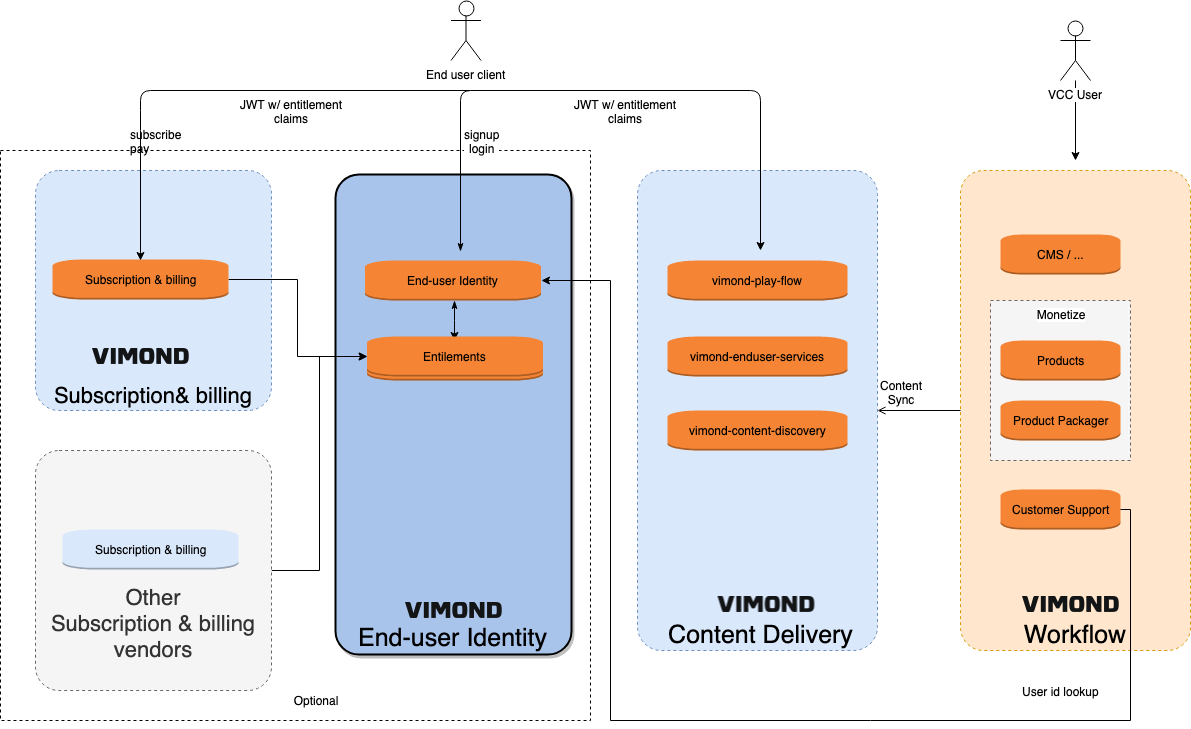
To facilitate login and logout, there are five methods available.
-
Auth0 Universal login using the Auth0 SDK for Web
-
Customized login, where you can design a unique login page using Auth0 SDK libraries.
-
Auth0 Lock is an embeddable login form customizable to your preferences and recommended for single-page apps. You to easily add social identity providers so that your users can login seamlessly using any provider they want.
-
Using the Auth0 authentication API. It does more or less the same as the auth0.js library, but if you for some reason are not able to use any of the Libraries when developing clients you can use the API directly. Typical usage is for smart TV, set-top boxes etc. In these cases you might want to consider to use Device Authorization Flow.
-
Device Authorization Flow. The device asks the user to go to a link on their computer or smartphone and authorize the device. This avoids a poor user experience for devices that do not have an easy way to enter text.
Sample
Section titled “Sample”We’ve created a simple single-page app demo portal featuring various samples, including login, user info retrieval and update, and logout. Access the complete code sample on github
These samples utilize Effect Hooks, a React 16.8 addition that allows for state usage and other React features without using classes. See Using the Effect Hook
In addition to our sample app, Auth0 offers multiple client tutorials employing Auth-lock, Auth0 SDK, or the API. Explore
Also, in this article you can read about when to consider to use Universal login or when to create a custom login page.