

Search APIs
The Content Discovery service provides powerful Search APIs that allow clients to search for assets, categories, and curated lists. These APIs enable full-text search and metadata-based queries to retrieve the desired content.
Asset Search
Section titled “Asset Search”The asset search endpoint allows clients to search across all published assets by performing full-text search on the asset’s metadata. Clients can query asset metadata using various parameters to find specific assets.
Performing a search based on asset metadata
Section titled “Performing a search based on asset metadata”To search for assets based on their metadata, you can use the following example curl command:
curl -X GET \ 'https://{tenant}.content-discovery.cf.{domain}/api/v1/assets?query=genre:drama AND director:"Mike Myers"'This command searches for assets with genre “drama” and director “Mike Myers”.
Searching for globally available assets:
curl -X GET \ 'https://{tenant}.content-discovery.cf.{domain}/api/v1/assets?query=publishing.geoExpressions:any'Searching for assets available in a specific region (e.g., Norway):
curl -X GET \ 'https://{tenant}.content-discovery.cf.{domain}/api/v1/assets?query=publishing.geoExpressions:(no any)'Searching using category metadata
Section titled “Searching using category metadata”The asset search endpoint also allows searching for assets using category metadata. This enables more complex queries involving categories. Here are some examples:
Searching based on categories’ metadata only:
curl -X GET \ 'https://{tenant}.content-discovery.cf.{domain}/api/v1/assets?query=category.sport:football AND category.round:15'Mixing categories’ metadata and assets’ metadata:
curl -X GET \ 'https://{tenant}.content-discovery.cf.{domain}/api/v1/assets?query=category.sport:football AND category.round:15 AND (team:"Athletico Vimond" OR score:"5-3")'Searching for assets under a specific category ID:
curl -X GET \ 'https://{tenant}.content-discovery.cf.{domain}/api/v1/assets?query=category.id:123'Searching for assets under a specific category ID or its subcategories:
curl -X GET \ 'https://{tenant}.content-discovery.cf.{domain}/api/v1/assets?query=category.path:123'Limitations
Section titled “Limitations”There are some limitations to be aware of when using search:
- Asset search can be done on asset metadata and category metadata only.
- Search on category metadata will only return the asset present directly under the concerned category. If the concerned category contains sub-categories, assets in these sub-categories will not be returned. The only exception for this is when searching on a
category.path, as you will fetch all assets that contain thatidsomewhere along the path. - You can use an ‘OR-CONDITION’ on a list of asset metadata or on a list of category metadata, but not across a mix of the two types.
# This is not a valid request because "Category.sport" is a category metadata while "team" is an asset metadata.curl -X GET \'https://{tenant}.content-discovery.cf.{domain}/api/v1/assets?\query=category.sport:football OR team:"Sydney FC"'
# This is not a valid request because the subclause contains mixed metadata and a conditional OR can only be executed between a set of clauses containing only asset metadata or a set of clauses containing only category metadatacurl -X GET \'https://{tenant}.content-discovery.cf.{domain}/api/v1/assets?\query=(category.sport:football AND team:"Sydney FC) OR \(category.sport:basketball AND team:"Sydney Kings")'
# If you want to perform the above request you will have to do it in two steps.curl -X GET \'https://{tenant}.content-discovery.cf.{domain}/api/v1/assets?\query=category.sport:football AND team:"Sydney FC"'
curl -X GET \'https://{tenant}.content-discovery.cf.{domain}/api/v1/assets?\query=category.sport:basketball AND team:"Sydney Kings"'
# However this is a valid requestcurl -X GET \'https://{tenant}.content-discovery.cf.{domain}/api/v1/assets?\query=(category.sport:basketball OR category.sport=football) AND \( team:"Sydney Kings" OR team:"Bergen Salmons") AND \category.year:2018- Asset search using category metadata is a powerful feature but when used improperly might lead to performance degradation. If you notice that one of your asset search queries using category metadata is performing poorly try to refactor it by splitting it up in two queries:
- Use a direct category search query to look for the opposite result set of your category clause by using the negation keywork
- - Include those category ids in the asset search query by negating the ids
-category.id:(id1 id2 ... idn). This avoids to look for categories metadata as category ids are included with the asset metadata
- Use a direct category search query to look for the opposite result set of your category clause by using the negation keywork
# Initial querycurl -X GET \'https://{tenant}.content-discovery.cf.{domain}/api/v1/assets?\query=category.sport:football'
# Fetch the ids of the categories that are not related to sportcurl -X GET \'https://{tenant}.content-discovery.cf.{domain}/api/v1/categories?\query=-sport:football&fields=id'
# Use those ids to exclude the unwanted categories from the asset querycurl -X GET \'https://{tenant}.content-discovery.cf.{domain}/api/v1/assets?\query=-category.id:(id1 id2 ... idn)'
Curated lists
Section titled “Curated lists”Curated lists can be retrieved from the Content Discovery service. These lists are created in the Curation module and can be looked up using their IDs or aliases. Curated lists are useful for organizing and presenting content in a customized manner.
Let’s assume we have the following lists:
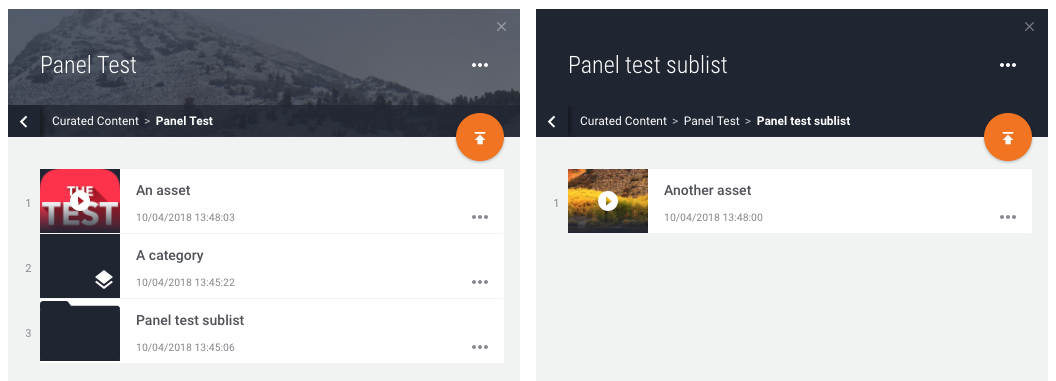
The “Panel Test” id is : kp3RBw95YLPr
Note that the curated list can also be given an alias. An alias is metadata that can be used as an alternative way to identify a curated list. By using the alias to retrieve a list, the administrator can just move the alias from one list to another, making it easy to change the advertised content.
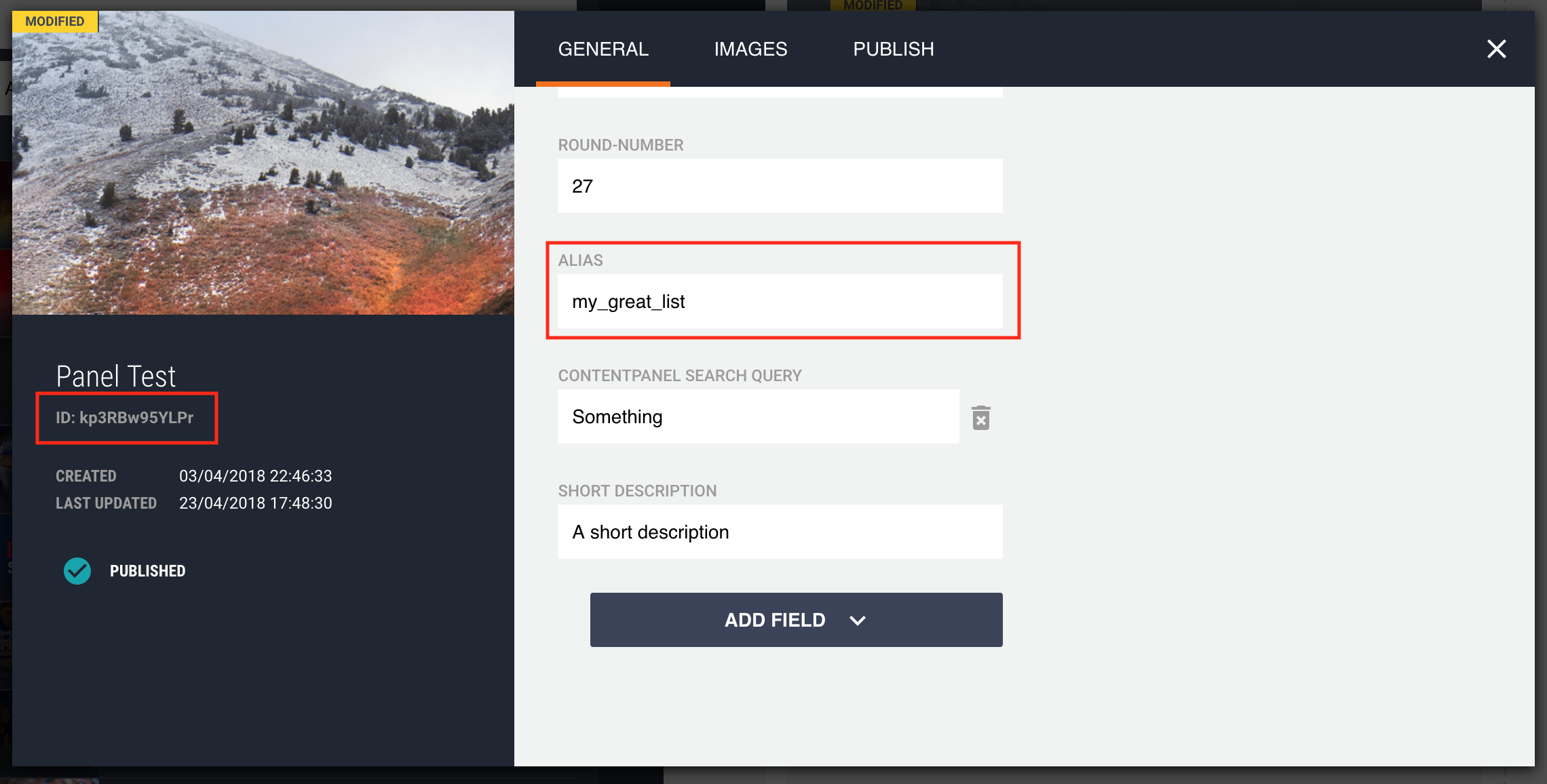
Once published we can perform a content panel lookup against the Vimond content discovery endpoint.
curl -X GET \  'https://{tenant}.content-discovery.cf.{domain}\  /api/v1/lists/kp3RBw95YLPr'
 # This is also equivalent to
 curl -X GET \  'https://{tenant}.content-discovery.cf.{domain}\  /api/v1/lists/my_great_list'
As a result, you will receive a complete tree of the requested content panels. Note that if a content panel contains an asset or a category, the related documents have been added to the response as the content part of the content panel. This way you do not need to fetch this asset separately.
{ "data": [ { // Main panel metadata "id": "kp3RBw95YLPr", "title": "Panel Test", "description": "A short description", "contentType": "contentpanel", "createTime": "2018-04-03T12:48:00Z", "updateTime": "2018-04-10T11:45:06Z", "alias": "my_great_list", "paths": [ { "path": "/editorial_root/kp3RBw95YLPr", "parents": [ "editorial_root" ], "level": 1 } ], "timestamp": "2018-04-10T11:45:07Z", "images": { "defaultUrl": "https://image-service.{domain}/api/v2/img/5ac3e11ae4b0173b400794dd", "templates": { "regions": [], "locations": [ "hero-custom", "carousel-custom", "hero-default", "carousel-item", "poster" ], "withRegion": "https://image-service.{domain}/api/v2/img/5ac3e11ae4b0173b400794dd?region=${REGION}", "withLocation": "https://image-service.{domain}/api/v2/img/5ac3e11ae4b0173b400794dd?location=${LOCATION}", "complete": "https://image-service.{domain}/api/v2/img/5ac3e11ae4b0173b400794dd?region=${REGION}&location=${LOCATION}" } }, "parentId": "editorial_root", // Underlying element "elements": [ { "id": "4424", "title": "An asset", "description": "A great asset, a great one!", "contentType": "asset", "createTime": "2018-04-03T19:43:37Z", "updateTime": "2018-04-10T11:48:03Z", "paths": [ { "path": "/editorial_root/kp3RBw95YLPr/4424", "parents": [ "editorial_root", "kp3RBw95YLPr" ], "level": 2 } ], "content": { "id": "4424", "title": "MILLS V DELLADOVA", "timestamp": "2018-04-03T11:54:55Z", "createTime": "2018-03-02T10:12:42Z", "images": { "defaultUrl": "https://image-service.{domain}/api/v2/img/5aa29e5ee4b08cd076197355-1520897431597", "version": "original", "templates": { "regions": [], "locations": [ "hero-custom", "carousel-custom", "hero-default", "carousel-item", "poster" ], "withRegion": "https://image-service.{domain}/api/v2/img/5aa29e5ee4b08cd076197355-1520897431597?region=${REGION}", "withLocation": "https://image-service.{domain}/api/v2/img/5aa29e5ee4b08cd076197355-1520897431597?location=${LOCATION}", "complete": "https://image-service.{domain}/api/v2/img/5aa29e5ee4b08cd076197355-1520897431597?region=${REGION}&location=${LOCATION}" } }, "category": { "id": "2464", "link": "https://{tenant}.content-discovery.cf.{domain}/api/v1/categories/2464" }, "labeledAsFree": false, "drmProtected": false, "duration": 23.025, "assetType": "match", "description": "Patty Mills vs Mathew Deelladova, impact on the court, who has more? ", "bif-hd-url": "bif_url", "bif-sd-url": "bif_url", "description-short": "Patty Mills vs Mathew Deelladova, impact on the court, who has more? ", "image-pack": "5aa29e5ee4b08cd076197355-1520897431597", "episodeUid": 11, "producer": "Thelo test something visible", "episode": 1, "sport": "basketball" }, "timestamp": "2018-04-10T11:48:07Z", "images": { "defaultUrl": "https://image-service.{domain}/api/v2/img/5acca404e4b0b4e652afff17", "templates": { "regions": [], "locations": [ "hero-custom", "carousel-custom", "hero-default", "carousel-item", "poster" ], "withRegion": "https://image-service.{domain}/api/v2/img/5acca404e4b0b4e652afff17?region=${REGION}", "withLocation": "https://image-service.{domain}/api/v2/img/5acca404e4b0b4e652afff17?location=${LOCATION}", "complete": "https://image-service.{domain}/api/v2/img/5acca404e4b0b4e652afff17?region=${REGION}&location=${LOCATION}" } }, "parentId": "kp3RBw95YLPr", "description-short": "Patty Mills vs Mathew Deelladova, impact on the court, who has more? " }, { "id": "2464", "title": "A category", "contentType": "category", "createTime": "2018-04-03T12:48:00Z", "updateTime": "2018-04-10T11:45:22Z", "paths": [ { "path": "/editorial_root/kp3RBw95YLPr/2464", "parents": [ "editorial_root", "kp3RBw95YLPr" ], "level": 2 } ], "content": { "id": "2464", "timestamp": "2018-04-03T12:40:03Z", "categoryType": "SPORT", "season-id": 2018, "round-number": 28, "title": "Integration test : 1519985559", "sport": "basketball" }, "timestamp": "2018-04-10T11:45:22Z", "parentId": "kp3RBw95YLPr" }, { "id": "gjvKDnAVNj6o", "title": "Panel test sublist", "contentType": "contentpanel", "createTime": "2018-04-03T12:48:05Z", "updateTime": "2018-04-10T11:45:06Z", "paths": [ { "path": "/editorial_root/kp3RBw95YLPr/gjvKDnAVNj6o", "parents": [ "editorial_root", "kp3RBw95YLPr" ], "level": 2 } ], "timestamp": "2018-04-10T11:45:08Z", "parentId": "kp3RBw95YLPr", "elements": [ { "id": "4471", "title": "Another asset", "description": "Patty Mills vs Mathew Delladova, impact on the court, who has more?", "contentType": "asset", "createTime": "2018-04-03T12:48:05Z", "updateTime": "2018-04-10T11:48:00Z", "paths": [ { "path": "/editorial_root/kp3RBw95YLPr/gjvKDnAVNj6o/4471", "parents": [ "editorial_root", "kp3RBw95YLPr", "gjvKDnAVNj6o" ], "level": 3 } ], "content": { "id": "4471", "title": "MILLS V DELLADOVA", "timestamp": "2018-04-03T11:54:53Z", "createTime": "2018-03-14T10:26:51Z", "images": { "defaultUrl": "https://image-service.vimond.io/api/v2/img/5aa71c31e4b0173b400792fc-1520909085537", "version": "original", "templates": { "regions": [], "locations": [ "hero-custom", "carousel-custom", "hero-default", "carousel-item", "poster" ], "withRegion": "https://image-service.{domain}/api/v2/img/5aa71c31e4b0173b400792fc-1520909085537?region=${REGION}", "withLocation": "https://image-service.{domain}/api/v2/img/5aa71c31e4b0173b400792fc-1520909085537?location=${LOCATION}", "complete": "https://image-service.{domain}/api/v2/img/5aa71c31e4b0173b400792fc-1520909085537?region=${REGION}&location=${LOCATION}" } }, "category": { "id": "2552", "link": "https://{tenant}.content-discovery.cf.{domain}/api/v1/categories/2552" }, "labeledAsFree": false, "drmProtected": false, "duration": 30, "assetType": "match", "description": "Patty Mills vs Mathew Delladova, impact on the court, who has more?" }, "timestamp": "2018-04-10T11:48:04Z", "images": { "defaultUrl": "https://image-service.{domain}/api/v2/img/5acca418e4b0b4e652afff18-1523360792761", "templates": { "regions": [], "locations": [ "hero-custom", "carousel-custom", "hero-default", "carousel-item", "poster" ], "withRegion": "https://image-service.{domain}/api/v2/img/5acca418e4b0b4e652afff18-1523360792761?region=${REGION}", "withLocation": "https://image-service.{domain}/api/v2/img/5acca418e4b0b4e652afff18-1523360792761?location=${LOCATION}", "complete": "https://image-service.{domain}/api/v2/img/5acca418e4b0b4e652afff18-1523360792761?region=${REGION}&location=${LOCATION}" } }, "parentId": "gjvKDnAVNj6o", "description-short": "Patty Mills vs Mathew Delladova, impact on the court, who has more?" } ], "sport": "basketball" } ], "description-short": "A short description", "season-id": 2018, "content-panel-search-query": "Something", "round-number": 27, "sport": "basketball", "series-id": 634 } ]}Note that Asset and Category field can be filtered by using the query parameters:
- ‘fields[asset]’ : List of fields wanted for the underlying asset documents.
- ‘fields[category]’ : List of fields wanted for the underlying category documents.
- ‘fields’: List of fields wanted for the underlying list documents.
📘 List field filtering
The fields ‘id’, ‘contentKey’, ‘contentType’, ‘elements’, ‘content’ and ‘paths’ cannot be filtered out.
Note that the Vimond API recursively fetches the underlying lists, and you can specify the depth wanted by using the ‘depth’ query parameter. e.g. Depth = 1
curl -X GET \ 'https://{tenant}.content-discovery.cf.{domain}/api/v1/\ lists/kp3RBw95YLPr?\ depth=1&fields[asset]=title&fields[category]=title&fields=title'Here we can see that the sub-elements were not extended.
{ "data": [ { "id": "kp3RBw95YLPr", "title": "Panel Test", "contentType": "contentpanel", "paths": [ { "path": "/editorial_root/kp3RBw95YLPr", "parents": [ "editorial_root" ], "level": 1 } ], "timestamp": "2018-04-10T11:45:07Z", "elements": [ { "id": "4424", "title": "An asset", "contentType": "asset", "paths": [ { "path": "/editorial_root/kp3RBw95YLPr/4424", "parents": [ "editorial_root", "kp3RBw95YLPr" ], "level": 2 } ], "content": { "id": "4424", "title": "MILLS V DELLADOVA", } }, { "id": "2464", "title": "A category", "contentType": "category", "paths": [ { "path": "/editorial_root/kp3RBw95YLPr/2464", "parents": [ "editorial_root", "kp3RBw95YLPr" ], "level": 2 } ], "content": { "id": "2464", } }, { "id": "gjvKDnAVNj6o", "title": "Panel test sublist", "contentType": "contentpanel", "paths": [ { "path": "/editorial_root/kp3RBw95YLPr/gjvKDnAVNj6o", "parents": [ "editorial_root", "kp3RBw95YLPr" ], "level": 2 } ] } ] } ]}📘 Limits
- The max depth allowed is 10 levels.
- The min depth allowed is 1.
- If not specified, the default depth level will be 2.
List Search
Section titled “List Search”Lists also support search on metadata, similar to asset and category search. You can search for lists based on their metadata using the list search functionality. Note that the search is only valid on list metadata and not on the underlying document.
For example,
curl -X GET \ 'https://{tenant}.content-discovery.cf.{domain}/api/v1/lists?\ query=sport: basketball AND \ season-id:2018\ &depth=1&fields[asset]=title&fields[category]=title&fields=title'Now we can see that the response returns a list of results matching the query expression. Also the fields of the asset document and category documents have been filtered out.
{ "data": [ { "id": "kp3RBw95YLPr", "title": "Panel Test", "contentType": "contentpanel", "paths": [ { "path": "/editorial_root/kp3RBw95YLPr", "parents": [ "editorial_root" ], "level": 1 } ], "elements": [ { "id": "4424", "title": "An asset", "contentType": "asset", "paths": [ { "path": "/editorial_root/kp3RBw95YLPr/4424", "parents": [ "editorial_root", "kp3RBw95YLPr" ], "level": 2 } ], "content": { "id": "4424", "title": "MILLS V DELLADOVA" } }, { "id": "2464", "title": "A category", "contentType": "category", "paths": [ { "path": "/editorial_root/kp3RBw95YLPr/2464", "parents": [ "editorial_root", "kp3RBw95YLPr" ], "level": 2 } ], "content": { "id": "2464" } }, { "id": "gjvKDnAVNj6o", "title": "Panel test sublist", "paths": [ { "path": "/editorial_root/kp3RBw95YLPr/gjvKDnAVNj6o", "parents": [ "editorial_root", "kp3RBw95YLPr" ], "level": 2 } ] } ] } ], "meta": { "numberOfHits": 1, "totalPages": 1, "pageSize": 1 }, "links": { "self": "https://{tenant}.content-discovery.cf.{domain}/api/v1/lists?query=sport:%20basketball%20AND%20season-id:2018&depth=1&fields[asset]=title&fields[category]=title&fields=title", "first": "https://{tenant}.content-discovery.cf.{domain}/api/v1/lists?query=sport:%20basketball%20AND%20season-id:2018&depth=1&fields[asset]=title&fields[category]=title&fields=title", "last": "https://{tenant}.content-discovery.cf.{domain}/api/v1/lists?query=sport:%20basketball%20AND%20season-id:2018&depth=1&fields[asset]=title&fields[category]=title&fields=title" }}Paginating many children in Lists
Section titled “Paginating many children in Lists”When dealing with large lists that have a significant number of children, it is advisable to paginate the children to avoid performance issues. The Content Discovery API supports pagination on children within a list using the childrenPage[number] and childrenPage[size] query parameters.
- ‘childrenPage[size]’ : Indicates the number of children that should be fetched under each list in the result. Must be a positive integer with maximum value 50.
- ‘childrenPage[number]’ : Indicates the number of initial results that should be skipped, defaults to 1 to start on the first page.
Note
- By default, pagination is disabled on children within a list and the service will return all of them. It will only be enabled if the request includes the query parameter
childrenPage[size]to define the specific number of children to return. It is recommended to start using pagination if you are working on lists with more than 50 children. - Maximum ‘depth’ query parameter value is 2.
For example, if your list has 15 children and you want to fetch 5 children on each page, you can use the following requests:
- Page 1:
GET /api/v1/lists/my-list?childrenPage[size]=5
- Page 2:
GET /api/v1/lists/my-list?childrenPage[number]=2&childrenPage[size]=5
- Page 3
GET /api/v1/lists/my-list?childrenPage[number]=3&childrenPage[size]=5
Also, the response is formatted to give you information about pagination.
Below is an example of a search response:
{ "data": [ { "id": "lKiR1uagKP", "contentType": "contentPanel", "createTime": "2021-11-10T09:02:53Z", "updateTime": "2021-11-22T10:26:04Z", "paths": [ { "path": "/editorial_root/lKiR1uagKP", "parents": [ "editorial_root" ], "level": 1 } ], "elements": [ { "id": "tvNrb8ce18", "contentType": "contentPanel", "createTime": "2021-11-10T09:02:51Z", "updateTime": "2021-11-22T10:26:04Z", "paths": [ { "path": "/editorial_root/lKiR1uagKP/tvNrb8ce18", "parents": [ "editorial_root", "lKiR1uagKP" ], "level": 2 } ], "timestamp": "2021-11-22T10:26:51Z", "parentId": "lKiR1uagKP", "title": "panel" }, { "id": "370421", "contentType": "asset", "createTime": "2021-11-10T09:02:51Z", "updateTime": "2021-11-22T10:26:04Z", "paths": [ { "path": "/editorial_root/lKiR1uagKP/370421", "parents": [ "editorial_root", "lKiR1uagKP" ], "level": 2 } ], "content": { "id": "370421", "timestamp": "2021-11-11T09:17:17Z", "createTime": "2021-10-20T08:31:27Z", "category": { "path": "999 253458 279767 279769", "link": "https://vimond.content-discovery.cf.eu-north-1-dev.vmnd.tv/api/v1/categories/279769", "id": "279769" }, "labeledAsFree": true, "drmProtected": false, "duration": 0.0, "assetType": "Preview", "isLive": false, "isParent": false, "transmissionTime": "2021-11-26T08:23:52Z", "relatedAssets": [], "version": { "available": [ "main" ], "type": "main" }, "publishing": { "start": "2021-11-11T08:38:55Z", "end": "2022-01-18T23:00:00Z", "platform": "web" }, "parent-asset-id": 369779, "publisher-id": 2, "arema-airing-region-africa": "Burkina Faso(BF)", "kids-mode": false, "title": "Bambi" }, "timestamp": "2021-11-22T10:26:51Z", "parentId": "lKiR1uagKP", "title": "Bambi" } ], "timestamp": "2021-11-22T10:26:51Z", "parentId": "editorial_root", "meta": { "totalPages": 4, "pageSize": 2, "numberOfHits": 7 }, "links": { "next": "https://vimond.content-discovery.cf.eu-north-1-dev.vmnd.tv/api/v1/lists/lKiR1uagKP?childrenPage[number]=3&childrenPage[size]=2", "last": "https://vimond.content-discovery.cf.eu-north-1-dev.vmnd.tv/api/v1/lists/lKiR1uagKP?childrenPage[number]=4&childrenPage[size]=2", "prev": "https://vimond.content-discovery.cf.eu-north-1-dev.vmnd.tv/api/v1/lists/lKiR1uagKP?childrenPage[number]=1&childrenPage[size]=2", "self": "https://vimond.content-discovery.cf.eu-north-1-dev.vmnd.tv/api/v1/lists/lKiR1uagKP?childrenPage[number]=2&childrenPage[size]=2", "first": "https://vimond.content-discovery.cf.eu-north-1-dev.vmnd.tv/api/v1/lists/lKiR1uagKP?childrenPage[number]=1&childrenPage[size]=2" }, "title": "PZ isContentPublished 2" } ]}Limitations
Section titled “Limitations”It is possible to specify childrenPage[size] on both list lookup and search requests to limit the number of children to fetch for each resulting list. However, the actual pagination to the next page of children is only possible for a direct lookup of a list and only on the first-level children of that list.
Consider the example request and response below. There you can see that you get the meta and links part in the response for each list that has children in various levels of depth. But the links in each of them are redirecting you to a direct lookup of the list in order to fetch the next page of children.
Example search request
GET /api/v1/lists?query=id:lKiR1uagKP&childrenPage[size]=2Example response for search request
{ "data": [ { "id": "lKiR1uagKP", "contentType": "contentpanel", "createTime": "2021-11-10T09:02:53Z", "updateTime": "2021-11-22T10:26:04Z", "paths": [ { "path": "/editorial_root/lKiR1uagKP", "parents": [ "editorial_root" ], "level": 1 } ], "elements": [ { "id": "iyUZN16Mep", "contentType": "contentpanel", "createTime": "2021-11-22T10:25:35Z", "updateTime": "2021-11-22T10:26:04Z", "paths": [ { "path": "/editorial_root/lKiR1uagKP/iyUZN16Mep", "parents": [ "editorial_root", "lKiR1uagKP" ], "level": 2 } ], "elements": [ { "id": "0Gm8iZC5zo", "contentType": "contentpanel", "createTime": "2021-11-22T10:25:33Z", "updateTime": "2021-11-22T10:26:01Z", "paths": [ { "path": "/editorial_root/lKiR1uagKP/iyUZN16Mep/0Gm8iZC5zo", "parents": [ "editorial_root", "lKiR1uagKP", "iyUZN16Mep" ], "level": 3 } ], "timestamp": "2021-11-22T10:26:52Z", "parentId": "iyUZN16Mep", "title": "List level 3" }, { "id": "tXXIYKwvWH", "contentType": "contentpanel", "createTime": "2021-11-22T10:25:33Z", "updateTime": "2021-11-22T10:26:01Z", "paths": [ { "path": "/editorial_root/lKiR1uagKP/iyUZN16Mep/tXXIYKwvWH", "parents": [ "editorial_root", "lKiR1uagKP", "iyUZN16Mep" ], "level": 3 } ], "timestamp": "2021-11-22T10:26:51Z", "parentId": "iyUZN16Mep", "title": "Another list" } ], "timestamp": "2021-11-22T10:26:51Z", "parentId": "lKiR1uagKP", "meta": { "totalPages": 2, "pageSize": 2, "numberOfHits": 3 }, "links": { "next": "https://vimond.content-discovery.cf.eu-north-1-dev.vmnd.tv/api/v1/lists/iyUZN16Mep?childrenPage[number]=2&childrenPage[size]=2", "last": "https://vimond.content-discovery.cf.eu-north-1-dev.vmnd.tv/api/v1/lists/iyUZN16Mep?childrenPage[number]=2&childrenPage[size]=2", "self": "https://vimond.content-discovery.cf.eu-north-1-dev.vmnd.tv/api/v1/lists/iyUZN16Mep?childrenPage[number]=1&childrenPage[size]=2", "first": "https://vimond.content-discovery.cf.eu-north-1-dev.vmnd.tv/api/v1/lists/iyUZN16Mep?childrenPage[number]=1&childrenPage[size]=2" }, "title": "List level 2" }, { "id": "EeYvd4tjby", "contentType": "menu_item", "createTime": "2021-11-22T10:25:39Z", "updateTime": "2021-11-22T10:26:04Z", "paths": [ { "path": "/editorial_root/lKiR1uagKP/EeYvd4tjby", "parents": [ "editorial_root", "lKiR1uagKP" ], "level": 2 } ], "timestamp": "2021-11-22T10:26:51Z", "parentId": "lKiR1uagKP", "title": "menuTestSub" } ], "timestamp": "2021-11-22T10:26:51Z", "parentId": "editorial_root", "meta": { "totalPages": 4, "pageSize": 2, "numberOfHits": 7 }, "links": { "next": "https://vimond.content-discovery.cf.eu-north-1-dev.vmnd.tv/api/v1/lists/lKiR1uagKP?childrenPage[number]=2&childrenPage[size]=2", "last": "https://vimond.content-discovery.cf.eu-north-1-dev.vmnd.tv/api/v1/lists/lKiR1uagKP?childrenPage[number]=4&childrenPage[size]=2", "self": "https://vimond.content-discovery.cf.eu-north-1-dev.vmnd.tv/api/v1/lists/lKiR1uagKP?childrenPage[number]=1&childrenPage[size]=2", "first": "https://vimond.content-discovery.cf.eu-north-1-dev.vmnd.tv/api/v1/lists/lKiR1uagKP?childrenPage[number]=1&childrenPage[size]=2" }, "title": "PZ isContentPublished 2" } ], "meta": { "numberOfHits": 1, "totalPages": 1, "pageSize": 1 }, "links": { "self": "https://vimond.content-discovery.cf.eu-north-1-dev.vmnd.tv/api/v1/lists?query=id:lKiR1uagKP&childrenPage[size]=2", "first": "https://vimond.content-discovery.cf.eu-north-1-dev.vmnd.tv/api/v1/lists?query=id:lKiR1uagKP&childrenPage[size]=2", "last": "https://vimond.content-discovery.cf.eu-north-1-dev.vmnd.tv/api/v1/lists?query=id:lKiR1uagKP&childrenPage[size]=2" }}Smart lists
Section titled “Smart lists”When creating and publishing a smart list in the Curation module, it can be looked up in Content Discovery as any other list, but it has a unique field smartList which contains the information needed to build the request to your desired search service. A typical use case here is to use Content Discovery as the smart list engine, in which case we will resolve the query for you and include it in the list response.
Consider the following request to look up a smart list where Content Discovery is the engine:
api/v1/lists/SaoLLZiMz8?childrenPage[size]=2
Here is the example response:
{ "data": [ { "id": "SaoLLZiMz8", "contentType": "list_smart", "createTime": "2021-11-10T11:41:25Z", "updateTime": "2021-11-22T10:26:04Z", "paths": [ { "path": "/editorial_root/lKiR1uagKP/SaoLLZiMz8", "parents": [ "editorial_root", "lKiR1uagKP" ], "level": 2 } ], "elements": [ { "id": "361908", "title": "test", "contentType": "asset", "createTime": "2021-08-11T14:29:25Z", "updateTime": "2021-09-17T06:51:49Z", "paths": [ { "path": "/editorial_root/lKiR1uagKP/SaoLLZiMz8/361908", "parents": [ "editorial_root", "lKiR1uagKP", "SaoLLZiMz8" ], "level": 3 } ], "content": { "id": "361908", "timestamp": "2021-09-17T06:51:49Z", "createTime": "2021-08-11T14:29:25Z", "category": { "link": "https://vimond.content-discovery.cf.eu-north-1-dev.vmnd.tv/api/v1/categories/249761", "id": "249761" }, "labeledAsFree": false, "drmProtected": false, "duration": 0.0, "assetType": " ", "isLive": true, "isParent": true, "transmissionTime": "2021-08-11T14:29:25Z", "relatedAssets": [], "version": { "available": [ "main" ], "type": "main" }, "publishing": { "start": "2021-08-11T14:29:25Z", "end": "9999-12-31T23:59:59Z", "platform": "web" }, "description": "test", "description-short": "test", "title": "test" }, "timestamp": "2021-09-17T06:51:49Z", "parentId": "SaoLLZiMz8" }, { "id": "364698", "title": "Tor Test", "contentType": "asset", "createTime": "2021-09-10T09:37:13Z", "updateTime": "2021-10-12T12:42:52Z", "paths": [ { "path": "/editorial_root/lKiR1uagKP/SaoLLZiMz8/364698", "parents": [ "editorial_root", "lKiR1uagKP", "SaoLLZiMz8" ], "level": 3 } ], "content": { "id": "364698", "timestamp": "2021-10-12T12:42:52Z", "createTime": "2021-09-10T09:37:13Z", "category": { "path": "999 133454 133455", "link": "https://vimond.content-discovery.cf.eu-north-1-dev.vmnd.tv/api/v1/categories/133455", "id": "133455" }, "labeledAsFree": false, "drmProtected": false, "duration": 0.0, "assetType": " ", "isLive": true, "isParent": true, "transmissionTime": "2021-09-10T09:37:13Z", "relatedAssets": [], "qualities": [], "markers": [], "version": { "available": [ "main" ], "type": "main" }, "publishing": { "start": "2021-09-10T09:37:14Z", "end": "9999-12-31T23:59:59Z", "platform": "web" }, "longSynopsis": "taranturla", "title": "Tor Test" }, "timestamp": "2021-10-12T12:42:52Z", "parentId": "SaoLLZiMz8" } ], "timestamp": "2021-11-22T10:26:45Z", "smartList": { "values": { "title": "test" }, "requestMap": { "method": "get", "options": { "headers": { "Accept": "application/json", "Content-Type": "application/json" }, "query": { "param": "query", "query": "title:test" }, "json": true, "timeout": 1000 }, "firstSortIndex": 0, "url": "https://vimond.content-discovery.cf.eu-north-1-dev.vmnd.tv/api/v1/assets" } }, "parentId": "lKiR1uagKP", "meta": { "totalPages": 27, "pageSize": 2, "numberOfHits": 54 }, "links": { "next": "https://vimond.content-discovery.cf.eu-north-1-dev.vmnd.tv/api/v1/lists/SaoLLZiMz8?childrenPage[number]=2&childrenPage[size]=2", "last": "https://vimond.content-discovery.cf.eu-north-1-dev.vmnd.tv/api/v1/lists/SaoLLZiMz8?childrenPage[number]=27&childrenPage[size]=2", "self": "https://vimond.content-discovery.cf.eu-north-1-dev.vmnd.tv/api/v1/lists/SaoLLZiMz8?childrenPage[number]=1&childrenPage[size]=2", "first": "https://vimond.content-discovery.cf.eu-north-1-dev.vmnd.tv/api/v1/lists/SaoLLZiMz8?childrenPage[number]=1&childrenPage[size]=2" }, "title": "PZ Smart List" } ]}You can see from the response that the children elements are populated the same way as any other list, but the content is fetched dynamically using the smart list engine.
Pagination for smart lists
Section titled “Pagination for smart lists”Another thing you can see from the example response is that the pagination also works in the same way as other lists, using the childrenPage[size] and childrenPage[number] query parameters.
Similarily, if you do not specify childrenPage[size] in the request, the service will for legacy reasons fetch all results. It is however recommended to use pagination to avoid impacting performance for your search queries.
Limitations
Section titled “Limitations”When using a third-party service as the engine the list response from Content Discovery will not have any children elements. It would be the responsibility of the clients to use the information in the smartList block to build the search request pointed at the third-party service. Fields to retrieve parameters fields[asset] and fields[category] is not applicable for the contents of smartList and fields will be applicable for both list and smartList.