

Terminology and Concepts
This section provided a comprehensive overview of the key terminology and concepts within the Vimond platform and APIs. Understanding these terms is crucial for effectively utilizing the Vimond APIs. Let’s explore the important concepts:
Environment
Section titled “Environment”An environment refers to a specific instance of the VIA platform where services and applications run. It represents a distinct operational context, which can include development, testing, staging, or production. Each environment has its own set of resources, configurations, and data. For instance, you might have a development environment for building and testing new features, a staging environment for final pre-production testing, and a production environment for serving live users.
Tenant
Section titled “Tenant”A tenant, in the context of VIA, refers to a separate, isolated customer instance within a specific environment. It’s essentially a self-contained space that holds all the data, configurations, and services related to a particular customer or organization. Tenants are used to maintain separation between different clients, allowing them to customize their setups and manage their own resources independently. This ensures that the data and settings of one tenant are completely distinct from another.
Service
Section titled “Service”A service in VIA refers to a specific module, or API that offers particular functionalities. It’s a building block of the platform’s capabilities. Each service is responsible for carrying out specific tasks or providing specific features. For example, a service might handle user authentication, content management, analytics, payment processing, or any other specific aspect of the platform.
Company / Publisher
Section titled “Company / Publisher”A company or publisher within the VIA context refers to an organizational entity with the role of creating, managing, and distributing content. In the VIA platform, a tenant can encompass multiple companies, indicating that the system supports numerous distinct content providers or organizations functioning within a unified streaming service.
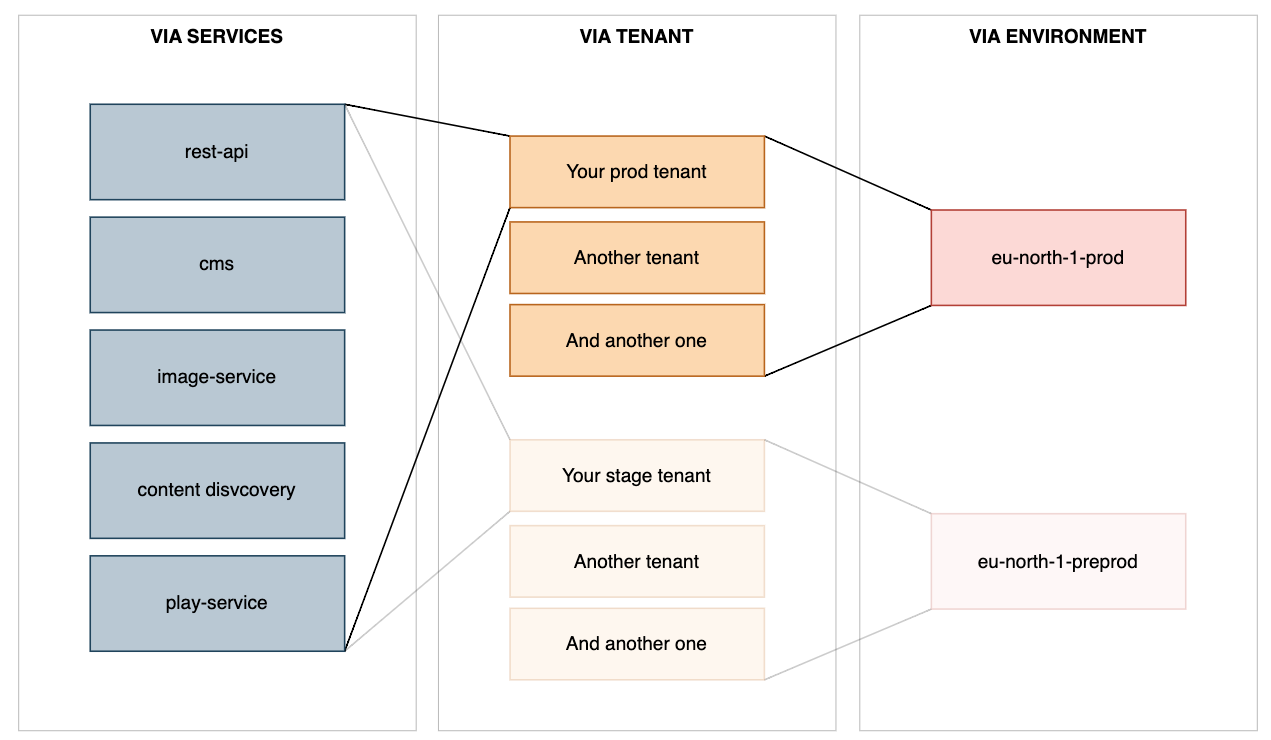
The correct format for constructing URLs in the context of the VIA platform should be:
https://<tenant>.<service>.<environment>.vmnd.tvIn this format:
tenantrefers to the specific customer instance or tenant within the environment.servicerefers to the particular VIA service or API you are accessing.environmentrefers to the operational and geographical context, such as development, testing, or production.
When you combine these components, you get a complete URL that directs you to the specific service of the designated tenant within the chosen environment. This URL structure helps ensure that each customer’s data and services are kept separate and secure.
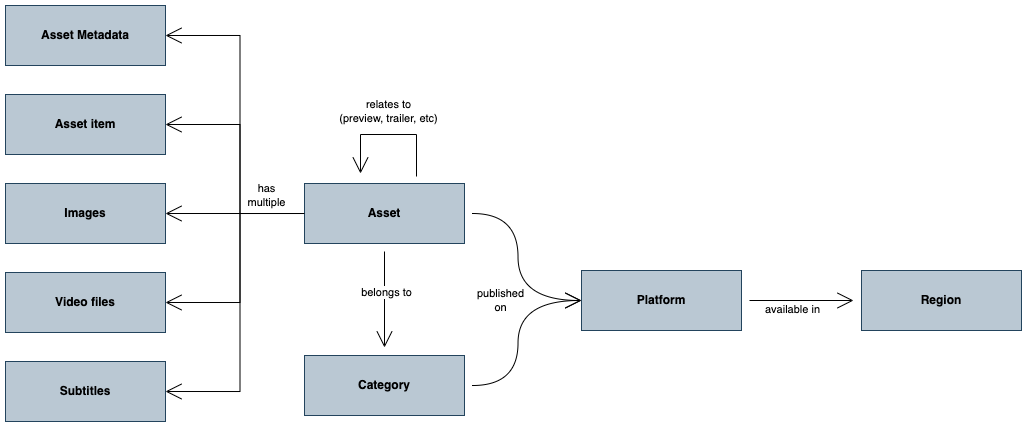
An asset represents a video asset and serves as the main representation. It holds vital information and metadata such as in- and out-points, duration, live/VOD status, and more. Both live and VOD assets are treated similarly, with the only difference being the live/VOD state and the manifest returned by the playback URL. Assets are associated with the following related concepts:
[block:parameters]
{
“data”: {
“h-0”: “Concept”,
“h-1”: “Description”,
“0-0”: “Asset metadata”,
“0-1”: “Asset metadata contains locale-dependent information about the asset, including its title, description, and other custom-defined metadata such as director, studio, team names, episode numbers, etc. Some metadata, such as director and studio, are specific to movies, while others, like team names and league names, are relevant to sports content. Metadata that is not locale-dependent have the locale set to *. \n \nPlease see Content Metadata for additional details.”,
“1-0”: “Asset images”,
“1-1”: “Editorial staff can upload multiple images in different sizes and ratios for an asset. These images can include thumbnails, main artwork, splash images, covers, wallpapers, and more. Image packs are created to bundle all the artwork related to an asset, and these image packs can be displayed in front-end applications. \n \nPlease see Content Images for additional details.”,
“2-0”: “Asset subtitle”,
“2-1”: “Multiple subtitle files in various formats and languages can be uploaded for an asset. Editorial staff can upload these subtitles through Feed Ingest or manually in VIA.”,
“3-0”: “Asset item”,
“3-1”: “An asset item represents a specific point in the video stream. It allows navigation to interesting points within an asset and is often displayed on the timeline in the player. Asset items can also be represented as a menu outside the player. They can have both an in-point and an out-point, and they can be soft-referenced as separate assets. \n \nAsset items can also have categories, which are used to distinguish different types of items, such as ad break marks, sports events, or chapter marks. \n \nAsset items do not have separate metadata and do not support internationalization (i18n).”,
“4-0”: “Asset relation”,
“4-1”: “Assets can be related to each other in various ways. For example, one asset can be a preview or trailer of another asset. \n \nPlease see Asset Relations and Multiple Camera Angles for a complete example.”,
“5-0”: “Asset Publishing”,
“5-1”: “Asset publishing states are categorized into live and on-demand states, as well as platforms. This means that an asset can be live-published to platforms A, B, and C, and on-demand-published to platform A only. Depending on the live/VOD state of an asset, different publishing rules will apply. \n \nAsset publishing rules can also include a publish- and unpublish date. If these are set, the system will automatically maintain the correct publishing status for an asset. \n \nPlease see Content Publishing for details on how to manage asset publishing.”,
“6-0”: “Video file”,
“6-1”: “Refers to the physical video files associated with an asset.”,
“7-0”: “Platform”,
“7-1”: “Platforms refer to publishing platforms, such as web, tablet, mobile, and IPTV/STB (set-top box). The platforms can be configured based on business requirements. Considerations for platform setup include publishing rights, logging of views and purchases, and video formats specific to each platform. Vimond can assist in determining the optimal platform setup for your service. \n \nPlease see Multi-Region publishing and Geo-blocking, for details on how to manage platforms.”,
“8-0”: “Region”,
“8-1”: “Each platform can be regionalized, allowing for automatic geo-blocking of content based on the platform’s region. \n \nPlease see Multi-Region publishing and Geo-blocking, for details on how to manage regions.”
},
“cols”: 2,
“rows”: 9,
“align”: [
“left”,
“left”
]
}
[/block]
Category
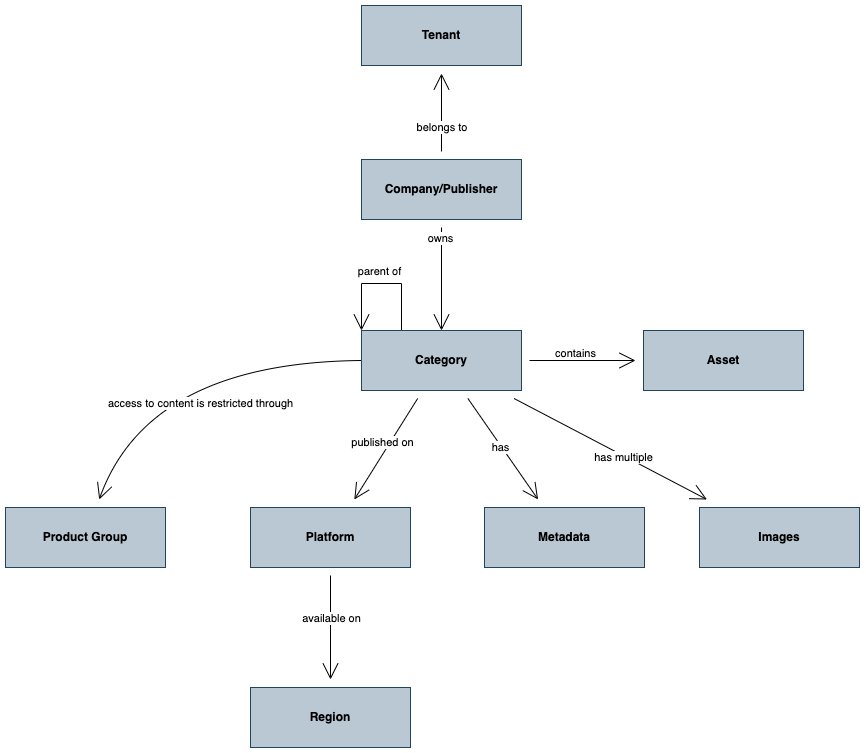
Section titled “Category”A category represents a content category and serves as a container for published assets. It helps organize the content catalog and can be used to determine where assets belong on front-end portals. Categories are organized in a tree structure, and each node in the tree can have a node type (level type) to process different node types correctly. VIA supports custom category types, allowing the creation of multi-level hierarchies within VIA.
Here’s an example of a category hierarchy with a mix of sports, news, and entertainment categories:
- Sports
- Soccer
- Premier League
- 2022/23
- 2023/24
- Champions League
- World Cup
- Premier League
- Handball
- World Cup
- Motocross
- …
- Soccer
- Entertainment
- Movies
- TV Shows
- Breaking Bad
- Season 01
- Season 02
- …
- Desperate Housewives
- …
- Breaking Bad
- News
- Economy news
- World news
- Domestic
Category-related concepts include:
[block:parameters]
{
“data”: {
“h-0”: “Concept”,
“h-1”: “Description”,
“0-0”: “Category publishing”,
“0-1”: “Categories can be published on one or more platforms. Unpublished categories will not be displayed in front-end applications. Assets linked to a category can be published even if the category itself is not published. They can be played back using direct links and will appear in search results. \n \nPlease see Content Publishing for additional details.”,
“1-0”: “Category metadata”,
“1-1”: “Category metadata holds locale-dependent information about a category, such as its title, description, and other custom-defined metadata like parental guidance information and search keywords. Metadata that is not locale-dependent have the locale set to *. \n \nPlease see Content Metadata for additional details.”,
“2-0”: “Category images”,
“2-1”: “Editorial staff can upload multiple images of different sizes and ratios for a category. These images can be uploaded via APIs or manually in VIA and can be used to create custom artwork for each category, such as image packs containing thumbnails, main artwork, splash images, covers, wallpapers, etc. \n \nPlease see Content Images for additional details.”,
“3-0”: “Company/publisher”,
“3-1”: “The Company defines content ownership attributes in a multi-publisher setup. For example, a service may have multiple content contributors that provide and maintain parts of the content catalog.”,
“4-0”: “Tenant”,
“4-1”: “A unique instance of the VIA Platform. No content is available cross-tenant.”
},
“cols”: 2,
“rows”: 5,
“align”: [
“left”,
“left”
]
}
[/block]
The provided diagram illustrates the interconnection between these concepts. Note that assets are published into categories and onto platforms, and categories themselves can also be published to platforms. This powerful construct allows asset publishing to override the publishing settings of a category. For example, the category “Desperate Housewives” may be available only on the web and set-top box platforms, but the first episode of each season can be available on mobile and tablet platforms as well. By deep linking to the specific asset, it can then be promoted and played back on additional platforms.
The following diagram illustrates how categories are linked to related concepts:
Product Setup with VIA Monetise
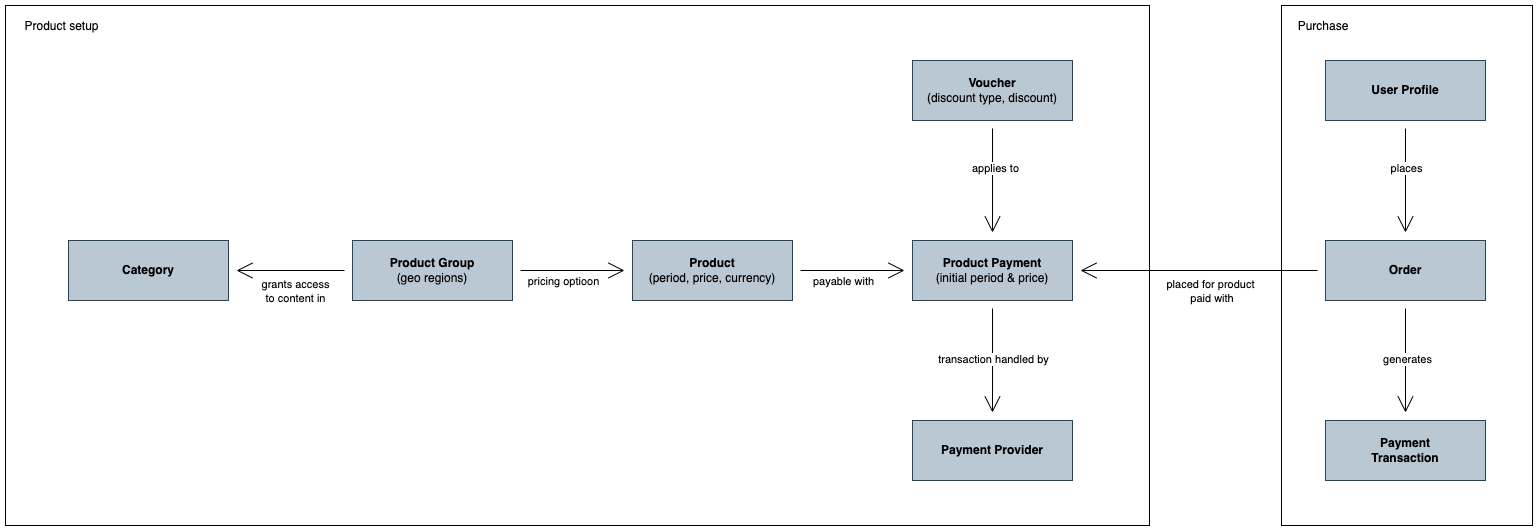
Section titled “Product Setup with VIA Monetise”When using VIA Monetise, the product setup involves three main objects: Product Group, Product, and Product Payment. These objects can be configured in the VIA Monetise admin UI or through the REST API. Let’s explore each concept:
[block:parameters]
{
“data”: {
“h-0”: “Concept”,
“h-1”: “Description”,
“0-0”: “Product Group”,
“0-1”: “Access to content is determined by linking it to a product group. If the content is not linked to any product group, it will default to “free with login” access. A product group defines the access type (free, free with login, or paid/restricted), title, description, and geo-restriction rules. \n \nGeo-restriction can be used to offer different products to users based on their country or location. \n \nContent categories linked to a product group will inherit the same access rule, but this inheritance can be broken by linking the child categories to different product groups. \n \nExamples of product groups include “Premium Sports” or “Basic Membership."",
“1-0”: “Product”,
“1-1”: “A Product is associated with a Product Group and defines the price and access period. For example, a product group like “Premium Sports” can have products such as “Premium Sports Month” and “Premium Sports Year,” allowing users to choose their preferred payment plan and pricing. \n \nProducts can have different payment plan types, such as running subscriptions, pay-per-view (PPV), or single periods that do not renew automatically. \n \nAdditional business rules like lock-in periods or seasonal access can also be applied to products.”,
“2-0”: “Payment plan”,
“2-1”: “A Product has a payment plan, which defines the period in seconds, plus a payment plan which can be of type running subscription, single period, or PPV.”,
“3-0”: “Product payment”,
“3-1”: “Product payments represent the available payment options for a product. For instance, a weekly subscription may be paid via SMS or credit card, while an annual subscription may use an invoice. \n \nCampaign attributes like initial price and initial period can be linked to product payments, enabling special offers such as “Get the first three months for $29, then pay $15/month.” The advantage of linking campaigns to payment types is to encourage users to choose payment options with low churn or low cost through better deals.”,
“4-0”: “Payment provider”,
“4-1”: “The payment provider is responsible for conducting the actual monetary transactions. The Vimond platform integrates with various payment providers like PayPal, DIBS, Nets, Klarna Mobil, and custom-made providers.”,
“5-0”: “Voucher”,
“5-1”: ” A voucher can provide free or discounted access to an existing product. It is linked to a specific product payment. Discount vouchers can be configured to apply to a product of the user’s choice, with discounts given as a percentage or fixed amount.”
},
“cols”: 2,
“rows”: 6,
“align”: [
“left”,
“left”
]
}
[/block]
The following diagram illustrates product setup and purchase objects:
Conditional Access
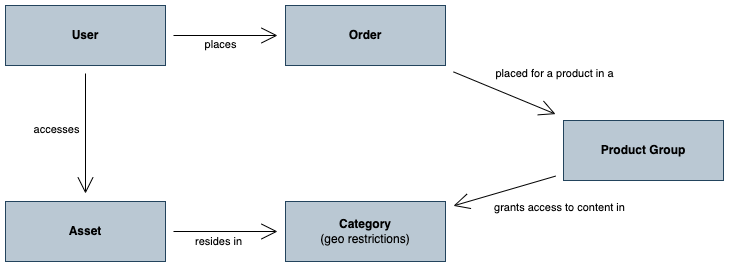
Section titled “Conditional Access”Conditional Access determines whether a user has access to view a specific asset. Let’s explore the concepts related to Conditional Access:
[block:parameters] { “data”: { “h-0”: “Concept”, “h-1”: “Description”, “0-0”: “Access”, “0-1”: “A user has access to view an asset if it resides in a category linked to a product group that satisfies certain conditions. These conditions include the product group being “free without login,” “free with login” and the user being authenticated, or “paid” (restricted) and the user having access to a product within that product group. Access can be obtained through purchase, vouchers, or granted by customer service. \n \nIf no product groups are configured, the platform defaults to “free without login."", “1-0”: “Order”, “1-1”: “An order represents a purchase made by a user. It can represent a running subscription, access to a single asset, or access to a product for a limited period (single-period product).”, “2-0”: “Geo-Restrictions”, “2-1”: “Geo-blocking rules are defined per platform, category, asset, and optionally per product group to control access based on user location. Supported rules include confining access to specific countries or IP addresses, or excluding countries or IP addresses from access. \n \nThese rules can be combined to allow inclusion and exclusion based on different criteria. \n \nSee Multi-Region publishing and Geo-blocking for examples of how to enable geo-blocking.”, “3-0”: “User”, “3-1”: “An authenticated user has a user profile and may have one or more orders associated with their account.”, “4-0”: “DRM”, “4-1”: “DRM (Digital Rights Management) is not directly related to Conditional Access but focuses on content protection. Conditional Access determines who can access what content, while DRM enforces those rules by preventing content sharing. In the Vimond platform, a DRM license is issued per playback per user, and subsequent access is managed by Conditional Access.”, “5-0”: “Global User”, “5-1”: “It is possible to mark an end-user as “global” to bypass all geo-restriction rules. This can be useful for providing demo access or for traveling staff.” }, “cols”: 2, “rows”: 6, “align”: [ “left”, “left” ] } [/block]
The diagram illustrates the interconnection of these Conditional Access concepts.
Curated Lists
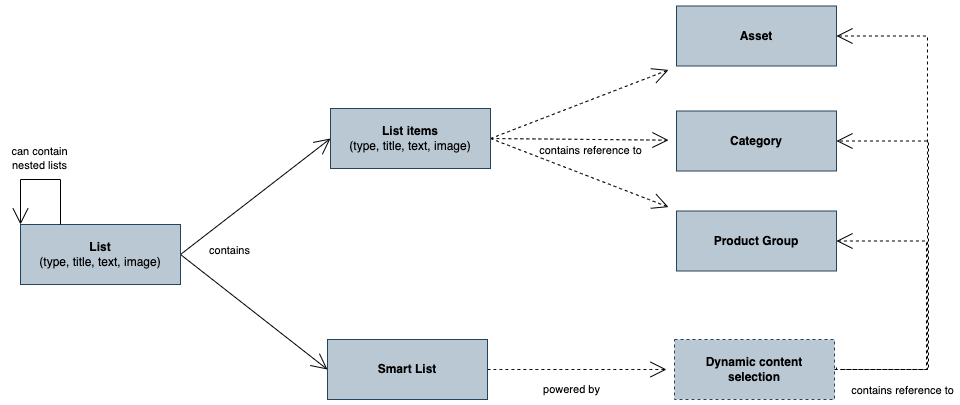
Section titled “Curated Lists”Curation involves manually selecting content to be promoted in front-end portals. In VIA, curation is achieved through lists. Let’s explore the concepts related to curation with lists:
[block:parameters]
{
“data”: {
“h-0”: “Concept”,
“h-1”: “Description”,
“0-0”: “List”,
“0-1”: “A list represents a curated list of items. These items can be categories, assets, product groups, or none (serving as references to external URLs). A list item can have a title, image, and text, which can override the properties of the referenced object. This allows curators to customize the promotion of assets with specific titles, images, and text. \n \nPlease see Curated Content for a complete example of how to use curated lists.”,
“1-0”: “Smart Lists”,
“1-1”: “VIA provides a tool for metadata-based curation called smart lists. These lists allow content to be filtered based on various metadata criteria. Smart lists can be queried through the search engine, enabling dynamic and personalized content recommendations. Examples of smart lists include “Latest from the Sports category” or “Most watched children’s movies.” \n \nExternal recommendation engines can also be used to power the smart list. \n \nPlease see Creating a Smartlist and Smartlist parameters for additional details.”,
“2-0”: “Content Panel”,
“2-1”: “You may sometimes come across references to content panel when working with the Vimond APIs, this is the old name for list and the two can be used interchangeably. To simplify communication content panel is being phased out of our vocabulary.”
},
“cols”: 2,
“rows”: 3,
“align”: [
“left”,
“left”
]
}
[/block]
The diagram illustrates the relationship between content panels and curated items.
Personalized Content
Section titled “Personalized Content”VIA offers features for personalized content based on user profiles and preferences. Let’s explore the concepts related to personalized content:
| Official Name | Description |
|---|---|
| User | A user profile holds user information such as username, password, email, and optional data like name, address, and phone numbers. |
| Subprofile | Subprofiles allow for differentiation between multiple users sharing the same account. This is useful when different members of a family have distinct preferences and playlists. |
| Playlist | A user can have one or more playlists, which are lists of assets that can be named and played back in sequence (similar to a watchlist). |
| Resume playback | Resume playback allows users to start watching a video, pause it, and resume from where they left off at a later time or on a different device/platform. |
| User Property | User properties are name-value pairs that can be customized according to specific needs. |
| Device Registration | This service manages user devices and allows for defining restrictions on device usage. Rule sets can be created to enforce device registration based on specific criteria. |
General terminology
Section titled “General terminology”[block:parameters] { “data”: { “h-0”: "", “h-1”: "", “0-0”: “Adaptive bitrate streaming”, “0-1”: “A technique used in streaming multimedia over computer networks, where the quality of the video stream is adjusted in real-time based on the user’s bandwidth and CPU capacity. This ensures smooth playback and optimal quality. It is based on HTTP and works efficiently over large distributed networks like the Internet.”, “1-0”: “VOD (Video on Demand)”, “1-1”: “The ability for users to select and watch/listen to video or audio content at their convenience, rather than having to watch it at a specific broadcast time.”, “2-0”: “AVOD \n(Advertising Video On Demand)”, “2-1”: “AVOD stands for “Advertising Video On Demand.” In this model, viewers can access video content for free, but they are required to watch advertisements during playback. The revenue is generated through advertising, as advertisers pay for ad placements within the content.”, “3-0”: “SVOD \n(Subscription Video On Demand)”, “3-1”: “SVOD stands for “Subscription Video On Demand.” In this model, viewers pay a recurring subscription fee to access a library of video content. Subscribers have unlimited access to the content during their subscription period and can watch without any interruptions from ads. ”, “4-0”: “TVOD \n(Transactional Video On Demand)”, “4-1”: “TVOD stands for “Transactional Video On Demand.” In this model, viewers pay for individual content items, such as movies or specific TV episodes, on a pay-per-view basis. The content is not included in a subscription, and users only pay for what they choose to watch. ”, “5-0”: “Mezzanine file”, “5-1”: “A lightly compressed master file that can be used to create additional compressed versions. Mezzanine files have a high data rate and can be easily re-compressed without significant loss of quality.”, “6-0”: “OTT”, “6-1”: “OTT stands for “Over-The-Top,” and it refers to the delivery of video, audio, and other media content over the internet directly to viewers. In the context of media distribution, “over-the-top” refers to content that is delivered without the involvement of traditional cable or satellite providers.”, “7-0”: “Transcoding”, “7-1”: “Transcoding is the process of converting media files from one digital format to another. It is used to ensure compatibility and optimal playback on various devices and platforms. Transcoding also helps optimize bandwidth and enables adaptive streaming for smoother playback. It is a crucial step in delivering media content across diverse devices and network conditions.”, “8-0”: “Encoding”, “8-1”: “Encoding is the process of converting raw media data, such as audio, video, or images, into a specific digital format using algorithms or codecs. This process reduces file size while maintaining acceptable quality. Encoding is essential for efficient storage, transmission, and playback of media content on different devices and platforms.”, “9-0”: “Packaging”, “9-1”: “Packaging in the context of media refers to the process of combining encoded audio, video, and other media elements into a specific file format suitable for distribution and playback. It involves creating a container that holds all the necessary data streams, metadata, and information required for seamless delivery to end-users. Packaging is crucial for ensuring compatibility across various devices and streaming platforms. Common packaging formats include HLS, DASH, and Smooth Streaming.”, “10-0”: “CDN”, “10-1”: “CDN stands for Content Delivery Network. It is a geographically distributed network of servers that work together to efficiently deliver content, such as web pages, images, videos, and other media files, to end-users. The main purpose of a CDN is to improve the performance, speed, and reliability of content delivery by caching and storing copies of the content on multiple servers located in different data centers around the world. \n \nWhen a user requests content, the CDN automatically routes the request to the nearest server, reducing the latency and decreasing the time it takes for the content to load. This localization of content delivery helps minimize network congestion and ensures a smoother user experience, especially for users located far from the origin server. \n \nCDNs are widely used by websites, streaming services, and other online platforms to optimize content delivery, reduce server load, and enhance overall performance for global audiences.” }, “cols”: 2, “rows”: 11, “align”: [ “left”, “left” ] } [/block]
These concepts provide a comprehensive understanding of the terminology and concepts used in the Vimond platform and APIs. If you have further questions or need more information, feel free to proceed to the Frequently Asked Questions section.